Dashboard: The Control Center
You will learn
- how to compose four independent section modules into a single popup, and why the widget tree is built once and refreshed, never rebuilt
- the anatomy of
wibox.widget.sliderand how to bind it two ways to a system value like volume - the programmatic-set guard that stops a read-then-assign from writing the value straight back to the system
- toggle buttons that update optimistically, then re-read the real system state to correct themselves
- how the DND toggle drives the notification module through its public API and follows it through a signal
Where We Are
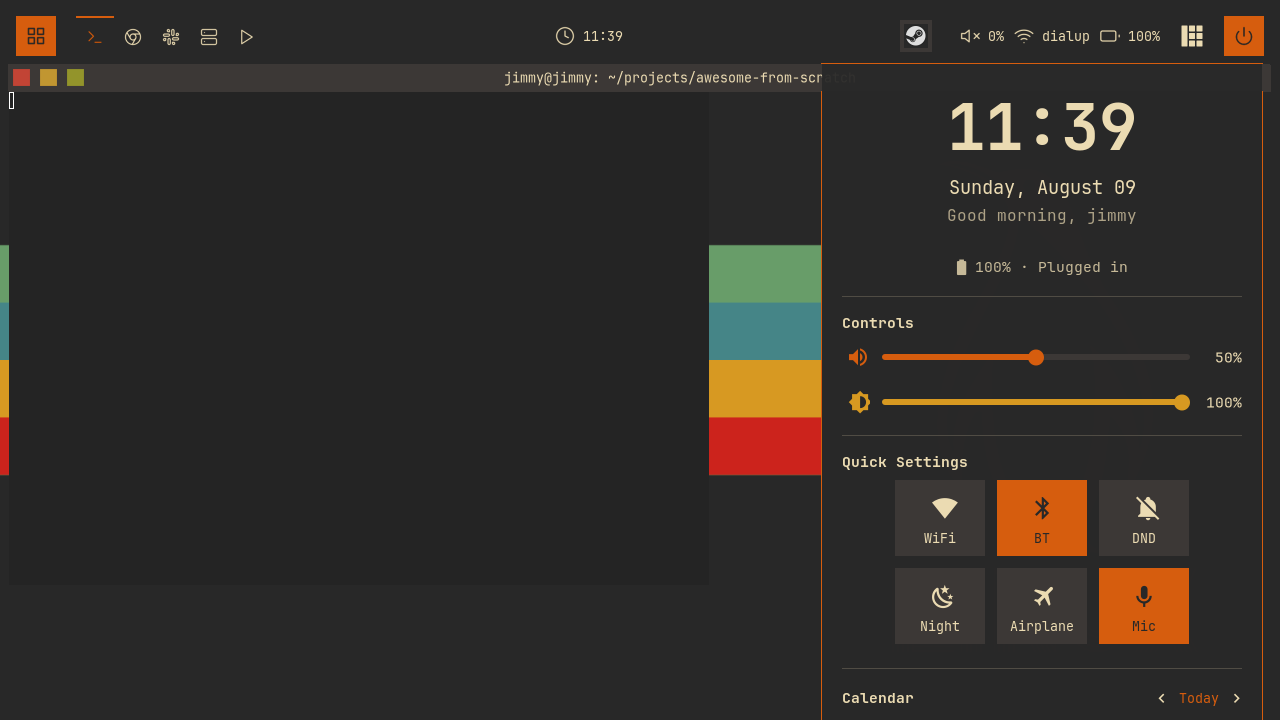
In chapter 10 we replaced the menubar with a fuzzy-search launcher, our fourth overlay UI built on the modal pattern: a popup plus a controller that owns visibility, Escape, click-outside dismissal, and the <name>::visible signal. This chapter builds the fifth and largest one: a control center on Mod+D with a clock, volume and brightness sliders, six quick-setting toggles, and a browsable calendar. To catch up: git checkout 10-launcher.
One Popup, Four Modules
The dashboard is the biggest widget tree in the config, so it does not live in one file. It is a directory, dashboard/, with an init.lua that assembles four section modules. This is the payoff of the ?/init.lua template we added to package.path back in chapter 02: require("dashboard") finds dashboard/init.lua, and inside the directory each section is its own module with its own state.
Wiring it up costs two lines in keybindings.lua:
-- keybindings.lua
local dashboard = require("dashboard")
-- keybindings.lua
  {{ modkey }, "d",                     function() dashboard.toggle() end,                        "toggle dashboard",                      "awesome"  },
Every section module exports a create() function that returns a finished widget, so init.lua reads like a table of contents:
-- dashboard/init.lua
local function create_dashboard_widget()
  return wibox.widget({
    {
      {
        -- Profile section (user info + time)
        profile.create(),
        -- Sliders section (volume, brightness)
        sliders.create(),
        -- Quick toggles section
        toggles.create(),
        -- Calendar section
        calendar.create(),
        spacing = config.spacing,
        layout = wibox.layout.fixed.vertical,
      },
      margins = config.margin,
      widget = wibox.container.margin,
    },
    bg = config.bg,
    shape = beautiful.shape,
    forced_width = config.width,
    widget = wibox.container.background,
  })
end
Four sections stacked in a fixed.vertical layout, wrapped in a margin and a background. Each section owns its content and its update logic; init.lua only decides the order and the frame around them.
Build Once, Refresh Forever
The controller is a modal.new call, same as the exit screen, the launcher, and the notification center, with the same named place function they all carry:
-- dashboard/init.lua
-- Docked top right, under the bar, on whatever screen the popup is on
local function place(d)
  awful.placement.top_right(d, {
    margins = {
      top = beautiful.wibar_height + beautiful.useless_gap * 3,
      right = beautiful.useless_gap * 2,
    },
    parent = d.screen,
  })
end

local controller = modal.new({
  name = "dashboard",
  build_popup = function()
    return awful.popup({
      widget = create_dashboard_widget(),
      screen = awful.screen.focused(),
      ontop = true,
      visible = false,
      bg = "#00000000", -- Fully transparent (widget has its own bg)
      shape = beautiful.shape,
      border_width = config.border_width,
      border_color = config.border_color,
      -- Placement lives on the popup itself, not in on_show: awful.popup
      -- re-applies it whenever the popup's size changes, which covers the
      -- first show, when the widget has not been measured yet.
      placement = place,
    })
  end,
Note parent = d.screen, not awful.screen.focused(): place docks the popup on whatever screen the popup is currently on, and which screen that is stays the controller's decision, made in modal.show before on_show runs.
The critical decision hides in what this does not do. The launcher and switcher rebuild their result lists every time the selection changes, because their content is cheap: textboxes with no behavior. The dashboard sections are not cheap. profile.create() starts timers. sliders.create() and toggles.create() connect signal handlers and register refresh functions. If we rebuilt the tree on every open, each open would create a fresh set of timers and signal connections while the old ones kept running against widgets nothing displays anymore. That is a leak, and one that grows a little every time you press Mod+D.
So the tree is built exactly once. The modal controller already gives us the right hook: build_popup runs on the first show only, and on_show runs on every show. Placement rides on the popup itself, and the comment in build_popup says why: awful.popup re-applies its placement function whenever the popup's size changes, which covers the very first show, before the widget has been measured. That leaves on_show doing only what legitimately changes between opens, position and freshness:
-- dashboard/init.lua
  on_show = function(popup)
    place(popup)

    -- Sync sections that mirror system state (volume, brightness, radios)
    sliders.refresh()
    toggles.refresh()
  end,
The place(popup) call re-docks the popup on the screen the controller just assigned; without it, reopening the dashboard on a different monitor would leave it where the last size change put it. awful.placement.top_right pins the popup to the top-right corner of that screen, and the top margin pushes it just below the wibar, so it drops down under the clock like a phone's control center. On every open, sliders.refresh() and toggles.refresh() re-read the system: volume may have changed from a keybinding, WiFi may have been switched off in a terminal. The widgets persist; their contents are re-synced at the moment you look at them.
This split is worth internalizing: build what is expensive and stateful once, refresh what mirrors the outside world on every show. Every section module below is shaped by it, exporting create() for the first job and, where it matters, refresh() for the second.
Sliders: Two-Way Binding
dashboard/sliders.lua is a factory, create_slider, called twice: once for volume, once for brightness. At its center is a widget we have not used yet, wibox.widget.slider, a built-in leaf widget that renders a draggable handle on a bar and stores a number in its value property:
-- dashboard/sliders.lua
  local slider = wibox.widget({
    bar_shape = gears.shape.rounded_bar,
    bar_height = slider_config.bar_height,
    bar_color = beautiful.bg_focus,
    bar_active_color = color,
    handle_shape = gears.shape.circle,
    handle_width = slider_config.handle_width,
    handle_color = color,
    handle_border_width = 0,
    value = 50,
    minimum = 0,
    maximum = 100,
    forced_height = slider_config.forced_height,
    widget = wibox.widget.slider,
  })
The anatomy splits into two parts. The bar is the track: bar_color paints the whole track, bar_active_color paints the filled portion left of the handle. The handle is the grabbable circle. Dragging it changes value between minimum and maximum, and every change fires a property::value signal, the same property-change signal mechanism we have been connecting to since the widget chapter.
A slider that only displays would be easy. This one is bound in both directions: dragging it must write to the system, and the system's real value must be read back into it. The factory takes both directions as parameters: get_cmd, a shell command that prints the current value, and set_cmd, a function that turns a number into the shell command that applies it.
The Feedback Loop
Here is the trap. property::value fires on every change to value, including assignments from our own code. So the naive flow, read the system value, assign it to the slider, deadlocks into an echo: the assignment fires property::value, the handler runs set_cmd, and we have written back to the system the very value we just read from it. Harmless-looking, but it means every refresh spawns a pointless shell command, and with a slow device it can race against a real drag.
The fix is a flag that marks our own assignments:
-- dashboard/sliders.lua
  -- property::value fires for programmatic assignments too. Without this
  -- guard, reading the system value and assigning it to the slider would
  -- immediately write that same value back to the system.
  local setting_programmatically = false

  local function set_value(value)
    setting_programmatically = true
    slider.value = math.min(100, math.max(0, value))
    setting_programmatically = false
  end

  -- Update value display when slider changes; only user drags hit the system
  slider:connect_signal("property::value", function()
    local value = math.floor(slider.value)
    value_widget.text = value .. "%"

    if set_cmd and not setting_programmatically then
      awful.spawn.with_shell(set_cmd(value))
    end
  end)
Signal handlers run synchronously in Lua's single thread, so setting the flag, assigning, and clearing the flag is airtight: the handler sees setting_programmatically == true, updates the percentage label, and skips the write. Only a genuine drag reaches set_cmd. This guard pattern shows up in every two-way binding you will ever build, in any toolkit.
Reading the System
The other direction is read_system_value, which runs get_cmd asynchronously and funnels the result through the guarded set_value. Each slider registers its reader in a module-level refreshers table, and sliders.refresh(), the function on_show calls, just walks it:
-- dashboard/sliders.lua
  read_system_value()
  table.insert(refreshers, read_system_value)

  -- External changes (e.g. the volume keybindings) announce themselves with a
  -- bare signal; the payload is fetched fresh from the system.
  if signal then
    awesome.connect_signal(signal, read_system_value)
  end
Note what the optional signal parameter means. The volume keybindings from chapter 02 emit a bare awesome.emit_signal("volume::update") with no payload; it does not say what the volume is, only that it changed. The slider treats the signal as "re-read", the same convention the wibar volume widget already follows, so there is exactly one source of truth: the system itself.
The two concrete sliders show both configurations:
-- dashboard/sliders.lua
local volume_slider = create_slider(
"",
beautiful.primary_color,
[[wpctl get-volume @DEFAULT_AUDIO_SINK@ 2>/dev/null | awk '{print int($2*100)}' || echo 50]],
function(value)
return string.format("wpctl set-volume @DEFAULT_AUDIO_SINK@ %d%%", value)
end,
"volume::update"
)
Volume listens for volume::update so it tracks the media keys live even while the dashboard is open. Brightness passes nil for the signal: nothing else in the config changes brightness, and since refresh() re-reads every slider on every open, a signal would buy nothing. Refresh-on-open is the safety net that makes signals optional.
Toggles: Buttons That Tell the Truth
dashboard/toggles.lua follows the same factory shape. create_toggle(icon, label, key, on_toggle, check_cmd, signal) builds one square button; six of them make the "Quick Settings" grid: WiFi, Bluetooth, DND, night light, airplane mode, and microphone. State lives in a plain module-level table, toggle_states, keyed by name, and a small update_visual swaps the button between active styling (accent background, dark text) and inactive (subtle background, normal text).
A click flips the state optimistically, restyles, and runs the command:
-- dashboard/toggles.lua
  container:add_button(awful.button({}, 1, function()
    toggle_states[key] = not toggle_states[key]
    update_visual()
    if on_toggle then
      on_toggle(toggle_states[key])
    end
  end))
The on_toggle callbacks are plain awful.spawn calls: nmcli radio wifi on/off, bluetoothctl power on/off, gammastep -O 4500 versus pkill gammastep, wpctl set-mute for the mic. Fire and forget.
But optimism is not truth. WiFi might be toggled from a terminal, gammastep might crash, Bluetooth might refuse. So most toggles also take a check_cmd that reads the real state, and register its reader in a refreshers table exactly like the sliders do, so toggles.refresh() corrects the whole grid every time the dashboard opens. The interesting part is interpreting the output, because every tool phrases its answer differently:
-- dashboard/toggles.lua
-- Interpret a check command's output as on/off. Frontier patterns (%f) match
-- whole words only, so "on" inside "disconnected" does not count as enabled.
local function parse_enabled(stdout)
  local out = stdout:lower()
  return (
    out:match("%f[%a]yes%f[%A]")
    or out:match("%f[%a]on%f[%A]")
    or out:match("%f[%a]enabled%f[%A]")
    or out:match("^%s*1%s*$")
  ) ~= nil
end
A naive stdout:match("on") would report WiFi as enabled whenever nmcli says "disconnected". The %f[%a]on%f[%A] frontier pattern anchors the match at word boundaries, so only a standalone "on" (or "yes", "enabled", or a bare "1") counts. It is a two-line function, but it is the difference between a toggle grid you trust and one you learn to ignore.
The DND Toggle Talks to Chapter 06
One toggle controls no external program at all. Do Not Disturb lives inside our own notification module, and the toggle is its remote control:
-- dashboard/toggles.lua
-- Do Not Disturb toggle: drives the notification module directly and
-- follows it when DND is toggled from anywhere else
toggle_states.dnd = notifications.config.dnd_mode
local dnd_toggle = create_toggle("", "DND", "dnd", function(state)
notifications.set_dnd_mode(state)
end, nil, "notifications::dnd_changed")
Clicking calls notifications.set_dnd_mode(state), the public API. And because set_dnd_mode emits notifications::dnd_changed, the toggle passes that signal name as its sixth parameter, so if DND is flipped from anywhere else, a keybinding, the notification center, the button restyles itself immediately. Two modules built five chapters apart, coordinating entirely through one function call and one signal, with neither reaching into the other's internals.
Profile: The Payoff of a Shared Battery API
The top section is the friendly one: a large wibox.widget.textclock for the time, a second one for the date (textclock re-renders itself on a timer, so both stay current for free), a time-of-day greeting refreshed by a gears.timer, and a battery line. The battery line is the part worth pausing on:
-- dashboard/profile.lua
local function render_battery(status)
  if battery_icon then
    battery_icon.text = battery.level_icon(status.percentage or 0, status.charging)
    battery_text.text = battery_line(status)
  end
end

-- The shared battery module already polls every 10 seconds; this section
-- just renders whatever it broadcasts instead of running its own poll
awesome.connect_signal("battery::update", render_battery)
Back in the widgets chapter we made widgets/battery.lua export get_status() and level_icon() instead of keeping them local to the wibar widget, and its 10-second poll broadcasts every reading as a battery::update signal. Here is why: the profile section gets battery reporting, upower fallbacks included, without running a poll of its own. It connects render_battery to that signal and, in create(), seeds the display with one direct battery.get_status(render_battery) call so the line is correct before the next broadcast arrives. Its icon can never disagree with the wibar's, because they are the same function fed by the same poll. battery_line then formats the status into "87% · 1.2h remaining" style text. The rest of the section is layout, browse the branch.
Calendar: Same Techniques, New Widget
The last section wraps another built-in, wibox.widget.calendar.month, which renders a month grid from a date table. Its one interesting property is fn_embed, a hook that receives each generated cell widget plus a flag ("header", "weekday", "focus", "normal") and returns the widget to actually display. Our decorate_cell uses it to set fonts, dim other-month days, and wrap today in an accent-colored background:
-- dashboard/calendar.lua
    elseif flag == "focus" then
      -- Today - orange background (no forced size, let it match other cells)
      widget.font = beautiful.font_size(10, "Bold")
      return wibox.widget({
        widget,
        bg = beautiful.primary_color,
        fg = beautiful.bg_normal,
        shape = beautiful.shape_small,
        widget = wibox.container.background,
      })
Navigation is three textbox buttons (previous, "Today", next) whose click handlers mutate a displayed_date table and assign it back to cal.date, which makes the calendar re-render that month. Buttons, hover restyling on mouse::enter/mouse::leave, month arithmetic: every technique is one you have already used in this chapter or an earlier one, so we will not walk it line by line. Browse dashboard/calendar.lua on the branch; it is 163 self-contained lines.
Press Mod+D in your nested session. The dashboard drops in below the bar; drag the volume slider and watch the wibar widget update through the same volume::update convention; toggle WiFi off in a terminal, close and reopen the dashboard, and watch the button tell the truth.
Try It
- Add a microphone volume slider to the sliders section.
create_slideralready takes everything you need: the get command iswpctl get-volume @DEFAULT_AUDIO_SOURCE@, the set command targets the same node, and there is no existing mic-volume signal, so decide whether refresh-on-open is enough. - Add a VPN toggle to the quick settings grid.
nmcli con up <name>/nmcli con down <name>foron_toggle, and write acheck_cmdthat greps your connection name out ofnmcli -t -f NAME con show --active. Check whetherparse_enabledhandles your check command's output, or whether echoingon/offyourself is cleaner.
Checkpoint
Your config now matches the 11-dashboard branch: five files under dashboard/, one keybinding, and a control center that stays in sync with the system it controls.
git checkout 11-dashboard
somewm-client test start --config "$PWD/rc.lua" --name afs
Compare your work: git diff 10-launcher 11-dashboard