Main Menu
You will learn
- why we retire
awful.menuand describe the menu as plain data instead - how precomputing selectable items makes separator handling trivial
- how to reuse the modal controller from chapter 07 for a second overlay
- how to position a popup at the mouse cursor and clamp it to the screen
- how to add a bar button that toggles the menu
Where We Are
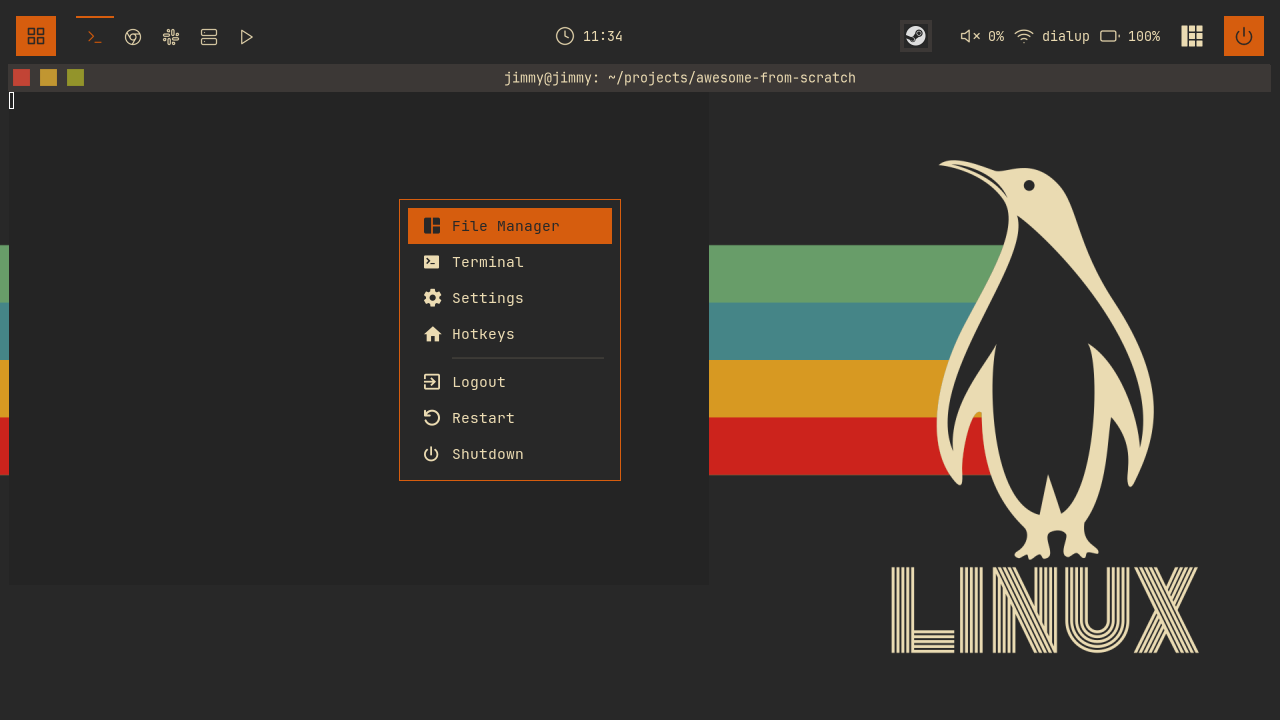
In chapter 07 we built the exit screen and, more importantly, extracted the modal pattern into modal.lua: an awful.popup, a keygrabber that closes on Escape, a selected-index variable, and a rebuild-on-change refresh, all managed by one controller. This chapter is the payoff. We build a second overlay, the right-click main menu, and the entire lifecycle comes for free. All we write is content, placement, and navigation keys.
To catch up: git checkout 07-exitscreen
Retiring awful.menu
Since chapter 00 our right-click menu has been the stock awful.menu, the nested myawesomemenu and mymainmenu tables that ship with the default config. It works, but it fights our design at every turn. awful.menu predates the modern widget system: it draws its own wiboxes, its theming is limited to a handful of theme.menu_* variables (height, width, a couple of colors), and there is no way to give it rounded corners, per-item icons in our font, hover styling, or vim-style keyboard navigation. Every other surface in this config is built from wibox widgets we fully control; the menu should be too.
So the commit for this chapter deletes the whole myawesomemenu / mymainmenu / mylauncher block from rc.lua and replaces it with two lines:
-- rc.lua
local wibar = require("wibar")
local mymainmenu = require("widgets.mainmenu")
The replacement lives in widgets/mainmenu.lua, and it follows the same philosophy as our keybindings in chapter 02: describe what the menu contains as a table, and let a small amount of code turn that description into widgets.
The Menu as Data
Two tables at the top of the module define everything the menu does. First, the applications it launches:
-- widgets/mainmenu.lua
-- The applications the menu launches - one obvious place to change them
local apps = {
  file_manager = "thunar",
  terminal = "ghostty",
  settings = "gnome-control-center",
}
This is the table to edit when you adopt this config. Prefer Nautilus? Change one string. Nothing else in the file mentions an application by name.
Second, the menu itself:
-- widgets/mainmenu.lua
-- Menu items definition
-- type: "item" | "separator"
local menu_items = {
{ type = "item", icon = "", label = "File Manager", command = apps.file_manager },
{ type = "item", icon = "", label = "Terminal", command = apps.terminal },
{ type = "item", icon = "", label = "Settings", command = apps.settings },
{ type = "item", icon = "", label = "Hotkeys", action = "hotkeys" },
{ type = "separator" },
{ type = "item", icon = "", label = "Logout", action = "logout" },
{ type = "item", icon = "", label = "Restart", action = "restart" },
{ type = "item", icon = "", label = "Shutdown", command = "systemctl poweroff" },
}
Each entry is either an item or a separator. The icons are not image files: they are Nerd Font glyphs, plain text rendered in the JetBrainsMono Nerd Font we required back in chapter 01. That means they recolor with fg like any other text, no SVG recoloring needed.
Items carry either a command or an action, and the distinction is exactly "shell versus internal". A command is a string handed to awful.spawn; note that even Shutdown is a command, because systemctl poweroff is something the shell does. An action names something only AwesomeWM itself can do:
-- widgets/mainmenu.lua
local function execute_item(item)
  mainmenu.hide()

  if item.command then
    awful.spawn(item.command)
  elseif item.action == "hotkeys" then
    hotkeys_popup.show_help(nil, awful.screen.focused())
  elseif item.action == "logout" then
    awesome.quit()
  elseif item.action == "restart" then
    awesome.restart()
  end
end
hotkeys_popup is the built-in help overlay you already know as Super+S; the menu just gives it a second, discoverable entry point. Hiding the menu first matters: if the item opens another popup (like the hotkeys help), we do not want the menu still floating underneath it.
Two entries you might expect are missing. There is no Lock item yet, because the lockscreen arrives in chapter 12, and no Apps item, because the application launcher arrives in chapter 10. When those chapters land their modules, adding a menu entry for each is a one-line change to this table.
Skipping Separators Once
Keyboard navigation should never land on a separator. The naive approach is to check menu_items[selected_index].type on every keypress and skip forward or backward until we hit a real item, and then, inside every widget builder, rescan the table to figure out which selectable position a given item occupies. Instead we do the work once, at load time:
-- widgets/mainmenu.lua
-- Selectable items (everything except separators), computed once. Each item
-- learns its own ordinal, so selection checks are a direct comparison instead
-- of a scan per widget.
local selectable_items = {}
for _, item in ipairs(menu_items) do
  if item.type == "item" then
    table.insert(selectable_items, item)
    item.selectable_index = #selectable_items
  end
end
Two things fall out of this. selectable_items is a dense array of just the items, so navigation is simple arithmetic over its length and selectable_items[selected_index] is always a real item. And because every item now carries its own selectable_index, the widget builder can answer "am I the selected one?" with a single comparison. Separators simply do not participate.
Building the Widgets
create_menu_item builds one row: an icon textbox, a label textbox, and a background container that carries the selection styling. This is chapter-07 vocabulary now, so we only walk the interesting part:
-- widgets/mainmenu.lua
local function create_menu_item(item)
  local is_selected = item.selectable_index == selected_index
and further down, the container that uses it:
-- widgets/mainmenu.lua
    bg = is_selected and beautiful.primary_color or "transparent",
    fg = is_selected and beautiful.bg_normal or beautiful.fg_normal,
    shape = beautiful.shape_small,
    forced_height = config.item_height,
    widget = wibox.container.background,
The selected row inverts its colors: primary background, dark foreground. Because the glyph icons are text, they invert along with the label for free. Each row also gets a left-click button that runs execute_item, and a mouse::enter handler that steals the selection:
-- widgets/mainmenu.lua
  item_widget:connect_signal("mouse::enter", function()
    if item.selectable_index == selected_index then
      return
    end
    selected_index = item.selectable_index
    mainmenu.refresh()
  end)
That keeps mouse and keyboard in one model. Hovering does not paint a separate hover state; it moves the same selected_index the arrow keys move, and refresh rebuilds the menu widget from scratch, the rebuild-on-change half of the modal pattern. The guard at the top skips that rebuild when the pointer re-enters the row that is already selected, so mouse motion over the current row costs nothing.
create_separator is a thin wibox.widget.separator (a one-pixel line widget) wrapped in margins, indented past the icon column so it aligns with the labels, and drawn in beautiful.fg_normal .. "33", our usual trick of appending a hex alpha byte to a theme color. create_menu_widget then loops over menu_items, adds a row or a separator per entry, sums the heights so the popup is sized exactly, and wraps everything in a translucent rounded background. Browse the branch for the full builders; they hold no surprises.
Wiring the Modal
Here is the whole reason chapter 07 factored out modal.lua. The controller owns visibility, the keygrabber, Escape, click-outside, and tag-change dismissal, and modal.show puts the popup on the focused screen. Our module supplies content, placement, and keys. Placement first. Unlike the exit screen, which centers itself, a context menu belongs where the mouse is, so the module keeps an anchor and one named place function:
-- widgets/mainmenu.lua
-- Where the menu opens: the mouse position at show time. One placement
-- function, installed on the popup (so awful.popup re-applies it whenever
-- the popup is resized, covering the not-yet-measured first show) and called
-- from on_show (so a new anchor takes effect even when the size is unchanged).
local anchor = { x = 0, y = 0 }

local function place(d)
  d.x = anchor.x
  d.y = anchor.y
  awful.placement.no_offscreen(d, { honor_workarea = true, margins = 10 })
end
mouse.coords() (captured into anchor at show time) is a global AwesomeWM API returning the pointer position in screen coordinates. place puts the popup's top-left corner there, then lets awful.placement.no_offscreen do the clamping: if the menu would overhang a screen edge, it is pulled back inside the workarea with a 10-pixel cushion. Right-click near the bottom-right corner and the menu opens up-and-left of the cursor instead of getting clipped. This is the same one-place-function shape the notification center used in chapter 07, wired in the same two spots:
-- widgets/mainmenu.lua
local controller = modal.new({
  name = "mainmenu",
  build_popup = function()
    return awful.popup({
      widget = create_menu_widget(),
      screen = awful.screen.focused(),
      ontop = true,
      visible = false,
      bg = "#00000000",
      shape = beautiful.shape,
      border_width = beautiful.border_width or 1,
      border_color = beautiful.primary_color,
      placement = place,
    })
  end,
  on_show = function(popup)
    selected_index = 1
    anchor = mouse.coords()
    popup.widget = create_menu_widget()
    place(popup)
  end,
on_show runs every time the menu opens, and it has shrunk to exactly what changes between opens: reset the selection, capture a fresh anchor, rebuild the content so the reset selected_index = 1 is actually visible, and call place so the new anchor takes effect. The placement = place constructor property covers the case on_show cannot: on the very first show the widget has not been measured yet, and awful.popup re-applies its placement function once the popup gets its real size.
keypressed handles navigation with wrap-around, and both arrow keys and vim keys work:
-- widgets/mainmenu.lua
  keypressed = function(_, key)
    if key == "Return" then
      local item = selectable_items[selected_index]
      if item then
        execute_item(item)
      end
    elseif key == "Up" or key == "k" then
      selected_index = selected_index - 1
      if selected_index < 1 then
        selected_index = #selectable_items
      end
      mainmenu.refresh()
    elseif key == "Down" or key == "j" then
      selected_index = selected_index + 1
      if selected_index > #selectable_items then
        selected_index = 1
      end
      mainmenu.refresh()
    end
  end,
})
Because selectable_items is dense, wrap-around is just clamping against its length; separators never enter the picture. Escape is absent on purpose: the controller already handles it. The module ends by re-exporting the controller's API (mainmenu.show = controller.show and friends), so callers never know a controller is involved.
The Bar Button
A right-click menu is invisible until you know it exists, so we also put a button for it on the wibar. widgets/menubutton.lua is twelve lines:
-- widgets/menubutton.lua
local awful = require("awful")
local beautiful = require("beautiful")
local wrappers = require("widgets.wrappers")
local mainmenu = require("widgets.mainmenu")

local menubutton = wrappers.image_widget("/grid.svg", beautiful.bg_normal)
local menubutton_widget = wrappers.square_icon(menubutton, beautiful.primary_color, beautiful.primary_color_hover)
menubutton_widget:add_button(awful.button({}, 1, function()
  mainmenu.toggle()
end))

return menubutton_widget
Both wrappers are from chapter 03: image_widget recolors the grid SVG to the bar's background color, and square_icon sits it on a primary-colored square with a hover shade. Clicking it toggles the menu. In wibar.lua it becomes the leftmost widget, before the taglist, and widgets/init.lua exports both new modules.
Watch the naming. This button opens the menu: a short, fixed list of destinations. The launcher we build in chapter 10 is a different creature, a fuzzy-search overlay across every installed application. Distros love to blur these two; we keep them separate.
Hooking It Up
Three bindings open the menu. The desktop right-click was already in rc.lua; it just changes from awful.menu's method-call syntax to our module's function-call syntax:
-- rc.lua
awful.mouse.append_global_mousebindings({
  awful.button({}, 3, function()
    mymainmenu.toggle()
  end),
awful.mouse.append_global_mousebindings registers mouse buttons on the root window, the bare desktop behind all clients, which is why this fires only when you click wallpaper, not a window. The keyboard gets a row in our bindings table from chapter 02:
-- keybindings.lua
  {{ modkey }, "w",                     function () mainmenu.toggle() end,                        "show main menu",                        "awesome"  },
Super+W toggles the menu at the cursor, wherever it happens to be. And the third path is the wibar button we just built.
Restart with Super+Ctrl+R and try all three. Right-click the desktop near a screen edge to watch the clamping work, then drive the menu entirely with j/k and Return.
Try It
- Add a Screenshot item to
menu_itemsthat runs your screenshot tool (grim,flameshot gui, whatever you use). Decide whether it belongs inappstoo, and where in the list it should sit. - Group the menu with a second separator: put the three application items in one block, Hotkeys in its own block, and the power items in a third. Notice that you touch only
menu_items, and keyboard navigation keeps working without any other change.
Checkpoint
Your config now has a fully themed, keyboard-navigable main menu, and building it took one data table and three callbacks because the modal controller did the rest. The finished code is on the 08-mainmenu branch:
git checkout 08-mainmenu
somewm-client test start --config "$PWD/rc.lua" --name afs
Compare your work: git diff 07-exitscreen 08-mainmenu