Keybindings: A Table You Can Read
You will learn
- how the
package.pathline at the top of rc.lua letsrequire("keybindings")find a file sitting next to it - the four parts of an
awful.keybinding, and howdescriptionandgroupfeed the Mod+S help popup - how to flatten bindings into
{mods, key, fn, description, group}rows with a ten-line converter - why global and client keybindings register through two different mechanisms
- the
keygrouppattern that covers nine tag keys with a single declaration
Where We Are
In chapter 01 we built theme/theme.lua: palettes, beautiful.font_size(size, style), shape helpers, and recolored SVG assets. The window manager looks like ours now, but rc.lua is still the stock monolith. To catch up: git checkout 01-theme.
A Third of Your Config Is Keybindings
Open rc.lua on the 01-theme branch and scroll. It is 679 lines, and about 240 of them, the single biggest block in the file, are keybindings: five separate awful.keyboard.append_global_keybindings calls, a client keybindings block, mouse bindings, and the tag number bindings. Every binding costs four to six lines of awful.key(...) boilerplate, so answering a simple question like "what is bound to Mod+M?" means scrolling and squinting.
This chapter does two things. First, the mechanical extraction: all of that moves into a new keybindings.lua, and rc.lua shrinks to a single line where the block used to be:
-- rc.lua
require("keybindings")
Second, and more interesting: while the bindings are moving, we reshape them. Instead of a wall of awful.key calls, we end up with a table where every binding is one aligned row. You can read the whole keymap top to bottom like a cheat sheet, and grep it.
How require Finds the Module
keybindings.lua is the first module we extract in this series (the theme file was loaded explicitly by beautiful.init, not by require), so this is the right moment to look at the two lines that make require("keybindings") work at all. They have been sitting at the top of rc.lua since chapter 00:
-- rc.lua
local config_dir = require("gears.filesystem").get_configuration_dir()
package.path = config_dir .. "?.lua;" .. config_dir .. "?/init.lua;" .. package.path
require searches the templates in package.path, substituting the module name for ?. Out of the box that path covers the system Lua directories, not your config directory, so require("keybindings") would fail. These lines prepend two templates: <config_dir>/?.lua (so require("keybindings") finds keybindings.lua) and <config_dir>/?/init.lua (so later chapters can require("dashboard") and get dashboard/init.lua).
get_configuration_dir() returns the directory of the rc.lua the compositor actually loaded, whatever that is: ~/.config/somewm, ~/.config/awesome, or a git checkout you pointed a nested test session at. Both SomeWM and AwesomeWM implement it identically, which is why the same config runs on both.
One more thing the extraction leans on: rc.lua defines terminal, filemanager, and modkey without local, so they are true Lua globals. keybindings.lua reads them directly. Since rc.lua runs its variable definitions before it reaches require("keybindings"), they are always set by the time the module needs them.
The Anatomy of awful.key
Before flattening anything, look at what one stock binding costs. This is from rc.lua on 01-theme:
-- rc.lua (before, on 01-theme)
  awful.key({ modkey }, "j", function()
    awful.client.focus.byidx(1)
  end, { description = "focus next by index", group = "client" }),
awful.key takes four things:
- A modifiers table.
{ modkey }means Mod4 (the Super key).{ modkey, "Shift" }means both held together. An empty table{}means the key fires bare, which is what hardware media keys want. - A key string. A letter like
"j", a named key like"Return"or"Escape", or a keysym like"XF86AudioRaiseVolume". Names are case-insensitive, so"Return"and"return"bind the same key. When you do not know the name for a key, look it up in Key Names, or runwev, press the key, and read thesym:field it prints. That is the fastest way to catch the ones whose name is not what the keycap says:,is"comma", Page Up is"Prior". - A callback. Runs when the combo is pressed. For client bindings it receives the focused client as its argument. What goes here is a function, not a call to one: either a name that already refers to a function, like
media_helpers.lower_volumewith no parentheses, or a wrapper likefunction() awful.spawn("brightnessctl s 5%-") end. - A description table.
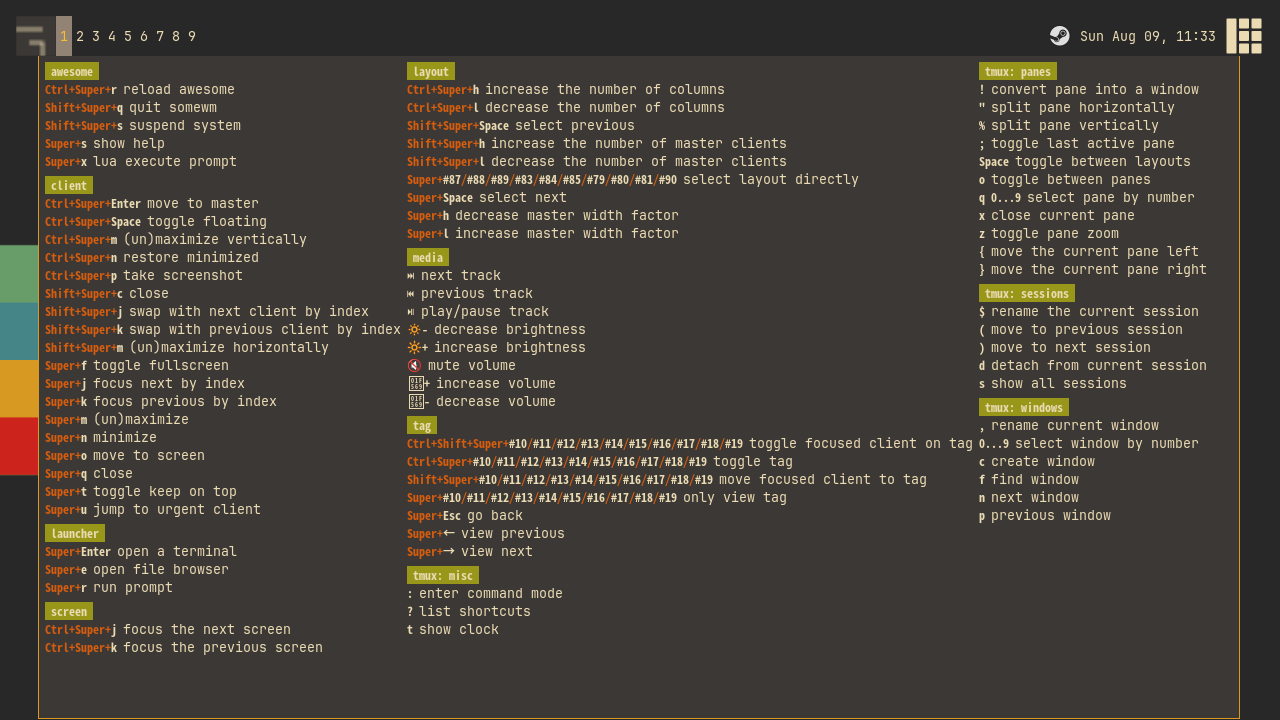
descriptionandgroupare not decoration: they are the data behind the hotkeys popup. Press Mod+S in a running session and every binding appears in a searchable overlay, organized bygroup("client", "layout", "media"), each labeled with itsdescription. Write these well and your config documents itself.
One Row Per Binding
The core idea of keybindings.lua: since every binding is the same four pieces of data, store them as data. Each binding becomes one row of a plain Lua table, and a small function converts rows into real awful.key objects:
-- keybindings.lua
local function table_to_keybinding(bindings)
  local key_bindings = {}
  for _, g_key in ipairs(bindings) do
    table.insert(key_bindings, awful.key(g_key[1], g_key[2], g_key[3], { description = g_key[4], group = g_key[5] }))
  end
  return key_bindings
end
Position 1 is the modifiers table, 2 the key, 3 the callback, 4 the description, 5 the group. Nothing clever, and that is the point: the cleverness budget goes into readability instead.
Here is what the rows look like. This is the top of global_keys:
-- keybindings.lua
--{modifier(s) table, key string,          function function,                     description string,    group string}
local global_keys = {
  -- no modifiers
  {{},         "XF86AudioLowerVolume",  media_helpers.lower_volume,                               "decrease volume",                       "media"    },
  {{},         "XF86AudioRaiseVolume",  media_helpers.raise_volume,                               "increase volume",                       "media"    },
  {{},         "XF86MonBrightnessDown", function() awful.spawn("brightnessctl s 5%-") end,        "decrease brightness",                   "media"    },
  {{},         "XF86MonBrightnessUp",   function() awful.spawn("brightnessctl s +5%") end,        "increase brightness",                   "media"    },
  {{},         "XF86AudioMute",         media_helpers.toggle_mute,                                "mute volume",                           "media"    },
Two deliberate choices are visible here.
The columns are aligned by hand. Modifiers sit under modifiers, keys under keys, descriptions under descriptions. Nothing enforces the alignment, and keeping it is worth the small effort: a glance down the second column answers "what is bound to what."
Media keys bind with no modifier. The XF86Audio* and XF86MonBrightness* strings are the keysym names your keyboard's volume and brightness keys actually send. They are real keys like any other, so binding them is just a row with an empty modifiers table. The playerctl rows for next/play/previous track follow the same pattern a few lines further down.
The rest of global_keys continues in sections by modifier: modkey only, then modkey+Control, then modkey+Shift, each section sorted by key. Familiar rows from the stock config are all still there, just one line each now:
-- keybindings.lua
  {{ modkey }, "j",                     function () awful.client.focus.byidx( 1) end,             "focus next by index",                   "client"   },
  {{ modkey }, "k",                     function () awful.client.focus.byidx(-1) end,             "focus previous by index",               "client"   },
  {{ modkey }, "s",                     hotkeys_popup.show_help,                                  "show help",                             "awesome"  },
  {{ modkey }, "Return",                function () awful.spawn(terminal) end,                    "open a terminal",                       "launcher" },
Browse the branch for the full set; every row follows this same shape.
Helper Tables
A one-row-per-binding table only stays readable if the callbacks stay short. Anything longer than a one-liner gets hoisted into one of three helper tables above global_keys: global_helpers, client_helpers, and media_helpers. The row then references the helper by name, which doubles as documentation.
client_helpers holds the multi-line client callbacks, most of them lifted from the stock config:
-- keybindings.lua
local client_helpers = {
  toggle_fullscreen = function(c)
    c.fullscreen = not c.fullscreen
    c:raise()
  end,
  minimize = function(c)
    -- The client currently has the input focus, so it cannot be
    -- minimized, since minimized clients can't have the focus.
    c.minimized = true
  end,
Two of them are not lifted, but rewritten. The stock config toggles floating with awful.client.floating.toggle and finds the master with awful.client.getmaster(). Both have been deprecated since AwesomeWM 4.0, and the SomeWM 2.0 development line has since deleted them outright. Since we are touching every binding in this chapter anyway, toggle_floating sets the c.floating property directly and move_to_master takes the first entry from awful.client.visible(c.screen). Same behavior, and it keeps working on every version this series supports.
media_helpers is where something new appears:
-- keybindings.lua
local media_helpers = {
  raise_volume = function()
    awful.spawn("wpctl set-volume @DEFAULT_AUDIO_SINK@ 5%+")
    awesome.emit_signal("volume::update")
  end,
awful.spawn fires the wpctl command and forgets about it. The second line is our first custom signal. Signals are the event system that everything in AwesomeWM and SomeWM communicates through: an object emits a named event, and any code that has connected a function to that name gets called. awesome.emit_signal("volume::update") broadcasts "the volume just changed" to anyone listening. Right now, nobody is listening and the line does nothing. In the next chapter we build a volume widget that connects to exactly this signal so it can refresh the instant you press the key, instead of waiting for a polling timer. We will unpack signals properly there; for now, just notice that the keybinding announces what happened rather than reaching into a widget directly.
Global Keys and Client Keys Register Differently
Scroll past the two tables and you reach the lines that actually install everything:
-- keybindings.lua
client.connect_signal("request::default_keybindings", function()
  awful.keyboard.append_client_keybindings(table_to_keybinding(client_keys))
end)
awful.keyboard.append_global_keybindings(table_to_keybinding(global_keys))
Two different mechanisms, and the difference matters.
Global keybindings work anywhere, whether a window is focused or not: switching tags, changing layouts, spawning a terminal. awful.keyboard.append_global_keybindings registers them immediately, at require time.
Client keybindings act on the currently focused window: its callbacks receive that client, c, as an argument. These are not registered directly. Instead we connect to the request::default_keybindings signal, which the client module emits once during startup when it is ready to assemble the binding set applied to every client. Answering a request signal rather than calling an install function is a recurring idiom in modern AwesomeWM configuration: the framework asks, your config answers, and the framework controls when and how the answer is applied. Inside the handler, awful.keyboard.append_client_keybindings adds our rows to that per-client set.
The client_keys table itself reads just like the global one:
-- keybindings.lua
local client_keys = {
  -- modkey only modifier
  {{ modkey },            "f",      client_helpers.toggle_fullscreen,       "toggle fullscreen",         "client" },
  {{ modkey },            "m",      client_helpers.toggle_maximized,        "(un)maximize",              "client" },
  {{ modkey },            "n",      client_helpers.minimize,                "minimize",                  "client" },
  {{ modkey },            "o",      function (c) c:move_to_screen() end,    "move to screen",            "client" },
  {{ modkey },            "q",      function (c) c:kill() end,              "close",                     "client" },
The stock mouse bindings moved along with the keys: the request::default_mousebindings handler with its click-to-focus, Mod+drag-to-move, and Mod+right-drag-to-resize awful.button entries sits at the bottom of the file, unchanged.
Nine Keys, One Binding
One block did not get converted to rows, and deliberately so. The tag bindings, Mod+1 through Mod+9 to view a tag, plus the Control and Shift variants, use awful.key's declarative form:
-- keybindings.lua
  awful.key({
    modifiers = { modkey },
    keygroup = "numrow",
    description = "only view tag",
    group = "tag",
    on_press = function(index)
      local screen = awful.screen.focused()
      local tag = screen.tags[index]
      if tag then
        tag:view_only()
      end
    end,
  }),
Instead of a key string, this form takes a keygroup: "numrow" means the entire 1 through 9 row, and the callback receives which position was pressed as index. One declaration covers nine physical keys, and the hotkeys popup renders it as a single "1..9" entry instead of nine duplicates.
This is why the tag bindings stay out of our row table: as rows they would be nine near-identical lines per variant, thirty-six lines of copy-paste across the four modifier combos. The keygroup form is the flattening for this shape of binding, so we keep it. There are five of these declarations: view tag, toggle tag, move client to tag, toggle client on tag, and a keygroup = "numpad" binding that selects a layout directly by numpad key. Browse the branch for the other four; they differ only in the body of on_press.
Two flattening patterns, one rule: pick the representation that removes the repetition. Rows remove per-binding boilerplate; keygroups remove per-key boilerplate.
Try It
- Add a row to
global_keysthat launches your browser on Mod+B, with a sensible description in the"launcher"group. Press Mod+S afterwards and find it in the popup. - Change the terminal.
terminalis a global defined in rc.lua, so the Mod+Return row should not need to change at all. Prove it.
Checkpoint
Your config now matches the 02-keybindings branch. rc.lua is 441 lines and contains no keybindings; keybindings.lua is 225 lines you can actually read.
git checkout 02-keybindings
somewm-client test start --config "$PWD/rc.lua" --name afs
Compare your work: git diff 01-theme 02-keybindings