Launcher: A Menubar Replacement
You will learn
- What XDG desktop entries are and how to parse them by hand
- How to scan the filesystem asynchronously so the compositor never freezes
- How to write a fuzzy matcher with a scoring system that feels right
- Why icon lookup is the slow part, and how a tiny disk cache fixes it
- How the modal pattern turns all of this into a polished popup on
Mod+P
Where We Are
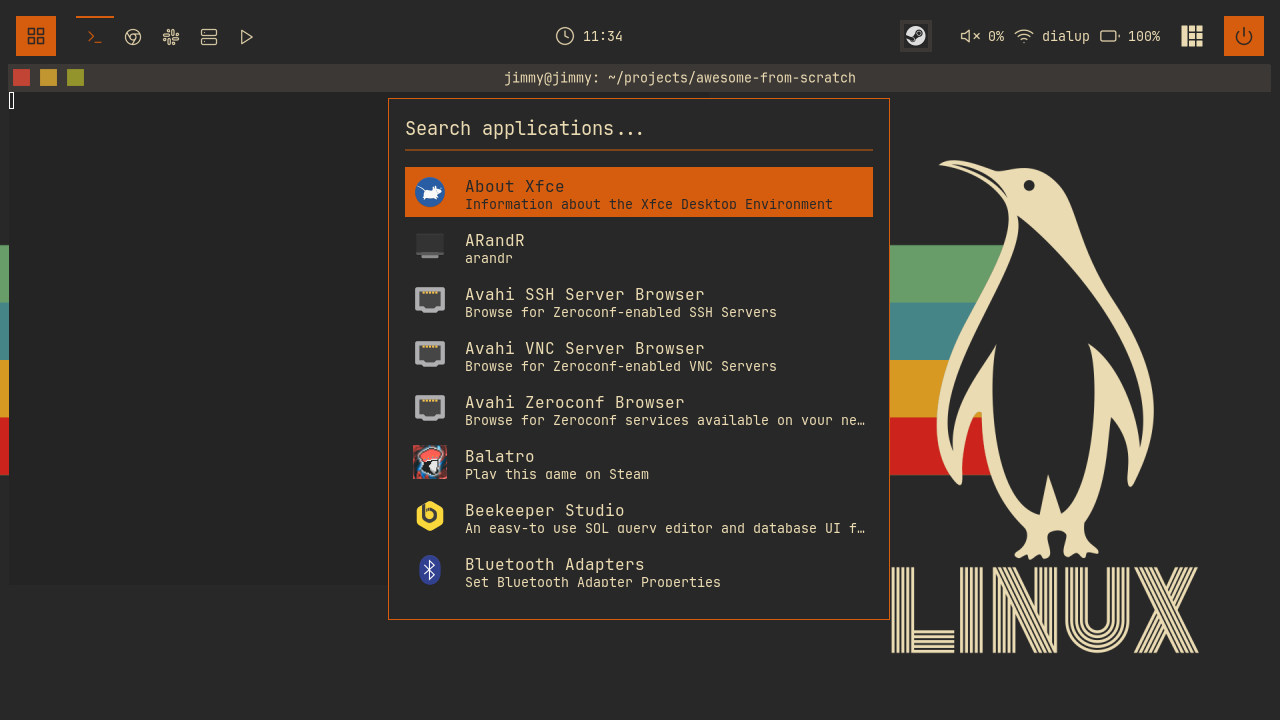
In chapter 09 we built the Super+Tab window switcher, our second consumer of the modal pattern: a popup, a keygrabber, a selected index, and a widget tree we rebuild on every change. This chapter is the third consumer, and the biggest single module in the config: a native application launcher with fuzzy search, icons, and a persistent cache. About 720 lines land in launcher/init.lua, plus one keybinding and one menu item.
To catch up: git checkout 09-switcher.
The Goal
AwesomeWM ships menubar, a bar that lists every installed application and filters as you type. It works, but it looks like 2012, it lives at the edge of the screen, and its matching is prefix-only. Most people bolt on rofi or dmenu instead. We are not doing that: this config is 100% native, so we build our own. Centered popup, fuzzy search, app icons, keyboard-first, and fast enough that you never think about it.
Where does the list of applications come from? Every graphical app on a Linux system installs a desktop entry: a small INI-style file with a .desktop extension, defined by the XDG Desktop Entry specification. They live in ~/.local/share/applications (per-user entries), /usr/local/share/applications, and /usr/share/applications (system packages). An abridged example:
# /usr/share/applications/firefox.desktop (abridged)
[Desktop Entry]
Type=Application
Name=Firefox
Comment=Web Browser
Exec=/usr/lib/firefox/firefox %u
Icon=firefox
Four fields matter to us: Name (what we display), Exec (what we spawn), Icon (a name, not a path - more on that headache later), and Comment (a one-line description we also search). Our launcher is, at heart, a machine that turns a directory of these files into a searchable list.
Before we start, one flag at the top of the new module deserves your attention:
-- launcher/init.lua
-- Flip this to true to watch the launcher work. It reports .desktop scanning, icon
-- cache hits, and timings on stderr (`~/.cache/somewm/stderr`).
--
-- Leave it on for a session the first time you build this. The launcher does a
-- synchronous directory walk on a cold cache, and seeing that number is the whole
-- reason the cache exists.
local debug_launcher = false
Take the comment's advice. Set it to true for your first session with this branch. The log lines it prints (scan timings, icon cache hits and misses, app counts) are the evidence behind every performance decision in this chapter, and watching the cold-cache number collapse on the second launch is genuinely satisfying.
Parsing Desktop Entries
parse_desktop_file reads one file and returns an app table, or nil if the entry should not appear in a launcher. The format is INI: [Section] headers followed by Key=Value lines. We only care about the [Desktop Entry] section, so the parser tracks whether it is inside it:
-- launcher/init.lua
  local app = {}
  local in_desktop_entry = false

  for line in file:lines() do
    if line:match("^%[Desktop Entry%]") then
      in_desktop_entry = true
    elseif line:match("^%[") then
      in_desktop_entry = false
    elseif in_desktop_entry then
Any other [Section] header (desktop entries can carry [Desktop Action ...] sections for right-click actions) flips the flag off, and lines outside the main section are ignored. Inside it, each line is split on the first = and routed by key:
-- launcher/init.lua
      local key, value = line:match("^([^=]+)=(.*)$")
      if key and value then
        if key == "Name" and not app.name then
          app.name = value
        elseif key == "Exec" then
          -- Remove field codes like %f, %F, %u, %U, etc.
          app.exec = value:gsub("%%[fFuUdDnNickvm]", ""):gsub("%s+$", "")
        elseif key == "Icon" then
          app.icon = value
        elseif key == "Comment" then
          app.comment = value
        elseif key == "NoDisplay" and value == "true" then
          file:close()
          return nil
        elseif key == "Hidden" and value == "true" then
          file:close()
          return nil
        elseif key == "Type" and value ~= "Application" then
          file:close()
          return nil
        end
      end
Three details here come straight from the spec:
- Field codes.
Execlines contain placeholders like%f(a file to open) and%u(a URL) that a file manager would substitute when launching a file with the app. We launch apps bare, so we strip every field code and trim the trailing whitespace that stripping leaves behind. NoDisplayandHidden. Both mean "do not show this in menus". Helper binaries, uninstalled-but-lingering entries, and settings panels all mark themselves this way. Honoring these two keys is the difference between a launcher with 60 real apps and one with 200 entries of noise.Type. Desktop entries also describe links and directories. Anything that is notType=Applicationgets rejected on the spot.
The and not app.name guard on Name keeps only the first name line, so a duplicate later in the file cannot overwrite it. The function ends by requiring both a name and an exec line; an entry missing either is useless to a launcher and returns nil.
Scanning Asynchronously
Now we need every .desktop file across three directories. The tempting one-liner is io.popen("find ..."), and it is a trap: io.popen blocks. The compositor is a single event loop; while Lua waits on that pipe, nothing renders, nothing responds, keyboard input queues up. On a slow disk or a cold page cache, that is a visible freeze the first time someone presses Mod+P. This is the same rule the widgets chapter established for polling battery and volume: anything that shells out goes through awful.spawn.easy_async, which spawns the process, returns immediately, and calls us back with the output when it finishes.
-- launcher/init.lua
  -- Phase 1: Find all desktop files, off the main loop. find(1) complains
  -- about directories that don't exist; stderr is simply ignored.
  local find_start = os.clock()
  local cmd = { "find" }
  for _, dir in ipairs(desktop_dirs) do
    table.insert(cmd, dir)
  end
  table.insert(cmd, "-name")
  table.insert(cmd, "*.desktop")

  awful.spawn.easy_async(cmd, function(stdout)
Passing the command as a table rather than a string skips the shell entirely: no quoting bugs, no glob expansion of *.desktop before find even sees it. find prints one path per line; if ~/.local/share/applications does not exist it grumbles on stderr, which easy_async simply drops.
Because the scan is asynchronous, there is a moment where the launcher is open but the list is not ready. The UI owns that state honestly: while the module-level apps_loading flag is true, the results area shows "Loading applications..." instead of an empty void, and the callback fills the list in when the scan lands. On any realistic machine that window is a few dozen milliseconds; you will only ever see the text on the very first cold open.
Inside the callback we parse each path, with one wrinkle: deduplication by basename.
-- launcher/init.lua
    for path in stdout:gmatch("[^\n]+") do
      local basename = path:match("([^/]+)$")
      if basename and not seen[basename] then
        seen[basename] = true
        local app = parse_desktop_file(path)
        if app then
The XDG spec says a desktop file's identity is its filename: if firefox.desktop exists in both ~/.local/share/applications and /usr/share/applications, they are the same application, only one should appear, and the user's copy overrides the system's. That is why desktop_dirs lists the user directory first: the first path find emits claims the basename, every later duplicate is skipped, and dedup doubles as precedence. After parsing, the list is sorted alphabetically so the empty-search view is stable.
The Fuzzy Matcher
This is the fun part. fuzzy_match(pattern, str) returns a score, higher is better, or nil for no match. Type ffx and Firefox should surface; type web and the browser should beat everything that merely contains those letters somewhere. The whole feel of the launcher lives in about thirty lines of scoring.
First, the trump card - an exact substring match beats any fuzzy match:
-- launcher/init.lua
  -- Exact substring match (highest priority)
  if str:find(pattern, 1, true) then
    -- Earlier match = higher score
    local pos = str:find(pattern, 1, true)
    return 1000 - pos
  end
Both strings were lowercased just above, so matching is case-insensitive, and the true argument makes find treat the pattern as plain text rather than a Lua pattern. The score is 1000 - pos: "fire" against "firefox" matches at position 1 and scores 999; against a name where it appears mid-string it scores less. Since the fuzzy path below tops out far under 1000, any real substring hit outranks every scattered-letters hit, and among substring hits, earlier is better. Typing more letters converges on what you meant instead of shuffling the list.
If there is no substring, we walk the string character by character, consuming the pattern as we find its letters in order:
-- launcher/init.lua
  local score = 0
  local pattern_idx = 1
  local last_match = 0

  for i = 1, #str do
    if pattern_idx <= #pattern and str:sub(i, i) == pattern:sub(pattern_idx, pattern_idx) then
      -- Bonus for consecutive matches
      if i == last_match + 1 then
        score = score + 10
      else
        score = score + 1
      end
      -- Bonus for matching at word boundaries
      if i == 1 or str:sub(i - 1, i - 1):match("[%s%-_]") then
        score = score + 5
      end
      pattern_idx = pattern_idx + 1
      last_match = i
    end
  end

  -- Return score only if entire pattern was matched
  if pattern_idx > #pattern then
    return score
  end

  return nil
Read the scoring like a rubric. A matched character is worth 1 point if it stands alone, 10 if it comes immediately after the previous match (runs of adjacent letters look intentional, not coincidental), plus 5 more if it sits at a word boundary: position 1, or right after a space, hyphen, or underscore. So gimp against "gnu image manipulation program" picks up the initial of each word, four boundary bonuses, and ranks high even though the letters are scattered; the same four letters spread randomly through some other name score a measly 4. The final guard is strict: if the loop ends without consuming the whole pattern, the result is nil, not a partial score. Every letter you type is a requirement, never a suggestion.
filter_apps runs this matcher against two fields per app:
-- launcher/init.lua
    local scored = {}
    for _, app in ipairs(all_apps) do
      local name_score = fuzzy_match(search_text, app.name)
      local comment_score = fuzzy_match(search_text, app.comment)
      local score = math.max(name_score or 0, (comment_score or 0) * 0.5)

      if score > 0 then
        table.insert(scored, { app = app, score = score })
      end
    end
Comments count at half weight: searching browser finds Firefox through its Comment=Web Browser line, but an app literally named "Browser" would still rank above it. The scored list is sorted descending, truncated to config.max_results (8 by default), and selected_index is clamped so the highlight never points past the end of a shrinking list.
Finding Icons
Here is the headache promised earlier: Icon=firefox is a name, not a path. The freedesktop icon theme spec says to resolve it you search icon theme directories, in theme priority order, across sizes and categories and file extensions, until something exists. Multiply it out: 4 base directories, 6 candidate themes, 9 sizes, 6 subdirectories, 4 extensions. That is potentially thousands of stat calls per icon, and we have dozens of icons to resolve.
Two layers fix this. The first: figure out which directories actually exist, once, and only ever walk those.
-- launcher/init.lua
-- The flattened, priority-ordered list of directories an icon can live in.
-- Built once: checking which base/theme/size/subdir combinations actually
-- exist on this machine turns thousands of file stats per icon lookup into a
-- short walk over a few dozen real directories.
local icon_search_dirs = nil
get_icon_search_dirs builds that list by nesting loops over the whole combinatorial space, pruning aggressively with gears.filesystem.dir_readable (a gears helper that checks a directory exists and is readable): if a base directory or a theme directory is missing, its entire subtree is skipped without ever being probed. The candidates are ordinary tables:
-- launcher/init.lua
  local themes = { beautiful.icon_theme or "hicolor", "Papirus", "Adwaita", "hicolor", "breeze", "gnome" }
  local sizes = { "scalable", "256x256", "128x128", "96x96", "64x64", "48x48", "32x32", "24x24", "22x22" }
  local subdirs = { "apps", "applications", "devices", "categories", "status", "mimetypes" }
On a typical system the thousands of theoretical combinations collapse to a few dozen real directories (turn on debug_launcher and it logs the exact count). Per icon, find_icon then walks just those, trying .svg, .png, .xpm, and the bare name. The ordering encodes preference: your theme first, scalable SVGs before raster sizes, big rasters before small ones. A small icon_overrides table up top papers over apps with nonconforming icon names (code becomes visual-studio-code, and so on).
The second layer is a persistent cache, because even the pruned walk is work we should do once per machine, not once per session:
-- launcher/init.lua
-- The format is one "name<TAB>path" line per entry. Icon names cannot contain
-- tabs or newlines, so nothing needs escaping; an empty path records a known
-- miss so we never re-run the expensive search for an icon that isn't there.
local icon_cache = {}
local icon_cache_path = gears.filesystem.get_cache_dir() .. "launcher-icons.cache"
gears.filesystem.get_cache_dir() resolves to ~/.cache/somewm/ (or ~/.cache/awesome/ on AwesomeWM) and creates the directory if it is missing, so the cache works on a fresh machine with zero setup. Loading it is one match per line:
-- launcher/init.lua
    local name, path = line:match("^([^\t]+)\t(.*)$")
    if name then
      icon_cache[name] = path ~= "" and path or false -- false = known missing
      count = count + 1
    end
The subtle and important part is that misses are cached too, as a line with an empty path, stored in the table as false. Think about why. If we only cached hits, every app whose icon genuinely does not exist on this machine would pay the full directory walk on every single startup, forever - and it would never get faster, because there is nothing to find. Misses are precisely the expensive case, so they are precisely what most needs caching. The false sentinel (rather than nil) is what lets find_icon distinguish "we searched and it is not there" from "we have never searched":
-- launcher/init.lua
  -- Cache the miss
  icon_cache[icon_name] = false
  icon_cache_dirty = true
  return nil
A dirty flag means the cache file is only rewritten when something actually changed.
One honest caveat: while the scan for desktop files is async, icon resolution runs synchronously inside the easy_async callback, on the main loop. A fully cold cache does its directory walking in Lua, once. That is exactly the number the debug_launcher comment tells you to go look at, and exactly why the cache exists: the cold path runs once per machine, and every session after that reads one small file instead.
The Interface
The widget side reuses everything we know. The popup is a vertical stack, a search input above a results list, all rebuilt from current state by create_launcher_widget on every keystroke - the rebuild-on-change half of the modal pattern. The search input shows a magnifier glyph, your query (or a "Search applications..." placeholder), and a 2px separator in beautiful.primary_color.
Each result row is an icon, the app name in beautiful.font_size(12), and the comment beneath it in beautiful.font_size(10) (falling back to the first word of the exec line when there is no comment). When an app has no resolvable icon, we do not show a broken-image box; we generate a tile:
-- launcher/init.lua
local function get_initial_color(name)
  local sum = 0
  for i = 1, #name do
    sum = sum + string.byte(name, i)
  end
  return initial_colors[(sum % #initial_colors) + 1]
end
initial_colors is a list of theme accents (beautiful.primary_color, beautiful.highlight, beautiful.active, and friends), and the byte-sum hash picks one deterministically from the app's name. The fallback widget draws the app's first letter, bold, dark-on-accent, in a colored square. Because the color is a pure function of the name, the same app gets the same tile every session; it reads as a designed icon set, not a failure state.
Rows respond to the mouse as well: clicking launches, hovering moves the selection (with a guard that skips the rebuild when the row is already the selected one), and the results container binds buttons 4 and 5 (how both X11 and Wayland deliver the scroll wheel) to step the selection up and down.
The modal controller from chapter 07 wires it all together. build_popup creates a centered, borderless-background awful.popup once; on_show is where lazy loading lives:
-- launcher/init.lua
  on_show = function(popup)
    -- Load apps if not already loaded; the list fills in when the async scan
    -- finishes (the popup shows "Loading applications..." until then)
    if #all_apps == 0 then
      load_apps(function()
        if launcher.is_visible() then
          launcher.refresh()
        end
      end)
    else
      log("Using cached apps (%d apps)", #all_apps)
    end

    -- Reset state
    search_text = ""
    selected_index = 1
    filter_apps()
The first open triggers the async scan, and the completion callback only refreshes the UI if the launcher is still visible - you may have opened and immediately dismissed it. Every open resets the search and selection, then the rest of on_show recenters the popup with awful.placement.centered(popup, { parent = popup.screen }) and rebuilds the widget - the controller has already moved the popup to the focused screen before on_show runs, so centering it on its own screen is all that is left. The controller owns Escape, click-outside dismissal, and the launcher::visible signal; this module never touches a keygrabber directly.
The keypressed handler routes Return to launch, Up/Down to move the selection, BackSpace to delete, and then:
-- launcher/init.lua
    elseif key == "Tab" then
      -- Tab completion - fill in selected app name
      if #filtered_apps > 0 then
        search_text = filtered_apps[selected_index].name
        launcher.refresh()
      end
    elseif #key == 1 then
      -- Single character - add to search
      search_text = search_text .. key
      launcher.refresh()
    end
Tab replaces your query with the selected app's full name, a cheap but pleasant completion. The final branch is the entire text-input implementation: keygrabbers hand us key names, and a name of length 1 is a printable character (a, 5, -), while special keys arrive as longer names (space, F11) and fall through harmlessly. It will not handle multi-byte input, but for launching apps it is exactly enough.
The rest of the module (the search input widget, the item layout, the height arithmetic in create_launcher_widget) follows the same declarative widget patterns as every popup we have built; browse the branch for the full tree.
Opening It
Two entry points. First, Mod+P joins the keybinding table from chapter 02:
-- keybindings.lua
  {{ modkey }, "p",                     function() launcher.toggle() end,                         "app launcher",                          "launcher" },
The "launcher" group files it next to the run prompt in the Super+S help popup - and Mod+P is the key the stock AwesomeWM config binds to menubar.show(), so muscle memory transfers directly.
Second, the main menu from chapter 08 gains an Apps item at the top:
-- widgets/mainmenu.lua
{ type = "item", icon = "", label = "Apps", action = "launcher" },
{ type = "separator" },
Its handler in execute_item calls require("launcher").show() - note the require inside the handler, so the menu module never depends on the launcher at load time, only at the moment you click. Right-click the desktop, click Apps, and one modal hands off to another.
Reload with Mod+Ctrl+R, press Mod+P, and type three letters of anything you have installed. Then check ~/.cache/somewm/stderr for the timing story you just built.
Try It
- Frecency. The list currently ranks purely by match score, but the app you launched five times today should outrank one you have never opened. Persist a launch counter per app (the icon cache's tab-separated file is a perfect template), bump it in
launch_selected, and fold it into the score infilter_apps; a small additive bonus is enough to feel dramatic. - A taller list. Bump
config.max_resultsfrom 8 to 12 and watch the popup:create_launcher_widgetcomputes its height frommax_resultsanditem_height, so the geometry follows automatically. Then make the empty-search view show your most-launched apps instead of the alphabet.
Checkpoint
Your config now matches the 10-launcher branch.
git checkout 10-launcher
somewm-client test start --config "$PWD/rc.lua" --name afs
Compare your work: git diff 09-switcher 10-launcher