Kiln
Kiln is a separate experimental playground, not a planned replacement for SomeWM. Some experiments may inform SomeWM's development, but there is no plan to move SomeWM users to Kiln.
Kiln is a tiling Wayland compositor for Linux. It arranges your windows on each monitor, keyboard shortcuts drive it, and one Lua file configures it.

What is different about it
On most desktops the window manager, the bar, the launcher and the notification popups are separate programs, each with its own config format and its own copy of your colours. In kiln they are one thing: elements your config puts on screen, drawn by kiln. The desktop in the screenshot (bar, tags, clock, titlebars, menus, notifications, launcher, lock screen) is a single Lua file of about 1000 lines, written with the same API your config uses.
A bar is five lines:
ui.bar(s, { edge = "top" }, function()
  widgets.taglist(s)
  ui.spacer()
  widgets.clock()
end)
A window is placed the same way as that clock: it is a box in the same layout. In AwesomeWM a window's rectangle comes from the tag layout, a widget's from the wibox layout and a floating thing's from placement, three systems with three sets of rules that run at three different times, and nothing can hold a window and a widget together. In kiln there is one layout, and a titlebar, a terminal and a clock are cells in it. Your first config builds a working desktop in 28 lines.
How a frame happens
Your config never draws and never updates anything. When something changes (a window opens, you switch tag, the clock ticks), kiln calls your config's functions again and they describe what the screen should contain: a tree of boxes, each with a sizing rule such as 180 pixels, a quarter of its parent, or whatever is left. A layout engine, Clay, turns that tree into pixel rectangles. Kiln draws the rectangles and places each application's window in the box your config gave it.
Because the whole screen is one tree, there is no separate code for where
windows go and where widgets go, and a click is answered by asking the tree
what is under the pointer. A tiling layout is short because a master column
beside a stack is two boxes with sizing rules. Press mod+shift+i on the
running desktop to see the tree in Clay's inspector:
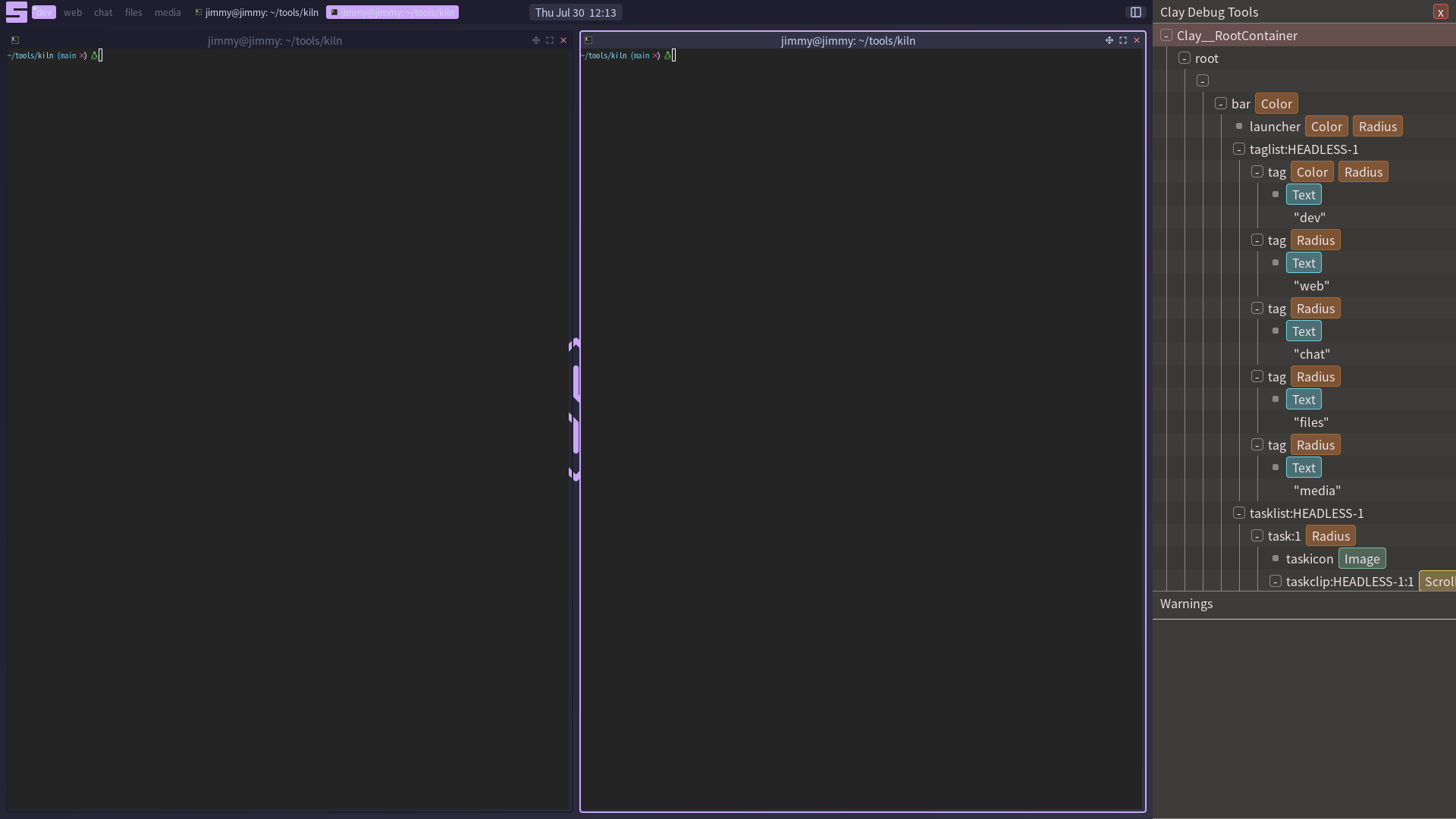
One tree per screen has what this replaces and what it costs.
Start here
- Install kiln from source.
- Launch it nested as a window inside your current session.
- Write your first config, then read the default config with that in hand.
mod+Return opens a terminal, mod+s shows every binding on one sheet,
mod+shift+q quits.
Coming from AwesomeWM or SomeWM
See kiln vs SomeWM for compatibility and configuration differences.
The API is not yet stable and may change between releases. See Limitations for what does not work yet.
Where things live
| Section | Open it when |
|---|---|
| Tutorials | You are new and want to build up a config step by step |
| How-To Guides | You have a specific task in hand |
| Reference | You need the exact property, method, signal, or default |
| Concepts | You want to understand how kiln works and why |
Short answers to common questions are in the FAQ. The source lives at github.com/trip-zip/kiln. Kiln is MIT licensed.