Window Switcher
You will learn
- how Alt-Tab semantics work: hold the modifier, tap Tab to cycle, release to commit
- how to enumerate clients and order them by most-recently-used with
awful.client.focus.history - why the switcher starts at index 2, not 1
- why hold-and-release input does not fit the modal pattern, and how
keyreleased_callbackimplements release-to-commit
Where We Are
In chapter 08 we built the main menu on top of the modal pattern from chapter 07: popup, keygrabber, selected index, rebuild on change, all packaged in modal.lua. This chapter builds another popup with a selected index, and yet it deliberately does not use modal.lua. Understanding why is half the lesson.
To catch up: git checkout 08-mainmenu.
What Alt-Tab Actually Means
Every desktop environment since Windows 95 has taught users the same gesture: hold a modifier, tap Tab to walk through your windows, release the modifier to land on the highlighted one. A single quick Super+Tab therefore means "flip to the window I was just using", because the list is ordered by most-recently-used and the first tap selects the previous window.
That gesture has two properties that shape everything in this chapter:
- The ordering is most-recently-used (MRU), not creation order or screen position. The window you were on a moment ago is always one tap away.
- Commit happens on key release. The switcher is not open until you dismiss it; it is open only while your thumb holds Super. Letting go is the confirmation.
The whole module lives in widgets/windowswitcher.lua, about 340 lines. We will walk the parts that carry these two ideas and skim the widget construction, which is chapter-07 material.
Collecting Windows in MRU Order
First problem: get the list of windows, in the right order. AwesomeWM calls windows clients, and client.get() returns every client the window manager knows about. But that list is in creation order, which is useless for Alt-Tab. What we want is focus history.
Conveniently, awful already maintains it. Every time focus changes, awful.client.focus.history pushes the newly focused client onto a most-recent-first stack, awful.client.focus.history.list. We never wrote code to maintain this; it is bookkeeping awful does for its own focus helpers, and we get to read it.
-- widgets/windowswitcher.lua
-- Collect all clients
local function collect_clients()
  clients = {}
  local seen = {}

  -- awful keeps a most-recent-first stack of focused clients; walking it
  -- first gives real Alt-Tab ordering, with the current window at index 1.
  for _, c in ipairs(awful.client.focus.history.list) do
    if (c:isvisible() or c.minimized) and not seen[c] then
      seen[c] = true
      table.insert(clients, c)
    end
  end

  -- Clients that were never focused (e.g. spawned in the background) go last.
  for _, c in ipairs(client.get()) do
    if (c:isvisible() or c.minimized) and not seen[c] then
      seen[c] = true
      table.insert(clients, c)
    end
  end
end
Two passes, one seen set. The first pass walks the history stack, so the resulting clients table starts with the currently focused window at index 1, the previously focused window at index 2, and so on. The second pass sweeps client.get() for anything the history missed: a window that was spawned in the background and never focused has no history entry, but it should still be reachable by Tab. The seen table, keyed by the client object itself, deduplicates the two passes.
The filter deserves a second look: c:isvisible() or c.minimized. c:isvisible() is true when the client is actually on screen, which excludes clients on unselected tags and, notably, minimized clients. We add or c.minimized on purpose: a minimized window is exactly the kind of thing you want Alt-Tab to rescue. Windows you cannot see because they live on another tag stay excluded, since tags are the tool for those.
Why Selection Starts at Index 2
Here is show() picking the initial selection:
-- widgets/windowswitcher.lua
  collect_clients()
  if #clients == 0 then
    return
  end

  -- Start at second item (first is current window)
  selected_index = math.min(2, #clients)
Index 1 is the window you are looking at right now, because the history stack put it there. Selecting it would make a quick Super+Tab a no-op. Tab means "go to the previous window", so the highlight starts on index 2. The math.min handles the one-window case, where index 2 does not exist and selecting your only window is the best we can do.
Drawing the List
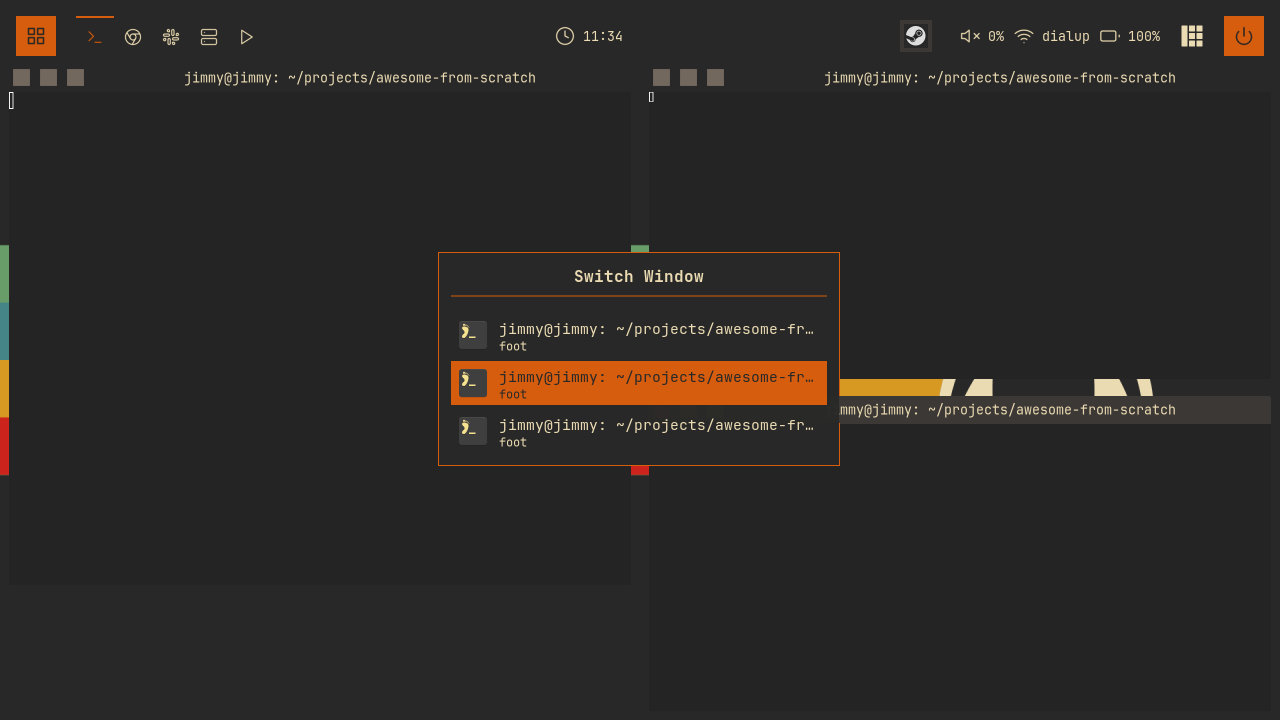
The popup itself is chapter-07 vocabulary: an awful.popup, centered, ontop, one item widget per visible client, the selected item painted with beautiful.primary_color, and a refresh() that rebuilds the whole widget tree whenever the selection moves. With more clients than config.max_items (ten), create_client_list renders a window of the list that follows the selection, so cycling past the bottom never moves the highlight off screen:
-- widgets/windowswitcher.lua
-- Refresh the popup display
local function refresh()
  if popup then
    popup.widget = create_popup_widget()
  end
end
Rebuild-on-change again: for ten rows, regenerating the tree is far simpler than mutating individual row backgrounds, and it is invisible at this scale.
Each row shows three client properties. c.icon is the window's icon as delivered by the application; c.name is the title (whatever the app sets, like "chapter-09.md - nvim"); c.class identifies the application ("ghostty", "firefox"). Not every client provides an icon, so there is a fallback:
-- widgets/windowswitcher.lua
  else
    -- Fallback: colored initial
    local initial = (c.class or c.name or "?"):sub(1, 1):upper()
The initial gets drawn in a beautiful.primary_color square, so iconless windows still get a recognizable badge. Titles longer than 40 characters are truncated with a trailing ... before they ever reach the textbox. The rest of create_client_item is layout plumbing; browse the branch if you want every margin.
Why This Is Not a Modal
Now the interesting part. We have modal.lua sitting right there, purpose-built for "popup plus keygrabber plus selected index". Why does this module hand-roll its own lifecycle?
Because a modal and a switcher have opposite input contracts. A modal opens and then waits: it grabs the keyboard and sits there until you press Escape, Return, or click outside. Time is not part of its semantics. The switcher's contract is hold-and-release: it exists only while a physical key is held, and the release of that key, not any keypress, commits the selection. modal.lua has no concept of key releases; its keygrabber only routes presses, and its stop_key = "Escape" dismissal model is exactly the "waits until dismissed" behavior we need to avoid. Bolting release detection onto the modal controller would complicate it for every other module. So the switcher owns its keygrabber directly.
A keygrabber, as introduced in chapter 07, is AwesomeWM's mechanism for stealing all keyboard input away from the focused client while some UI is active. Here is the switcher's, started at the end of show():
-- widgets/windowswitcher.lua
  -- Start keygrabber with modifier key events enabled
  keygrabber = awful.keygrabber({
    autostart = true,
    stop_key = nil,
    mask_modkeys = false, -- Receive modifier key events
    keypressed_callback = function(_, mod, key, _)
      if key == "Tab" then
Two options matter. stop_key = nil means no key automatically stops the grabber; we stop it ourselves. And mask_modkeys = false is the load-bearing line of the whole module: by default, a keygrabber filters out events for modifier keys themselves (Shift, Control, Super), only reporting them as the mod table attached to other keys. We need to see the Super key as a key, because its release is our commit signal.
Inside keypressed_callback, Tab cycles forward and Shift+Tab cycles backward, wrapping at both ends:
-- widgets/windowswitcher.lua
        if shift_held then
          selected_index = selected_index - 1
          if selected_index < 1 then
            selected_index = #clients
          end
        else
          selected_index = selected_index + 1
          if selected_index > #clients then
            selected_index = 1
          end
        end
        refresh()
shift_held comes from scanning the mod table that arrives with every key event. After moving the index, refresh() repaints the highlight. Two more presses get handled: Return activates immediately (for people who release Super first out of habit), and Escape calls hide(), which cancels without switching.
Then the release-to-commit itself:
-- widgets/windowswitcher.lua
    keyreleased_callback = function(_, _, key, _)
      -- Activate when Super key is released
      if key == "Super_L" or key == "Super_R" then
        windowswitcher.activate()
      end
    end,
keyreleased_callback is the mirror of keypressed_callback, and it can only see the Super key at all because we set mask_modkeys = false. The moment either Super key comes up, we activate whatever is highlighted. Note the flow this produces: the Super+Tab keybinding fires on the Tab press while Super is already down, show() runs and starts the grabber, and from then on the grabber owns the keyboard, counting Tab presses and waiting for the Super release.
One last piece of the grabber, the same re-entrancy trap modal.lua documents:
-- widgets/windowswitcher.lua
    stop_callback = function()
      -- Keygrabber stopped externally
      if visible then
        windowswitcher.hide()
      end
    end,
Stopping a grabber fires its stop_callback synchronously. hide() sets visible = false before calling keygrabber:stop(), so when that stop lands here, the if visible guard is already false and we do not recurse back into hide(). The callback only does real work when something else stopped the grabber out from under us.
Committing the Switch
-- widgets/windowswitcher.lua
function windowswitcher.activate()
  if not visible then
    return
  end

  local c = clients[selected_index]

  windowswitcher.hide()

  if c then
    if c.minimized then
      c.minimized = false
    end
    c:jump_to()
  end
end
Grab the selected client, tear down the popup and grabber first, then switch. Because we included minimized clients in the list, we unminimize before jumping. c:jump_to() is the do-everything focus call: it switches to the client's tag if needed, raises the window, and focuses it, which also pushes it onto the focus history stack, so the next Super+Tab starts from here. That is the loop that makes quick Super+Tab, Super+Tab, Super+Tab bounce between your two most recent windows.
Wiring the Keybinding
One line in the global keys table, using the table-driven format from chapter 02:
-- keybindings.lua
  {{ modkey }, "Tab",                   windowswitcher.show,                                      "window switcher",                       "client"   },
Note it binds show, not toggle. Pressing Super+Tab while the switcher is already open never reaches this binding anyway; the keygrabber owns the keyboard at that point and handles Tab itself. The module also gets registered in widgets/init.lua alongside the others.
Reload with Super+Ctrl+R, open a few windows, and hold Super while tapping Tab. Watch the highlight walk the list in the order you last used the windows, and let go anywhere to land there.
Try It
- Show the tag next to each window. Each client knows its tags via
c:tags(), andc.first_tag.namegives the primary one. Add a small dimmed textbox tocreate_client_itemso entries on other tags say where jumping will take you. - Limit the switcher to the current tag. Add a second filter to
collect_clientsthat keeps only clients on the selected tag (compare againstawful.screen.focused().selected_tag). Bonus: bind it to a different key, and keep the global version on Super+Tab.
Checkpoint
Your code should now match the 09-switcher branch.
git checkout 09-switcher
somewm-client test start --config "$PWD/rc.lua" --name afs
Compare your work: git diff 08-mainmenu 09-switcher