Notifications: Routing, History, Center
You will learn
- How notifications travel from apps over D-Bus into naughty, and where your code hooks in
- Routing and styling notifications per app family and urgency with
ruled.notification - Keeping a history with an unread counter, plus DND and focus modes
- Wiring action buttons (Open, Snooze, Mark Read) through the
invokedsignal - Building a grouped notification center popup with an unread badge on the clock
Where We Are
In chapter 05 we met ruled.client: a declarative rule engine that matches new windows and applies properties to them. This chapter applies the exact same idea to notifications, then goes much further: a 1,180-line notifications.lua that routes, records, snoozes, and collects every notification your desktop produces. It is the biggest single file in the series, so we will walk the interesting parts closely and summarize the repetitive ones. To catch up: git checkout 05-rules-titlebars.
How Naughty Works
Desktop notifications are not a window manager invention. Any app that wants to notify you (Firefox, Discord, notify-send) sends a message over the D-Bus session bus to whatever service owns the org.freedesktop.Notifications name. On a GNOME desktop that service is part of the shell. Under AwesomeWM and SomeWM, it is naughty, the built-in notification library. Naughty claims the D-Bus name, receives the messages, and turns each one into a notification object with a title, message, app_name, urgency, optional icon, and optional actions.
From there, two signals drive everything, and both should look familiar after chapter 05:
ruled.notificationfires its rules against the new notification, exactly likeruled.clientfires against a new window. Rules set properties (position, timeout, colors) and can run a callback.- Naughty emits
request::display, asking your config to actually put the notification on screen. The stock answer is one line:naughty.layout.box({ notification = n }), which builds a default popup box.
The default rc.lua contained a minimal version of both: one catch-all rule and a bare request::display handler. Our diff deletes that stanza from rc.lua and moves the whole subsystem into notifications.lua.
A Safety Net for Fragile Modules
Before requiring the new module, rc.lua grows a small wrapper. Read the comments carefully, they carry the design reasoning:
-- rc.lua
-- These two modules are the ones most likely to break a config badly enough that you
-- cannot log in. Load them behind pcall and report the failure as a notification, so a
-- typo costs you one missing feature instead of a session.
--
-- Report failures on both channels on purpose. If the module that failed is
-- `notifications`, then nothing ever registered a `request::display` handler and the
-- notification below paints nowhere, so stderr is the only thing you will actually see.
local function try(name, fn)
  local ok, err = pcall(fn)
  if not ok then
    io.stderr:write(("[rc.lua] %s failed to load: %s\n"):format(name, tostring(err)))
    naughty.notification({
      urgency = "critical",
      title = name .. " failed to load",
      message = tostring(err),
    })
  end
  return ok
end

-- Notification system: after theme init, before anything can fire a notification.
try("notifications", function()
  require("notifications")
end)
The double reporting is the point. A failed module load normally shows up as a critical notification, which is great, unless the broken module is the one that displays notifications. In that case the naughty.notification call succeeds but paints nothing, because nobody is answering request::display anymore. Writing to stderr as well means the error still lands in your session log either way. We will reuse try() for every big module we add from here on.
Routing Notifications with Rules
notifications.lua opens with a module table M and a M.config block of tunables: a five second default timeout, a table of position presets, DND and focus mode flags, and sound file paths. Then comes the rule set, registered the same way client rules were:
-- notifications.lua
ruled.notification.connect_signal("request::rules", function()
  -- Default rule for all notifications
  ruled.notification.append_rule({
    rule = {},
    properties = {
      screen = awful.screen.preferred,
      implicit_timeout = M.config.default_timeout,
      position = M.config.positions.top_right,
    },
  })

  -- Critical notifications
  ruled.notification.append_rule({
    rule = { urgency = "critical" },
    properties = {
      bg = beautiful.bg_urgent,
      fg = beautiful.fg_urgent,
      timeout = 0, -- Never timeout
      border_color = "#ff0000",
      position = M.config.positions.top_middle,
    },
    callback = function(n)
      play_sound("critical")
    end,
  })
The empty rule = {} matches everything, so every notification gets a screen, a timeout, and the top-right position unless a later rule says otherwise. The critical rule shows the two properties you will tweak most: timeout = 0 means "stay until dismissed" (the freedesktop spec's convention, which naughty follows), and position moves urgent things to the top middle of the screen where you cannot miss them. A low urgency rule follows the same shape: dimmer colors, three second timeout, slight transparency.
After urgency comes routing by app family. The browser rule is the most interesting because it carries the VIP feature. First, the configuration and matcher near the top of the file:
-- notifications.lua
  -- VIP contacts. A notification whose title or message mentions one of these names
  -- gets the style below, is bumped to critical, and never times out. Matching is
  -- plain text and case-insensitive, so punctuation in a name is safe.
  --
  -- Empty by default. Put the handful of people you must not miss in here.
  vip_contacts = {},
-- notifications.lua
-- Does this notification mention one of the VIP contacts?
--
-- Note the `1, true` on find: that is a plain-text search. Without it, a name
-- containing a `-` or `.` would be read as a Lua pattern and match the wrong things.
local function is_vip(notification)
  local haystack = ((notification.title or "") .. " " .. (notification.message or "")):lower()

  for _, name in ipairs(M.config.vip_contacts) do
    if haystack:find(name:lower(), 1, true) then
      return true
    end
  end
  return false
end
vip_contacts ships empty on purpose: it is a personal list, and the intended use is two or three names of people whose messages must never scroll past unseen. The find(..., 1, true) detail matters because contact names come from the real world, and a name like "J. Smith-Jones" contains two Lua pattern metacharacters.
The browser rule uses it in its callback:
-- notifications.lua
  ruled.notification.append_rule({
    rule_any = {
      app_name = { "Firefox", "Chrome", "Chromium", "Brave", "firefox", "chrome", "chromium", "brave" },
    },
    properties = {
      position = M.config.positions.bottom_right,
    },
    callback = function(n)
      if is_vip(n) then
        n.bg = M.config.vip_style.bg
        n.fg = M.config.vip_style.fg
        n.urgency = "critical"
        n.timeout = 0 -- Don't auto-dismiss

        n:append_actions(naughty.action({ name = "Reply" }))
        n:append_actions(naughty.action({ name = "Snooze" }))
      else
        -- Standard browser notification actions
        n:append_actions(naughty.action({ name = "Open" }))
        n:append_actions(naughty.action({ name = "Snooze" }))
      end
    end,
  })
Ordinary browser noise goes to the bottom right, out of your eyeline. A message mentioning a VIP is promoted to critical, restyled, pinned until you deal with it, and given different action buttons. Note the pattern here: the rules attach actions declaratively via naughty.action({ name = ... }). An action is just a named button; what clicking it does is decided later, in one central handler we will get to shortly.
Two more rules are worth a close look. Calendar and reminder apps get timeout = 0, because a reminder that silently disappears after five seconds has failed at its one job, plus Snooze and Dismiss buttons. Media players get the opposite treatment: bottom middle, four seconds, and deliberately no actions, because "now playing" toasts are purely informational.
The remaining rules follow the same shape and you can skim them on the branch: chat apps (Discord, Slack, Teams) at top right with a ten second timeout and Open, Mark Read, and Snooze actions; email clients at bottom left with Read, Archive, Snooze; system and device events at top middle; battery notifications forced to critical with an orange background; download completions at bottom right with an Open Folder button.
History, Unread Counts, and Quiet Modes
Rules decide where a notification goes. The state layer remembers that it existed. M.history is a plain array capped at M.max_history = 50, with M.unread_count tracking how many entries you have not looked at yet:
-- notifications.lua
local function add_to_history(notification)
  local history_item = {
    title = notification.title,
    message = notification.message,
    app_name = notification.app_name,
    timestamp = os.time(),
    urgency = notification.urgency,
    icon = notification.icon,
    id = notification.id or tostring(os.time() .. math.random()),
    is_read = false,
  }

  table.insert(M.history, 1, history_item)
  M.unread_count = M.unread_count + 1

  -- Store reference to active notification
  if notification.resident then
    M.active_notifications[history_item.id] = notification
  end

  -- Trim history if too long
  while #M.history > M.max_history do
    local removed = table.remove(M.history)
    if not removed.is_read then
      M.unread_count = math.max(0, M.unread_count - 1)
    end
    if M.active_notifications[removed.id] then
      M.active_notifications[removed.id] = nil
    end
  end
end
New entries are inserted at index 1 so the history reads newest-first. The trim loop at the bottom does the bookkeeping a naive table.remove would forget: if the entry falling off the end was never read, the unread counter must come down with it, and any reference in M.active_notifications (a map of still-on-screen resident notifications, keyed by id) must be released so the object can be collected.
Every time the count changes, the module emits awesome.emit_signal("notification::unread_count", M.unread_count). This is the same custom-signal pattern our widgets used in chapter 03: the notification module does not know or care who is listening; the clock widget will subscribe later.
The quiet modes live in one small predicate:
-- notifications.lua
local function should_display(n)
  if M.config.dnd_mode and n.urgency ~= "critical" then
    return false
  end

  if M.config.focus_mode then
    local c = client.focus
    if c and c.fullscreen and n.urgency ~= "critical" then
      return false
    end
  end

  return true
end
DND mode swallows everything except critical notifications. Focus mode is subtler: it only suppresses popups while the focused client is fullscreen, so a game or a movie is never interrupted but normal desktop use is unaffected. Both have toggle functions (M.toggle_dnd_mode, M.toggle_focus_mode) exported for keybindings, and set_dnd_mode emits a notifications::dnd_changed signal so anything mirroring the state (the dashboard toggle, eventually) stays in sync.
Drawing the Notification Itself
With rules and state in place, the display handler is short:
-- notifications.lua
naughty.connect_signal("request::display", function(n)
  -- Set resident for important notifications
  if n.urgency == "critical" or n.app_name == "System" then
    n.resident = true
  end

  -- Always record, even when DND swallows the popup
  add_to_history(n)
  awesome.emit_signal("notification::unread_count", M.unread_count)

  if not should_display(n) then
    return
  end

  play_sound(n.urgency or "normal")

  n.widget_template = build_widget_template(n)
  naughty.layout.box({ notification = n })
end)
The ordering is deliberate: history is recorded before the DND check, so muted notifications are not lost, they just wait in the notification center. resident = true tells naughty not to destroy the notification when an action is invoked, which matters for critical items you may act on more than once. Returning without calling naughty.layout.box is all it takes to suppress the popup.
build_widget_template(n) is a named builder that returns the declarative widget tree naughty should render: an icon constrained to beautiful.notification_icon_size on the left, a vertical stack of naughty.widget.title (bold) over naughty.widget.message on the right, the action row underneath, all wrapped in a wibox.container.background that pulls bg, fg, shape, and border from the notification (as set by the rules) with theme fallbacks. The naughty.widget.* entries are placeholder widgets that naughty fills with the actual notification content.
The action row comes from a second builder:
-- notifications.lua (inside build_actions_widget)
      notification = n,
      base_layout = wibox.widget({
        spacing = 8,
        layout = wibox.layout.flex.horizontal,
      }),
      widget_template = {
        {
          {
            id = "text_role",
            halign = "center",
            valign = "center",
            widget = wibox.widget.textbox,
          },
          margins = { left = 12, right = 12, top = 6, bottom = 6 },
          widget = wibox.container.margin,
        },
        bg = beautiful.notification_action_bg_normal,
        fg = beautiful.notification_action_fg_normal,
        shape = gears.shape.rectangle,
        shape_border_width = beautiful.notification_action_border_width or 1,
        shape_border_color = beautiful.notification_action_border_color,
        widget = wibox.container.background,
      },
      widget = naughty.list.actions,
naughty.list.actions is a stock widget that renders one button per action, laying them out with base_layout and stamping each one from widget_template. The id = "text_role" textbox is where it injects each action's name. build_actions_widget returns nil when the notification has no actions, and since nil entries simply vanish from a declarative widget table, actionless notifications get no empty button row.
Actions: One Handler for Every Button
The rules attached the buttons; one signal handler gives them behavior. When any action on any notification is clicked, naughty emits invoked with the notification and the action:
-- notifications.lua
naughty.connect_signal("invoked", function(n, a)
  if a.name == "Open" or a.name == "Reply" then
    -- Find notification's app and activate it
    for _, c in ipairs(client.get()) do
      if c.class and n.app_name and c.class:lower():match(n.app_name:lower()) then
        c:activate({ context = "notification_action", raise = true })
        break
      end
    end
  elseif a.name == "Snooze" then
    show_snooze_picker({
      title = n.title,
      message = n.message,
      app_name = n.app_name,
      urgency = n.urgency,
      icon = n.icon,
    })
  elseif a.name == "Dismiss" or a.name == "Mark Read" or a.name == "Read" or a.name == "Archive" then
    -- Every acknowledge-style action does the same local thing: the history
    -- entry is read. What "Archive" means is up to the sending app.
    mark_read_in_history(n)
  elseif a.name == "Open Folder" then
    -- Open the Downloads folder with whatever the system prefers
    awful.spawn("xdg-open " .. os.getenv("HOME") .. "/Downloads")
  end
end)
Dispatching on a.name keeps the whole action vocabulary in one place. "Open" and "Reply" walk the client list and activate the first window whose class matches the notification's app name, jumping you straight to Discord or Firefox. The four acknowledge-style names all funnel into mark_read_in_history, which finds the matching history entry by id (falling back to a title-plus-message comparison for notifications that never got one), flips is_read, decrements the counter, and re-emits the unread signal. The comment is honest about the limits: our side of "Archive" is local bookkeeping; whether the email actually gets archived is between the button and the sending app.
Snooze
Snoozing is "make this notification come back later", and it needs three pieces: durations, a re-fire mechanism, and a picker UI.
-- notifications.lua
M.snooze_durations = {
  { label = "5 minutes", seconds = 5 * 60 },
  { label = "15 minutes", seconds = 15 * 60 },
  { label = "1 hour", seconds = 60 * 60 },
  { label = "3 hours", seconds = 3 * 60 * 60 },
}
The re-fire is a single-shot gears.timer (the same timer type our widgets poll with, but single_shot = true makes it fire once and stop):
-- notifications.lua (inside snooze_notification)
  local timer = gears.timer({
    timeout = duration_seconds,
    single_shot = true,
    callback = function()
      -- Re-create the notification
      naughty.notification({
        title = notif_data.title,
        message = notif_data.message .. "\n\n<i>(Snoozed " .. duration_label .. " ago)</i>",
        app_name = notif_data.app_name,
        urgency = notif_data.urgency or "normal",
        icon = notif_data.icon,
      })

      -- Remove from snoozed list
      M.snoozed_notifications[snooze_id] = nil
    end,
  })
Notice it does not resurrect the original notification object; it fires a brand new one from the saved plain-data snapshot, with a suffix noting the snooze. Because it is a new notification, it flows through the rules and the display handler like any other. The timer is stashed in M.snoozed_notifications so it is not garbage collected before it fires.
The picker is our first hand-rolled popup: awful.popup is a free-floating wibox that sizes itself to the widget you hand it. build_picker_widget builds a vertical column of duration buttons (each an icon, a label, hover colors, and a click handler that calls snooze_notification), and show_snooze_picker wraps it in a popup placed near the mouse cursor, clamped to the screen edges. Then comes the part to actually study:
-- notifications.lua (inside show_snooze_picker)
  -- Close on click outside. The handler has to be connected *after* this
  -- click finishes (hence the timer), and has to disconnect itself - an
  -- awkward dance every popup in this config ends up re-inventing.
  gears.timer.start_new(0.1, function()
    local close_handler
    close_handler = function()
      M.hide_snooze_picker()
      client.disconnect_signal("button::press", close_handler)
    end
    client.connect_signal("button::press", close_handler)
    return false
  end)
end
Why the 0.1 second delay? The click that opened the picker is still in flight. Connect the close handler immediately and it can catch the tail of that very click, closing the picker the instant it opens. So we defer the connection past the current click, and the handler disconnects itself after firing so it does not leak. It works, but the comment is not shy about it: this is an awkward dance.
The notification center does its own version of the same dance. Its lifecycle is a show/hide/toggle triple guarded by a popup_visible flag, plus two dismissal handlers:
-- notifications.lua
-- Close on click outside (the dashboard does the same dance)
client.connect_signal("button::press", function()
  if popup_visible then
    M.hide_notification_center()
  end
end)

tag.connect_signal("property::selected", function()
  if popup_visible then
    M.hide_notification_center()
  end
end)
Click any window or switch tags and the center closes, which is what you expect from transient UI. But step back and count what we hand-rolled in this one file: visibility state, show/hide/toggle, click-outside-to-close (twice, in two different ways), screen-edge clamping. We hand-roll this lifecycle here; the dashboard will need the same dance, and in the next chapter we extract it once and for all into the modal pattern.
The Notification Center
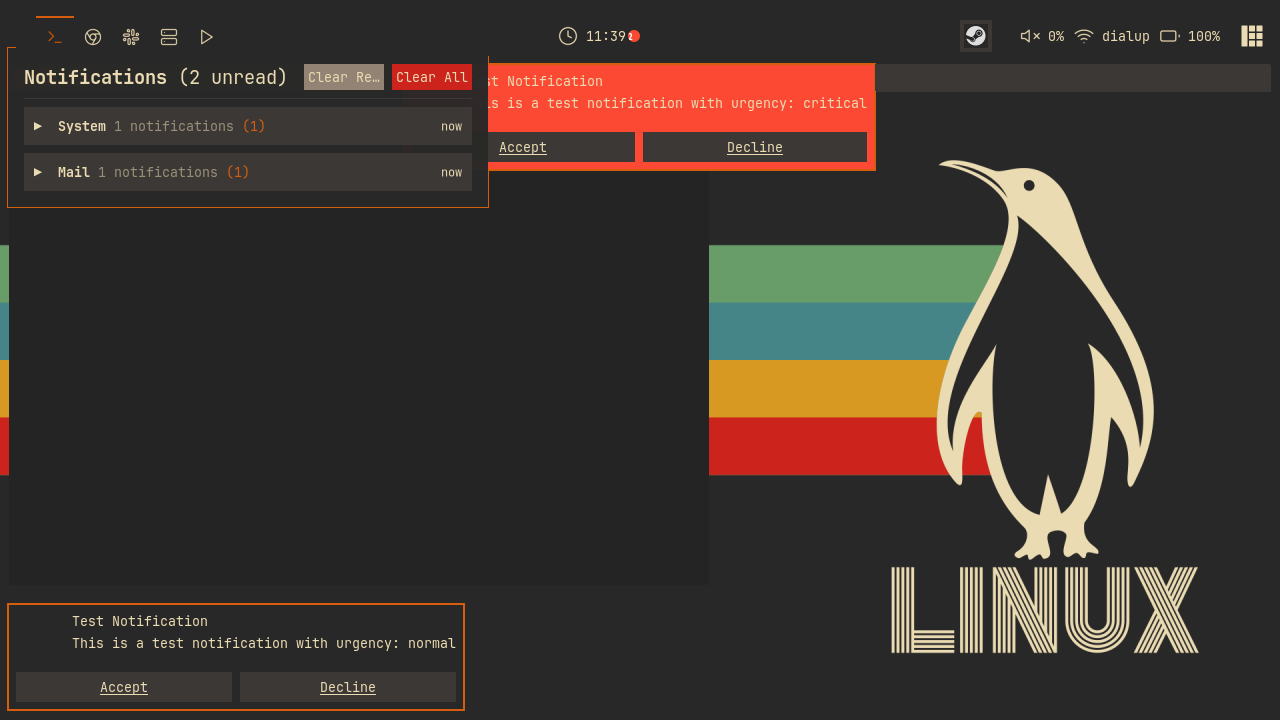
The center is what makes the history worth keeping: press Mod+Shift+N (or click the clock) and a popup lists everything, grouped by app. The grouping pass:
-- notifications.lua (inside group_notifications_by_app)
  for _, notif in ipairs(M.history) do
    local app = notif.app_name or "Unknown"
    if not groups[app] then
      groups[app] = {
        app_name = app,
        notifications = {},
        unread_count = 0,
        latest_timestamp = notif.timestamp,
      }
      table.insert(group_order, app)
    end
    table.insert(groups[app].notifications, notif)
    if not notif.is_read then
      groups[app].unread_count = groups[app].unread_count + 1
    end
It returns both the groups map and a group_order array sorted by each group's latest timestamp, so the app that pinged you most recently sits on top. Groups render collapsed by default: create_group_header draws a chevron, the app name, a count, a per-group unread badge, and a relative timestamp from format_time_ago (which returns "now", "12m ago", "3h ago", or a date for anything older than a day). Clicking a header flips a flag in the expanded_groups table and calls refresh_popup, which rebuilds the whole widget tree from current state, the same rebuild-on-change approach our widgets have used since chapter 03, just at popup scale.
Expanded groups list their notifications through create_notification_item: a bold title with an unread dot, the message ellipsized to one line, the relative time, and a small clock button that opens the snooze picker for that entry. Clicking the item body marks it read, adjusts the counter, emits the unread signal, and refreshes. The header row holds the two bulk actions: Clear Read rebuilds M.history keeping only unread entries (releasing active_notifications references for the ones removed), and Clear All resets history, counter, and the active map in one stroke. A max_visible cap of 15 rows keeps the popup from growing past the screen; everything is assembled by create_popup_widget, which you can browse on the branch since it just composes the pieces you have already seen.
The last two touches close the loop. widgets/clock.lua wraps the chapter 03 clock in a layout with a tiny circular badge, subscribes to the unread signal, and becomes a button:
-- widgets/clock.lua
clock_widget:add_button(awful.button({}, 1, function()
  notifications.toggle_notification_center()
end))
-- widgets/clock.lua
-- Update badge when unread count changes
awesome.connect_signal("notification::unread_count", function(count)
  set_clock()
end)
Inside set_clock, the badge shows math.min(notifications.unread_count, 99) and hides itself when the count is zero. And keybindings.lua adds one row to the global table from chapter 02:
-- keybindings.lua
  {{ modkey, "Shift" }, "n",            function() notifications.toggle_notification_center() end, "toggle notifications",                  "awesome"  },
Reload the config, then generate some traffic from the Lua prompt (Mod+x):
require("notifications").generate_sample_notifications()
Five staggered samples fire, each landing where its rule routed it: the critical battery warning pinned top middle, the Discord message top right, the Firefox download bottom right. The clock grows a badge; Mod+Shift+N opens the center with the history grouped and waiting.
Try It
- Add a "Tomorrow morning" entry to
M.snooze_durationsthat fires at a fixed clock time rather than a fixed number of seconds. You will need to compute the seconds until 9am fromos.time()andos.date("*t")when the button is clicked. - Give your terminal's notifications a home: add a rule matching
app_name = { "ghostty" }that positions them bottom middle with a short timeout, then test it withnotify-send -a ghostty "build done".
Checkpoint
Your code should now match the 06-notifications branch.
git checkout 06-notifications
somewm-client test start --config "$PWD/rc.lua" --name afs
Compare your work: git diff 05-rules-titlebars 06-notifications