Exit Screen: The Modal Pattern
You will learn
- What "the modal pattern" is: the five ingredients shared by every overlay UI in this config
- How to write
modal.lua, including the keygrabber recursion bug it exists to solve - How to refactor last chapter's hand-rolled notification center onto the new controller
- How to build a full-screen power menu with keyboard shortcuts and vim-style navigation
- How the coming chapters (main menu, launcher, dashboard) reduce to "a
modal.newcall plus content"
Where We Are
In chapter 06 we built a notification system: rule-based routing, a history, and a notification center popup with its own show/hide/toggle lifecycle, click-outside dismissal, and a notification_center::visible signal. All of that lifecycle code was written by hand, and the chapter ended with a warning that we would be writing it again. This chapter is where we stop writing it again. To catch up: git checkout 06-notifications.
Naming the Pattern
Look at what the notification center needed beyond its actual content, and you get a checklist:
- A popup: an
awful.popup, which is an on-top window that sizes itself to the widget you put inside it. - A visibility flag: a boolean guarding
show()andhide()so double calls do nothing. - A keygrabber: so Escape closes the overlay instead of going to whatever client has focus.
- Dismissal rules: clicking a client or switching tags should close the overlay.
- A
::visiblesignal: so other widgets can react when the overlay opens or closes.
A keygrabber is new here, so let's define it: awful.keygrabber diverts all keyboard input to a callback while it is active. The focused client stops receiving keys entirely. That is exactly what an overlay wants: while the exit screen is open, pressing r should mean "reboot", not "type r into the terminal behind it".
Every overlay UI we are going to build (exit screen, main menu, launcher, dashboard) needs this same checklist, and so does the notification center we already built. Five copies of the same fiddly lifecycle is four too many, so before building anything new, we extract it. This is the modal pattern, and modal.lua is where it lives from now on.
The Modal Controller
The new file opens by naming both the pattern and the trap inside it:
-- modal.lua
-- The one pattern behind every overlay UI in this config: exit screen, main
-- menu, launcher, dashboard, notification center. A "modal" is an awful.popup
-- plus the fiddly lifecycle around it: a visibility flag, a keygrabber that
-- closes on Escape, click-outside and tag-change dismissal, and a
-- "<name>::visible" signal other widgets can react to.
--
-- The subtle part every hand-rolled copy of this pattern got wrong at least
-- once: grabber:stop() synchronously fires stop_callback, and stop_callback
-- wants to hide the modal - which stops the grabber. The controller breaks
-- that loop in one place (see the comments in show/hide) so the modules using
-- it never have to think about it.
That second paragraph is the whole reason this file earns its keep, so let's spell the bug out before reading the code.
The Recursion Bug
There are two ways a modal closes: the user presses Escape (the grabber stops itself, then fires its stop_callback), or our code calls hide() (which must stop the grabber, which fires stop_callback). Both paths need the same cleanup: hide the popup, clear the flag, emit the signal. The natural instinct is to put that cleanup in stop_callback and also in hide(), and now you have a loop: hide() calls grabber:stop(), stop() synchronously fires stop_callback, stop_callback calls hide(), which calls grabber:stop() again. Depending on how you wrote it, that is a stack overflow, a double-emitted signal, or an error from stopping a stopped grabber.
The fix is a discipline, not a trick: flip the visibility flag first, route both paths through hide(), and let the guard at the top of hide() end the re-entry. Here is show():
-- modal.lua
  function self.show()
    if visible then
      return
    end

    if not self.popup then
      self.popup = args.build_popup()
    end

    -- Every modal opens on the screen the user is looking at
    self.popup.screen = awful.screen.focused()

    if args.on_show then
      args.on_show(self.popup)
    end

    self.popup.visible = true
    visible = true

    grabber = awful.keygrabber({
      autostart = true,
      stop_key = "Escape",
      stop_callback = function()
        -- The grabber is already stopped when this fires (Escape, or an
        -- explicit stop from hide()). Clearing the reference first and
        -- routing through hide() gives both paths one cleanup; hide()'s
        -- visibility guard ends the re-entry.
        grabber = nil
        self.hide()
      end,
      keypressed_callback = function(_, mods, key, _)
        if args.keypressed then
          args.keypressed(mods, key)
        end
      end,
    })

    awesome.emit_signal(args.name .. "::visible", true)
  end
Note the lazy creation: the popup is not built until the first show(). Modules can require("modal") and call modal.new at startup without paying for widgets nobody has opened yet. And note the screen assignment: show() sets self.popup.screen = awful.screen.focused() itself, because every modal opens on the screen the user is looking at; no consumer has to remember it. on_show runs after that, before the popup becomes visible, which is where consumers refresh their content and re-apply their placement on the freshly assigned screen.
And hide(), where the guard does its work:
-- modal.lua
  function self.hide()
    if not visible then
      return
    end

    -- Flip the flag before stopping the grabber: stop() re-enters hide() via
    -- stop_callback, and this guard ends that second call immediately.
    visible = false

    local kg = grabber
    grabber = nil
    if kg then
      kg:stop()
    end

    self.popup.visible = false

    if args.on_hide then
      args.on_hide(self.popup)
    end

    awesome.emit_signal(args.name .. "::visible", false)
  end
Trace the Escape path: the grabber stops, stop_callback fires, stop_callback nils the reference and calls hide(). visible is still true, so hide() proceeds; grabber is already nil, so there is no second stop(). Now trace the programmatic path: hide() flips visible to false, then stops the grabber; stop_callback fires and calls hide() again, but the guard sees visible == false and returns immediately. Both paths run the cleanup exactly once. That is the entire trick, and every consumer of modal.lua gets it for free.
Dismissal Rules
The last piece of modal.new handles dismissal by mouse and by tag switch:
-- modal.lua
  -- Clicking a client or switching tags while the modal is open dismisses it
  client.connect_signal("button::press", function()
    if visible then
      self.hide()
    end
  end)

  tag.connect_signal("property::selected", function()
    if visible then
      self.hide()
    end
  end)
These are global signals: client fires button::press when you click any client window, and tag fires property::selected when the visible tag changes. Since both handlers route through hide(), they get the same single-cleanup guarantee as everything else.
That is nearly the whole file: modal.new(args) takes a name (the signal prefix), the required build_popup, and optional on_show, on_hide, and keypressed callbacks. It returns a controller exposing show(), hide(), toggle(), is_visible(), and .popup. Escape is reserved: the controller owns it, and keypressed sees everything else. Browse modal.lua on the branch for the few lines we skipped.
Refactoring the Notification Center
The proof that the extraction is right: last chapter's code collapses onto it. The hand-rolled show_notification_center / hide_notification_center / toggle_notification_center trio, the popup_visible flag, and the click-outside and tag-change handlers, about 130 lines in all, become one modal.new call:
-- notifications.lua
local center_anchor = { x = 0, y = 0 }

local function place_center(d)
  local wa = d.screen.workarea
  d.x = center_anchor.x - d.width / 2
  d.y = wa.y + (beautiful.useless_gap or 4)
  awful.placement.no_offscreen(d, { honor_workarea = true, margins = beautiful.useless_gap or 4 })
end

local center = modal.new({
  name = "notification_center",
  build_popup = function()
    return awful.popup({
      widget = create_popup_widget(),
      screen = awful.screen.focused(),
      ontop = true,
      visible = false,
      bg = "#00000000",
      border_width = beautiful.border_width or 1,
      border_color = beautiful.primary_color,
      shape = beautiful.shape or gears.shape.rounded_rect,
      placement = place_center,
    })
  end,
  on_show = function(popup)
    center_anchor = mouse.coords()
    popup.widget = create_popup_widget()
    place_center(popup)
  end,
})
Last chapter's positioning (center under the click point, tuck below the bar, keep on screen) survives, but tightened into one named place_center function, with awful.placement.no_offscreen doing the edge clamping instead of hand-written arithmetic. It is wired in twice, deliberately: installed as the popup's placement property, which awful.popup re-applies whenever the popup's size changes (covering the very first show, before the widget has been measured), and called directly from on_show, so a freshly captured mouse anchor takes effect on every open. The screen is not this module's problem anymore: modal.show has already put the popup on the focused screen before on_show runs. This one-place-function shape repeats in every modal consumer from here on. The public API survives as three assignments, so nothing else in the config notices the refactor:
-- notifications.lua
M.show_notification_center = center.show
M.hide_notification_center = center.hide
M.toggle_notification_center = center.toggle
The best deletion is in the snooze picker. Remember its click-outside handling? It had to connect a button::press handler after the opening click finished, so it used a one-shot timer, and the handler had to disconnect itself:
-- notifications.lua (06-notifications, now deleted)
  -- Close on click outside. The handler has to be connected *after* this
  -- click finishes (hence the timer), and has to disconnect itself - an
  -- awkward dance every popup in this config ends up re-inventing.
  gears.timer.start_new(0.1, function()
    local close_handler
    close_handler = function()
      M.hide_snooze_picker()
      client.disconnect_signal("button::press", close_handler)
    end
    client.connect_signal("button::press", close_handler)
    return false
  end)
That 0.1 second hack is gone entirely. The picker is now a module-local snooze_picker = modal.new({...}) with the same anchor-plus-place-function shape as the center (picker_anchor and place_picker), and the controller's dismissal handlers cover the click-outside case. show_snooze_picker opens it with an unconditional snooze_picker.hide() first (a no-op when it is already hidden), so clicking Snooze on a second notification re-anchors the picker instead of ignoring the click. This is the beat to internalize: we hand-rolled the pattern once, felt exactly where it hurt, and then extracted it. Extracting before you have felt the pain produces the wrong abstraction; extracting after your first copy produces this one.
Building the Exit Screen
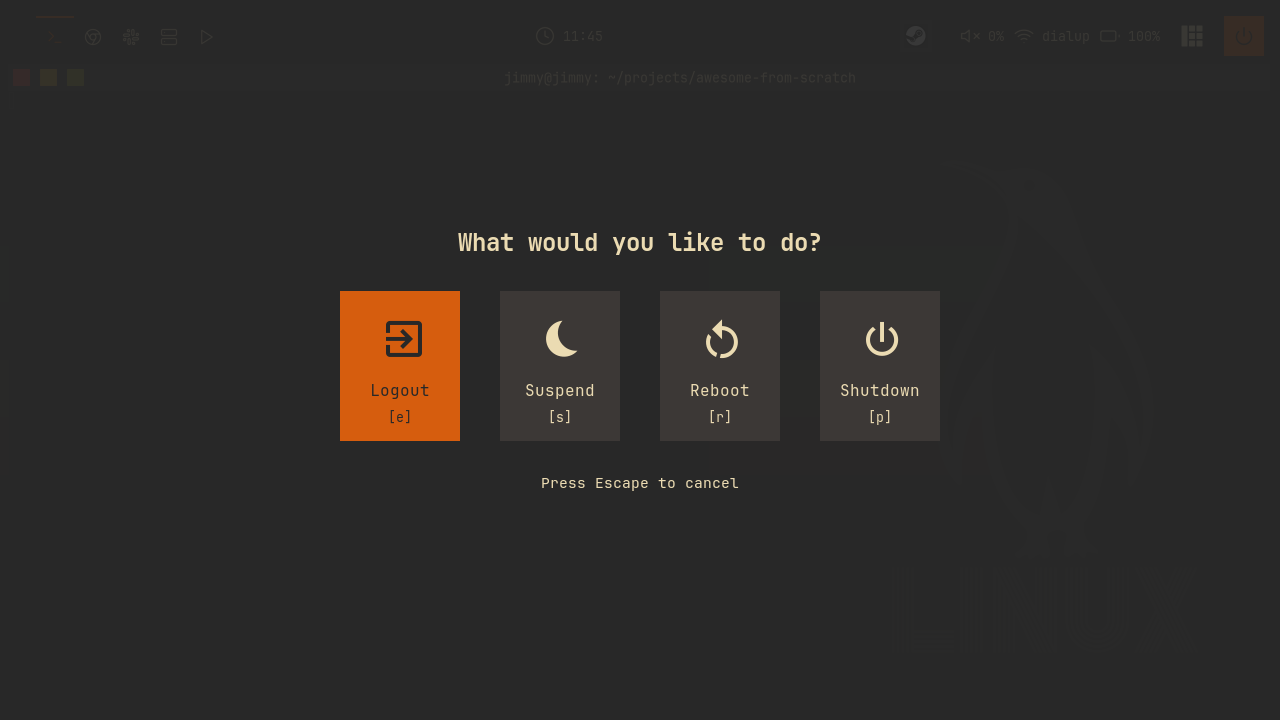
Now the first from-scratch consumer: a full-screen power menu on Mod+Shift+E. It starts with a data table, one entry per option:
-- exitscreen/init.lua
local options = {
{
name = "Logout",
icon = "",
key = "e",
command = function()
awesome.quit()
end,
},
{
name = "Suspend",
icon = "",
key = "s",
command = function()
awful.spawn("systemctl suspend")
end,
},
Reboot and Shutdown follow the same shape with systemctl reboot and systemctl poweroff. The icons are Nerd Font glyphs, which is why JetBrainsMono Nerd Font is a hard dependency of this config.
A power menu usually has a Lock entry, and ours does not, deliberately. We have no lockscreen yet: asking the compositor to lock before a lock surface exists is a silent no-op, the screen just stays unlocked with no error to tell you why. Chapter 12 builds the lockscreen and adds Lock to this table. You will spot one comment in this file that already talks about a [l] key for Lock; it is reading ahead to that chapter.
Buttons and Selection
create_button turns an option into a widget: icon over name over [key] hint, wrapped in a background container. Selection is pure styling, driven by comparing the button's index against a module-local selected_index:
-- exitscreen/init.lua
    bg = is_selected and beautiful.primary_color or beautiful.bg_focus,
    fg = is_selected and beautiful.bg_normal or beautiful.fg_normal,
    shape = beautiful.shape,
    forced_width = config.button_size,
    forced_height = config.button_size + 30,
    widget = wibox.container.background,
There is no in-place highlight toggling. When the selection changes, we rebuild the whole widget tree and swap it in; exitscreen.refresh() does exactly that. For a four-button menu, rebuild-on-change is simpler than tracking widget references, and it is the approach every modal in this series uses. Mouse support comes from two handlers on each button: a click runs the option's command, and mouse::enter sets selected_index and refreshes, so hovering and arrow keys fight over the same state instead of maintaining two. The hover handler starts with a guard, if selected_index == index then return end, so re-entering the already selected button does not trigger a pointless rebuild.
Assembling the Layout
Building the row of buttons runs into a mismatch: we have the buttons in a Lua array, but declarative widget layouts want children listed inline. unpack bridges the two:
-- exitscreen/init.lua
        -- Buttons. unpack() must be the LAST field in the constructor: Lua
        -- adjusts a multi-value expression to a single value anywhere else,
        -- which would silently render only the first button.
        {
          layout = wibox.layout.fixed.horizontal,
          spacing = config.spacing,
          unpack(buttons),
        },
unpack(buttons) expands the array into positional entries of the layout table, exactly as if we had typed each button out, with the caveat the comment spells out: it only expands to all its values in the last position of the constructor. One portability line at the top of the file makes it work everywhere:
-- exitscreen/init.lua
-- somewm and AwesomeWM both run on LuaJIT, which is Lua 5.1, where `unpack` is a global
-- and `table.unpack` does not exist. Write it this way round so the config also works
-- on a 5.2+ interpreter.
local unpack = unpack or table.unpack
The outer container is a wibox.container.background with bg = beautiful.bg_normal .. "E8". The popup itself is fully transparent (bg = "#00000000") and placed with awful.placement.maximize, so it covers the whole screen; the E8 alpha suffix on the inner background is what dims your desktop behind the centered buttons.
Keyboard Handling
The keypressed callback checks the labeled shortcut keys before anything else:
-- exitscreen/init.lua
  keypressed = function(_, key)
    -- The labeled shortcut keys are checked before vim navigation, so the
    -- key a button displays is the key that triggers it
    for i, option in ipairs(options) do
      if key == option.key then
        selected_index = i
        exitscreen.refresh()
        -- Small delay for visual feedback
        gears.timer.start_new(0.15, function()
          execute_selected()
          return false
        end)
        return
      end
    end

    if key == "Return" then
      execute_selected()
    elseif key == "Left" or key == "h" then
      selected_index = math.max(1, selected_index - 1)
      exitscreen.refresh()
    elseif key == "Right" or key == "l" then
      selected_index = math.min(#options, selected_index + 1)
      exitscreen.refresh()
    end
  end,
Ordering matters here. l is vim for "move right", but once chapter 12 adds Lock with shortcut l, the shortcut must win, so shortcuts are checked first and return skips navigation. The 0.15 second timer is pure feedback: pressing r first paints Reboot as selected, then executes a beat later, so you see what you triggered instead of the screen just going black. gears.timer.start_new(seconds, fn) runs fn once after the delay when fn returns false; returning true would make it repeat.
The module's tail hands the entire lifecycle to the controller and re-exports it:
-- exitscreen/init.lua
-- The modal controller owns visibility, the keygrabber, Escape, and the
-- exitscreen::visible signal; this module only describes content and keys.
local controller = modal.new({
  name = "exitscreen",
with build_popup creating the maximized popup and on_show resetting selected_index = 1, re-running awful.placement.maximize(popup) so the popup fills whichever screen the controller just moved it to, and rebuilding the widget. Then exitscreen.show, .hide, .toggle, and .is_visible are just the controller's functions assigned onto the module table. Notice what this file does not contain: no visibility flag, no keygrabber, no Escape handling, no dismissal signals. Content and keys only.
Wiring It Up
Two entry points. First, a power button for the wibar, and it is the smallest widget in the config:
-- widgets/power.lua
local power = wrappers.image_widget("/power.svg", beautiful.bg_normal)
local power_widget = wrappers.square_icon(power, beautiful.primary_color, beautiful.primary_color_hover)

-- Click for the power menu (the exit screen)
power_widget:add_button(awful.button({}, 1, function()
  exitscreen.show()
end))
It registers in widgets/init.lua and slots into the right side of the wibar after a separator, as the last item. Second, one row in the keybinding table:
-- keybindings.lua
  {{ modkey, "Shift"   }, "e",          function() exitscreen.toggle() end,                       "exit screen",                           "awesome"  },
Restart the config and try it: Mod+Shift+E opens the overlay, arrows or h/l move the selection, r flashes Reboot before executing, Escape or a tag switch dismisses. The power icon in the wibar opens the same screen.
The Payoff
Here is why this chapter is the hinge of the series. The overlays still to come are each "a modal.new call plus content":
- The main menu: a modal whose content is a list of actions.
- The launcher: a modal whose content is a search box and a results list.
- The dashboard: a modal whose content is sliders, toggles, and a calendar.
Each of those chapters gets to spend its pages on what makes it interesting, because the lifecycle is a solved problem. One deliberate exception: the window switcher stays hand-rolled. Its grabber has different semantics: you hold the modifier, cycle with Tab, and releasing the modifier commits the selection. That release-to-commit lifecycle does not fit a controller built around show/hide/Escape, and forcing it in would bend the abstraction out of shape. Knowing where a pattern stops applying is part of owning it.
Try It
- Add a fifth option to the exit screen: Hibernate, with icon
, keyh, runningsystemctl hibernate. Notice what happens to vim navigation when you pickhas the shortcut, and why the shortcut-first ordering inkeypressedmakes that a feature rather than a bug. Pick a different key if you disagree. - Change the Escape behavior for the exit screen only: instead of closing immediately, make the first Escape reset the selection to 1 and only a second Escape close. You will discover that Escape never reaches
keypressedbecause the controller reserves it asstop_key; extendmodal.newwith an option to change that.
Checkpoint
The finished code for this chapter is on the 07-exitscreen branch:
git checkout 07-exitscreen
somewm-client test start --config "$PWD/rc.lua" --name afs
Compare your work: git diff 06-notifications 07-exitscreen