Dashboard: The Control Center
Where We Are
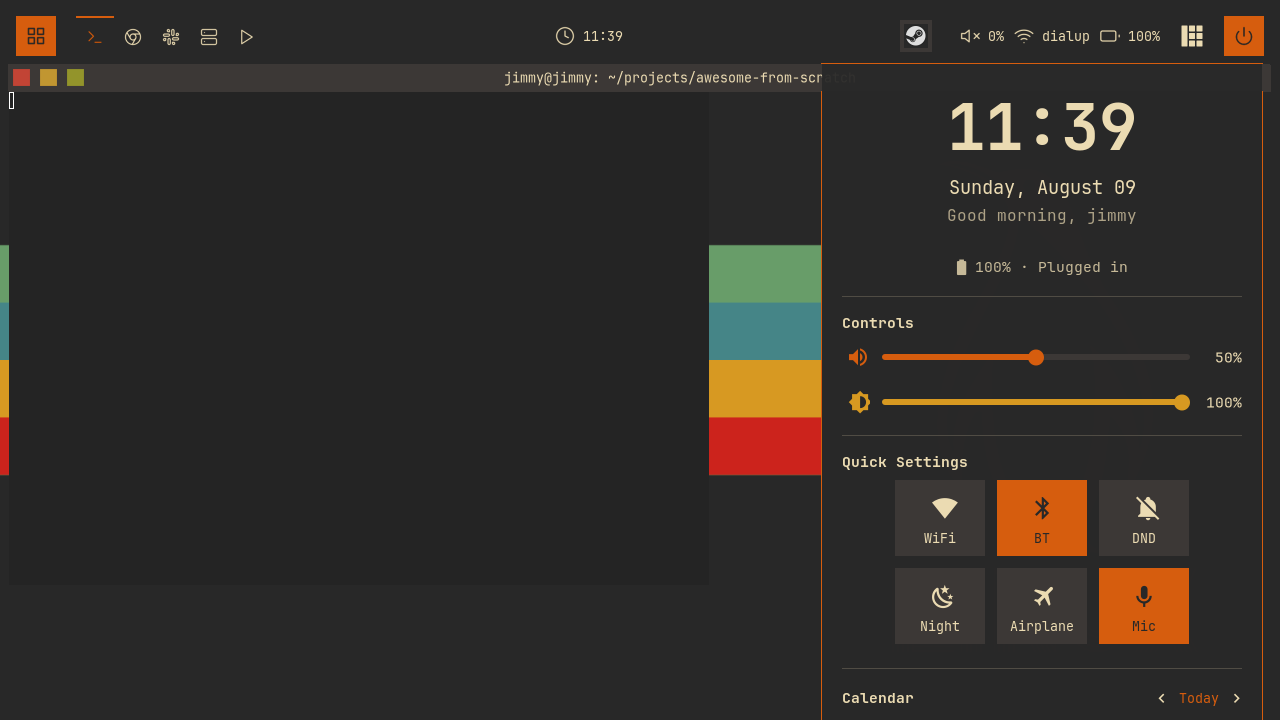
Build a dashboard on Mod+D with a clock, volume and brightness sliders, quick settings, and a calendar. To catch up: git checkout 10-launcher.
One Popup, Four Modules
Create dashboard/init.lua to assemble four section modules: profile, sliders, toggles, and calendar. require("dashboard") loads this file through the ?/init.lua search path.
Add the module and keybinding to keybindings.lua:
-- keybindings.lua
local dashboard = require("dashboard")
-- keybindings.lua
  {{ modkey }, "d",                     function() dashboard.toggle() end,                        "toggle dashboard",                      "awesome"  },
Each section exports create(), which returns its widget:
-- dashboard/init.lua
local function create_dashboard_widget()
  return wibox.widget({
    {
      {
        -- Profile section (user info + time)
        profile.create(),
        -- Sliders section (volume, brightness)
        sliders.create(),
        -- Quick toggles section
        toggles.create(),
        -- Calendar section
        calendar.create(),
        spacing = config.spacing,
        layout = wibox.layout.fixed.vertical,
      },
      margins = config.margin,
      widget = wibox.container.margin,
    },
    bg = config.bg,
    shape = beautiful.shape,
    forced_width = config.width,
    widget = wibox.container.background,
  })
end
Build Once, Refresh on Opening
Create the popup with modal.new and place it below the bar:
-- dashboard/init.lua
-- Docked top right, under the bar, on whatever screen the popup is on
local function place(d)
  awful.placement.top_right(d, {
    margins = {
      top = beautiful.wibar_height + beautiful.useless_gap * 3,
      right = beautiful.useless_gap * 2,
    },
    parent = d.screen,
  })
end

local controller = modal.new({
  name = "dashboard",
  build_popup = function()
    return awful.popup({
      widget = create_dashboard_widget(),
      screen = awful.screen.focused(),
      ontop = true,
      visible = false,
      bg = "#00000000", -- Fully transparent (widget has its own bg)
      shape = beautiful.shape,
      border_width = config.border_width,
      border_color = config.border_color,
      -- Placement lives on the popup itself, not in on_show: awful.popup
      -- re-applies it whenever the popup's size changes, which covers the
      -- first show, when the widget has not been measured yet.
      placement = place,
    })
  end,
profile.create() starts timers; sliders.create() and toggles.create() register signal handlers and refresh functions. Call them once in build_popup. Rebuilding on every opening would leave the previous timers and handlers running.
On each opening, reposition the popup and read the current system values:
-- dashboard/init.lua
  on_show = function(popup)
    place(popup)

    -- Sync sections that mirror system state (volume, brightness, radios)
    sliders.refresh()
    toggles.refresh()
  end,
place(popup) uses the screen assigned by the modal controller, so reopening on another monitor moves the dashboard there.
Sliders: Two-Way Binding
In dashboard/sliders.lua, define create_slider for volume and brightness:
-- dashboard/sliders.lua
  local slider = wibox.widget({
    bar_shape = gears.shape.rounded_bar,
    bar_height = slider_config.bar_height,
    bar_color = beautiful.bg_focus,
    bar_active_color = color,
    handle_shape = gears.shape.circle,
    handle_width = slider_config.handle_width,
    handle_color = color,
    handle_border_width = 0,
    value = 50,
    minimum = 0,
    maximum = 100,
    forced_height = slider_config.forced_height,
    widget = wibox.widget.slider,
  })
bar_color sets the track colour; bar_active_color sets its filled portion. Dragging the handle changes value and emits property::value.
The factory takes get_cmd, which reads the system value, and set_cmd, which converts a value into a command to apply it.
The Feedback Loop
Use a flag to distinguish programmatic assignments from user input:
-- dashboard/sliders.lua
  -- property::value fires for programmatic assignments too. Without this
  -- guard, reading the system value and assigning it to the slider would
  -- immediately write that same value back to the system.
  local setting_programmatically = false

  local function set_value(value)
    setting_programmatically = true
    slider.value = math.min(100, math.max(0, value))
    setting_programmatically = false
  end

  -- Update value display when slider changes; only user drags hit the system
  slider:connect_signal("property::value", function()
    local value = math.floor(slider.value)
    value_widget.text = value .. "%"

    if set_cmd and not setting_programmatically then
      awful.spawn.with_shell(set_cmd(value))
    end
  end)
The handler runs synchronously during slider.value assignment, before the flag is cleared. It updates the label but skips set_cmd.
Reading the System
read_system_value runs get_cmd asynchronously and passes its result to set_value. Register each reader in refreshers; sliders.refresh() calls them when the dashboard opens:
-- dashboard/sliders.lua
  read_system_value()
  table.insert(refreshers, read_system_value)

  -- External changes (e.g. the volume keybindings) announce themselves with a
  -- bare signal; the payload is fetched fresh from the system.
  if signal then
    awesome.connect_signal(signal, read_system_value)
  end
Configure the volume slider:
-- dashboard/sliders.lua
local volume_slider = create_slider(
"",
beautiful.primary_color,
[[wpctl get-volume @DEFAULT_AUDIO_SINK@ 2>/dev/null | awk '{print int($2*100)}' || echo 50]],
function(value)
return string.format("wpctl set-volume @DEFAULT_AUDIO_SINK@ %d%%", value)
end,
"volume::update"
)
Volume updates on volume::update. Brightness passes nil for the signal and refreshes when the dashboard opens.
Quick Settings
create_toggle(icon, label, key, on_toggle, check_cmd, signal) builds a button for WiFi, Bluetooth, DND, night light, airplane mode, or microphone. Store state in toggle_states[key]; update_visual applies active or inactive styling.
A click flips the state optimistically, restyles, and runs the command:
-- dashboard/toggles.lua
  container:add_button(awful.button({}, 1, function()
    toggle_states[key] = not toggle_states[key]
    update_visual()
    if on_toggle then
      on_toggle(toggle_states[key])
    end
  end))
External controls use nmcli, bluetoothctl, gammastep, and wpctl.
Most toggles also use a check_cmd to read the current state, since commands can fail or settings can change elsewhere. Register each reader in refreshers so toggles.refresh() updates the grid whenever the dashboard opens:
-- dashboard/toggles.lua
-- Interpret a check command's output as on/off. Frontier patterns (%f) match
-- whole words only, so "on" inside "disconnected" does not count as enabled.
local function parse_enabled(stdout)
  local out = stdout:lower()
  return (
    out:match("%f[%a]yes%f[%A]")
    or out:match("%f[%a]on%f[%A]")
    or out:match("%f[%a]enabled%f[%A]")
    or out:match("^%s*1%s*$")
  ) ~= nil
end
Do Not Disturb
Connect DND to the notification module:
-- dashboard/toggles.lua
-- Do Not Disturb toggle: drives the notification module directly and
-- follows it when DND is toggled from anywhere else
toggle_states.dnd = notifications.config.dnd_mode
local dnd_toggle = create_toggle("", "DND", "dnd", function(state)
notifications.set_dnd_mode(state)
end, nil, "notifications::dnd_changed")
Clock and Battery
Use wibox.widget.textclock for the time and date, and a gears.timer for the greeting. Subscribe to the existing battery poll:
-- dashboard/profile.lua
local function render_battery(status)
  if battery_icon then
    battery_icon.text = battery.level_icon(status.percentage or 0, status.charging)
    battery_text.text = battery_line(status)
  end
end

-- The shared battery module already polls every 10 seconds; this section
-- just renders whatever it broadcasts instead of running its own poll
awesome.connect_signal("battery::update", render_battery)
In create(), call battery.get_status(render_battery) to initialise the display before the next broadcast. battery_line formats the reading as text such as “87% · 1.2h remaining”.
Calendar
wibox.widget.calendar.month renders a month from a date table. Its fn_embed callback receives a cell widget and a flag such as "header", "weekday", "focus", or "normal". Use it to style cells; this branch highlights today:
-- dashboard/calendar.lua
    elseif flag == "focus" then
      -- Today - orange background (no forced size, let it match other cells)
      widget.font = beautiful.font_size(10, "Bold")
      return wibox.widget({
        widget,
        bg = beautiful.primary_color,
        fg = beautiful.bg_normal,
        shape = beautiful.shape_small,
        widget = wibox.container.background,
      })
Add previous, Today, and next buttons. Update displayed_date and assign it to cal.date to display the chosen month.
Press Mod+D. Check that the dashboard opens below the bar and that the volume slider changes the system volume. Change volume with a media key and check the slider updates. Reopen the dashboard to check that brightness and quick settings refresh.
Try It
- Add a microphone volume slider to the sliders section.
create_slideralready takes everything you need: the get command iswpctl get-volume @DEFAULT_AUDIO_SOURCE@, the set command targets the same node, and there is no existing mic-volume signal, so decide whether refresh-on-open is enough. - Add a VPN toggle to the quick settings grid.
nmcli con up <name>/nmcli con down <name>foron_toggle, and write acheck_cmdthat greps your connection name out ofnmcli -t -f NAME con show --active. Check whetherparse_enabledhandles your check command's output, or whether echoingon/offyourself is cleaner.
Checkpoint
The finished code is on the 11-dashboard branch.
git checkout 11-dashboard
somewm-client test start --config "$PWD/rc.lua" --name afs
Compare your work: git diff 10-launcher 11-dashboard