Launcher: A Menubar Replacement
Where We Are
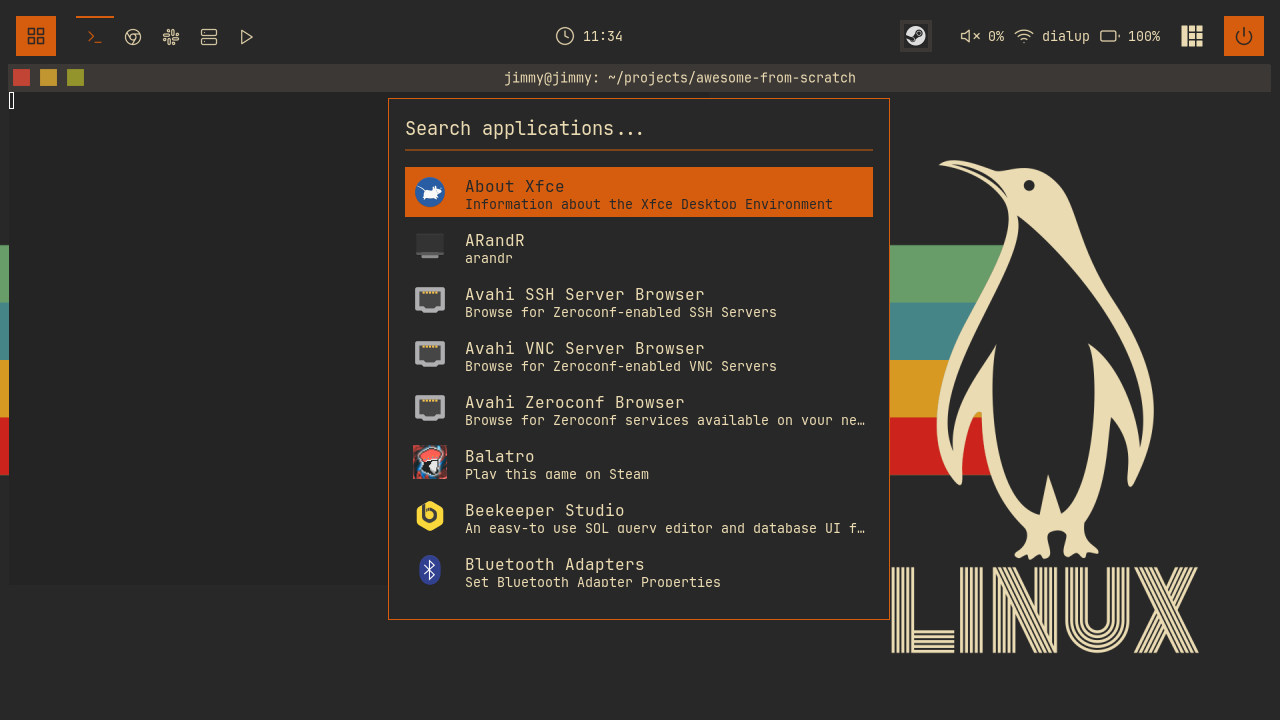
Build launcher/init.lua: an application launcher with fuzzy search, icons, and an icon cache, opened with Mod+P.
To catch up: git checkout 09-switcher.
Application Entries
Applications provide .desktop files with names, commands, and icons. Search ~/.local/share/applications, /usr/local/share/applications, and /usr/share/applications. A Firefox entry looks like this:
# /usr/share/applications/firefox.desktop (abridged)
[Desktop Entry]
Type=Application
Name=Firefox
Comment=Web Browser
Exec=/usr/lib/firefox/firefox %u
Icon=firefox
Enable debug_launcher while testing to log scan timings and icon-cache results:
-- launcher/init.lua
-- Logs to stderr (`~/.cache/somewm/stderr`).
local debug_launcher = false
Parsing Desktop Entries
parse_desktop_file returns an app table or nil. Read Key=Value lines only inside the [Desktop Entry] section:
-- launcher/init.lua
  local app = {}
  local in_desktop_entry = false

  for line in file:lines() do
    if line:match("^%[Desktop Entry%]") then
      in_desktop_entry = true
    elseif line:match("^%[") then
      in_desktop_entry = false
    elseif in_desktop_entry then
Split each line on its first =:
-- launcher/init.lua
      local key, value = line:match("^([^=]+)=(.*)$")
      if key and value then
        if key == "Name" and not app.name then
          app.name = value
        elseif key == "Exec" then
          -- Remove field codes like %f, %F, %u, %U, etc.
          app.exec = value:gsub("%%[fFuUdDnNickvm]", ""):gsub("%s+$", "")
        elseif key == "Icon" then
          app.icon = value
        elseif key == "Comment" then
          app.comment = value
        elseif key == "NoDisplay" and value == "true" then
          file:close()
          return nil
        elseif key == "Hidden" and value == "true" then
          file:close()
          return nil
        elseif key == "Type" and value ~= "Application" then
          file:close()
          return nil
        end
      end
Exec field codes such as %f and %u represent file or URL arguments. This launcher strips them because it opens apps without those arguments. Return nil if the entry has no name or command.
Scanning Asynchronously
Use awful.spawn.easy_async to run find. Waiting on io.popen would block the compositor’s event loop:
-- launcher/init.lua
  -- Phase 1: Find all desktop files, off the main loop. find(1) complains
  -- about directories that don't exist; stderr is simply ignored.
  local find_start = os.clock()
  local cmd = { "find" }
  for _, dir in ipairs(desktop_dirs) do
    table.insert(cmd, dir)
  end
  table.insert(cmd, "-name")
  table.insert(cmd, "*.desktop")

  awful.spawn.easy_async(cmd, function(stdout)
The argument table passes *.desktop directly to find, without shell expansion.
Show “Loading applications...” while apps_loading is true. The callback fills the list when the scan finishes.
Skip duplicate basenames:
-- launcher/init.lua
    for path in stdout:gmatch("[^\n]+") do
      local basename = path:match("([^/]+)$")
      if basename and not seen[basename] then
        seen[basename] = true
        local app = parse_desktop_file(path)
        if app then
List the user directory first in desktop_dirs, so its entries take precedence over system entries with the same basename. Sort the parsed apps alphabetically for the empty-search view.
The Fuzzy Matcher
fuzzy_match(pattern, str) returns a score or nil for no match. Lowercase both strings before comparing them.
Try a plain-text substring match first:
-- launcher/init.lua
  -- Exact substring match (highest priority)
  if str:find(pattern, 1, true) then
    -- Earlier match = higher score
    local pos = str:find(pattern, 1, true)
    return 1000 - pos
  end
Otherwise, match the letters in order, with bonuses for adjacent letters and word boundaries:
-- launcher/init.lua
  local score = 0
  local pattern_idx = 1
  local last_match = 0

  for i = 1, #str do
    if pattern_idx <= #pattern and str:sub(i, i) == pattern:sub(pattern_idx, pattern_idx) then
      -- Bonus for consecutive matches
      if i == last_match + 1 then
        score = score + 10
      else
        score = score + 1
      end
      -- Bonus for matching at word boundaries
      if i == 1 or str:sub(i - 1, i - 1):match("[%s%-_]") then
        score = score + 5
      end
      pattern_idx = pattern_idx + 1
      last_match = i
    end
  end

  -- Return score only if entire pattern was matched
  if pattern_idx > #pattern then
    return score
  end

  return nil
filter_apps runs this matcher against two fields per app:
-- launcher/init.lua
    local scored = {}
    for _, app in ipairs(all_apps) do
      local name_score = fuzzy_match(search_text, app.name)
      local comment_score = fuzzy_match(search_text, app.comment)
      local score = math.max(name_score or 0, (comment_score or 0) * 0.5)

      if score > 0 then
        table.insert(scored, { app = app, score = score })
      end
    end
Sort by descending score and limit the list to config.max_results (8 by default). Clamp selected_index when the list shrinks.
Finding Icons
An icon name such as firefox must be resolved to a file. Avoid checking nonexistent directories for every app: build the search-directory list once.
-- launcher/init.lua
-- Existing icon directories, in search order.
local icon_search_dirs = nil
get_icon_search_dirs checks candidates with gears.filesystem.dir_readable, skipping missing directories:
-- launcher/init.lua
  local themes = { beautiful.icon_theme or "hicolor", "Papirus", "Adwaita", "hicolor", "breeze", "gnome" }
  local sizes = { "scalable", "256x256", "128x128", "96x96", "64x64", "48x48", "32x32", "24x24", "22x22" }
  local subdirs = { "apps", "applications", "devices", "categories", "status", "mimetypes" }
find_icon searches those directories for .svg, .png, .xpm, and bare filenames, in that order. icon_overrides maps names such as code to visual-studio-code.
Save resolved paths in a persistent cache:
-- launcher/init.lua
-- The format is one "name<TAB>path" line per entry. Icon names cannot contain
-- tabs or newlines, so nothing needs escaping; an empty path records a known
-- miss so we never re-run the expensive search for an icon that isn't there.
local icon_cache = {}
local icon_cache_path = gears.filesystem.get_cache_dir() .. "launcher-icons.cache"
The cache directory is ~/.cache/somewm/, or ~/.cache/awesome/ on AwesomeWM. Read each tab-separated entry:
-- launcher/init.lua
    local name, path = line:match("^([^\t]+)\t(.*)$")
    if name then
      icon_cache[name] = path ~= "" and path or false -- false = known missing
      count = count + 1
    end
false records a known miss; nil means the icon has not been searched for:
-- launcher/init.lua
  -- Cache the miss
  icon_cache[icon_name] = false
  icon_cache_dirty = true
  return nil
A dirty flag means the cache file is only rewritten when something actually changed.
Icon resolution still runs synchronously inside the callback. A cold cache can block the main loop; check the debug timings.
The Interface
create_launcher_widget builds a search input above the results list. Rebuild it when the query or selection changes.
Each row shows an icon, app name, and comment. If no comment exists, use the first word of the command. For missing icons, display the app’s initial on a coloured square:
-- launcher/init.lua
local function get_initial_color(name)
  local sum = 0
  for i = 1, #name do
    sum = sum + string.byte(name, i)
  end
  return initial_colors[(sum % #initial_colors) + 1]
end
initial_colors lists theme accents. The name determines the colour, so each app keeps the same fallback icon between sessions.
Clicking launches an app; hovering selects it. Skip the rebuild if that row is already selected. Scroll buttons 4 and 5 move the selection.
Use modal.new from chapter 07. Build the popup once and load apps in on_show:
-- launcher/init.lua
  on_show = function(popup)
    -- Load apps if not already loaded; the list fills in when the async scan
    -- finishes (the popup shows "Loading applications..." until then)
    if #all_apps == 0 then
      load_apps(function()
        if launcher.is_visible() then
          launcher.refresh()
        end
      end)
    else
      log("Using cached apps (%d apps)", #all_apps)
    end

    -- Reset state
    search_text = ""
    selected_index = 1
    filter_apps()
After resetting the query and selection, centre the popup with awful.placement.centered(popup, { parent = popup.screen }) and rebuild its widget. The visibility check prevents the scan callback from refreshing a dismissed launcher.
The keypressed handler routes Return to launch, Up/Down to move the selection, BackSpace to delete, and then:
-- launcher/init.lua
    elseif key == "Tab" then
      -- Tab completion - fill in selected app name
      if #filtered_apps > 0 then
        search_text = filtered_apps[selected_index].name
        launcher.refresh()
      end
    elseif #key == 1 then
      -- Single character - add to search
      search_text = search_text .. key
      launcher.refresh()
    end
Keygrabbers provide key names. This input handler accepts single-byte names; it does not handle multi-byte text or the space key.
Opening It
Add Mod+P to keybindings.lua:
-- keybindings.lua
  {{ modkey }, "p",                     function() launcher.toggle() end,                         "app launcher",                          "launcher" },
Add an Apps entry at the top of the main menu:
-- widgets/mainmenu.lua
{ type = "item", icon = "", label = "Apps", action = "launcher" },
{ type = "separator" },
In execute_item, handle "launcher" with require("launcher").show(). Keeping the require inside the handler avoids loading the launcher with the menu.
Reload with Mod+Ctrl+R, press Mod+P, and search for an installed app. With debugging enabled, compare the first and subsequent load timings in ~/.cache/somewm/stderr.
Try It
- Launch frequency. Persist a launch counter per app, increment it in
launch_selected, and add a score bonus infilter_apps. Try the icon cache’s tab-separated format for storage. - A taller list. Bump
config.max_resultsfrom 8 to 12 and watch the popup:create_launcher_widgetcomputes its height frommax_resultsanditem_height, so the geometry follows automatically. Then make the empty-search view show your most-launched apps instead of the alphabet.
Checkpoint
Your config now matches the 10-launcher branch.
git checkout 10-launcher
somewm-client test start --config "$PWD/rc.lua" --name afs
Compare your work: git diff 09-switcher 10-launcher