Exit Screen: The Modal Pattern
Where We Are
Extract the notification center’s popup controls into modal.lua, then use it to build a full-screen power menu. To catch up: git checkout 06-notifications.
Naming the Pattern
The shared controller needs:
- A popup: an
awful.popup, which is an on-top window that sizes itself to the widget you put inside it. - A visibility flag: a boolean guarding
show()andhide()so double calls do nothing. - A keygrabber: so Escape closes the overlay instead of going to whatever client has focus.
- Dismissal rules: clicking a client or switching tags should close the overlay.
- A
::visiblesignal: so other widgets can react when the overlay opens or closes.
awful.keygrabber receives keyboard input while active, preventing it from reaching the focused client.
The Modal Controller
The Recursion Bug
hide() must stop the keygrabber, and the grabber’s stop_callback must hide the popup. But grabber:stop() fires stop_callback synchronously. If both call each other without a guard, they recurse.
Route both paths through hide(). Clear the visibility flag before stopping the grabber so a second call returns immediately. First, show():
-- modal.lua
  function self.show()
    if visible then
      return
    end

    if not self.popup then
      self.popup = args.build_popup()
    end

    -- Every modal opens on the screen the user is looking at
    self.popup.screen = awful.screen.focused()

    if args.on_show then
      args.on_show(self.popup)
    end

    self.popup.visible = true
    visible = true

    grabber = awful.keygrabber({
      autostart = true,
      stop_key = "Escape",
      stop_callback = function()
        -- The grabber is already stopped when this fires (Escape, or an
        -- explicit stop from hide()). Clearing the reference first and
        -- routing through hide() gives both paths one cleanup; hide()'s
        -- visibility guard ends the re-entry.
        grabber = nil
        self.hide()
      end,
      keypressed_callback = function(_, mods, key, _)
        if args.keypressed then
          args.keypressed(mods, key)
        end
      end,
    })

    awesome.emit_signal(args.name .. "::visible", true)
  end
show() builds the popup on first use. On each opening, it assigns the focused screen, then calls on_show to refresh content and placement before making the popup visible.
Then define hide():
-- modal.lua
  function self.hide()
    if not visible then
      return
    end

    -- Flip the flag before stopping the grabber: stop() re-enters hide() via
    -- stop_callback, and this guard ends that second call immediately.
    visible = false

    local kg = grabber
    grabber = nil
    if kg then
      kg:stop()
    end

    self.popup.visible = false

    if args.on_hide then
      args.on_hide(self.popup)
    end

    awesome.emit_signal(args.name .. "::visible", false)
  end
Dismissal Rules
The last piece of modal.new handles dismissal by mouse and by tag switch:
-- modal.lua
  -- Clicking a client or switching tags while the modal is open dismisses it
  client.connect_signal("button::press", function()
    if visible then
      self.hide()
    end
  end)

  tag.connect_signal("property::selected", function()
    if visible then
      self.hide()
    end
  end)
modal.new(args) takes a signal-prefix name, a required build_popup, and optional on_show, on_hide, and keypressed callbacks. It returns show(), hide(), toggle(), is_visible(), and .popup. Escape is reserved; other presses reach keypressed.
Refactoring the Notification Center
Replace the notification center’s visibility flag, show/hide/toggle functions, and dismissal handlers with modal.new:
-- notifications.lua
local center_anchor = { x = 0, y = 0 }

local function place_center(d)
  local wa = d.screen.workarea
  d.x = center_anchor.x - d.width / 2
  d.y = wa.y + (beautiful.useless_gap or 4)
  awful.placement.no_offscreen(d, { honor_workarea = true, margins = beautiful.useless_gap or 4 })
end

local center = modal.new({
  name = "notification_center",
  build_popup = function()
    return awful.popup({
      widget = create_popup_widget(),
      screen = awful.screen.focused(),
      ontop = true,
      visible = false,
      bg = "#00000000",
      border_width = beautiful.border_width or 1,
      border_color = beautiful.primary_color,
      shape = beautiful.shape or gears.shape.rounded_rect,
      placement = place_center,
    })
  end,
  on_show = function(popup)
    center_anchor = mouse.coords()
    popup.widget = create_popup_widget()
    place_center(popup)
  end,
})
placement = place_center repositions the popup when its size changes, including after its first measurement. Calling place_center in on_show applies the new mouse position on every opening. Keep the existing public functions:
-- notifications.lua
M.show_notification_center = center.show
M.hide_notification_center = center.hide
M.toggle_notification_center = center.toggle
Convert the snooze picker to modal.new too, using picker_anchor and place_picker for placement. Remove its dismissal timer. Call snooze_picker.hide() before showing it so clicking Snooze on another notification repositions the open picker.
Building the Exit Screen
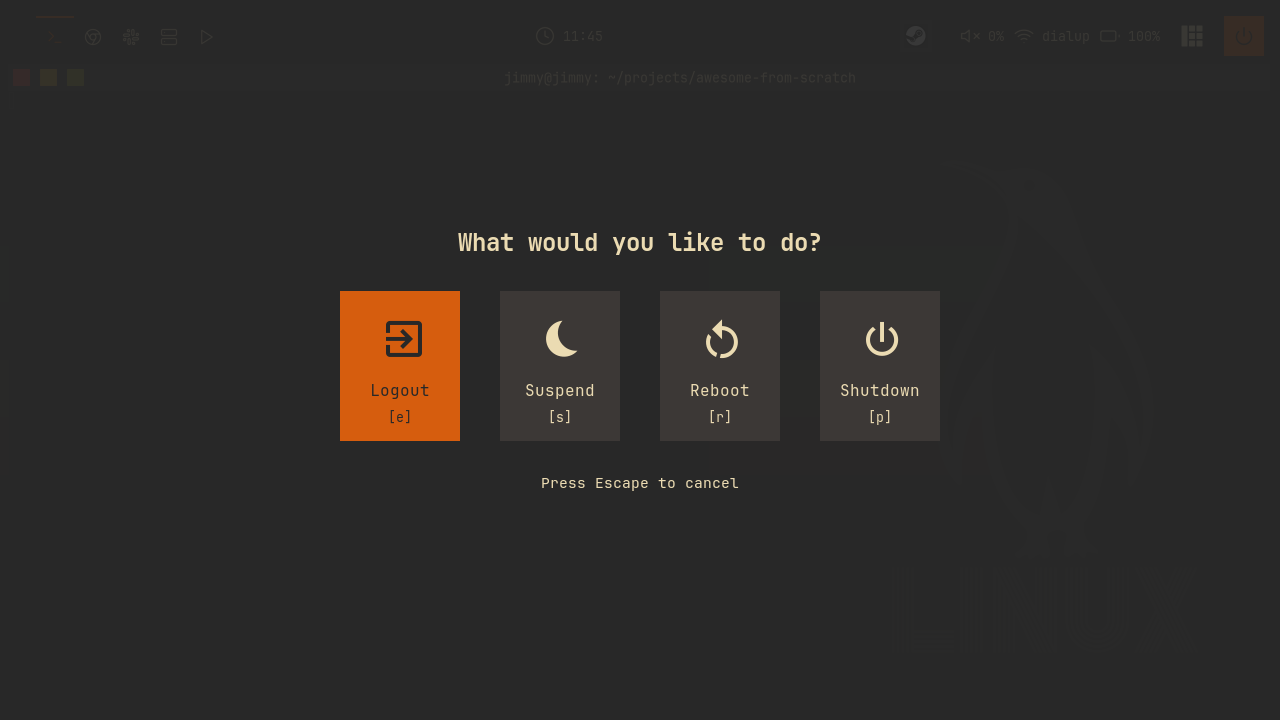
Create exitscreen/init.lua with one entry per power-menu option:
-- exitscreen/init.lua
local options = {
{
name = "Logout",
icon = "",
key = "e",
command = function()
awesome.quit()
end,
},
{
name = "Suspend",
icon = "",
key = "s",
command = function()
awful.spawn("systemctl suspend")
end,
},
Reboot and Shutdown follow the same shape with systemctl reboot and systemctl poweroff. The icons are Nerd Font glyphs, which is why JetBrainsMono Nerd Font is a hard dependency of this config.
Lock requires a lock surface; without one, the lock request leaves the screen unlocked. Chapter 12 adds the lockscreen and its menu entry.
Buttons and Selection
create_button turns an option into a widget: icon over name over [key] hint, wrapped in a background container. Selection is pure styling, driven by comparing the button's index against a module-local selected_index:
-- exitscreen/init.lua
    bg = is_selected and beautiful.primary_color or beautiful.bg_focus,
    fg = is_selected and beautiful.bg_normal or beautiful.fg_normal,
    shape = beautiful.shape,
    forced_width = config.button_size,
    forced_height = config.button_size + 30,
    widget = wibox.container.background,
exitscreen.refresh() rebuilds the widget tree when selection changes. A click runs the command; mouse::enter selects the hovered button. Guard the hover handler with if selected_index == index then return end to avoid rebuilding an already selected button.
Assembling the Layout
Use unpack to insert the button array into the layout:
-- exitscreen/init.lua
        -- Buttons. unpack() must be the LAST field in the constructor: Lua
        -- adjusts a multi-value expression to a single value anywhere else,
        -- which would silently render only the first button.
        {
          layout = wibox.layout.fixed.horizontal,
          spacing = config.spacing,
          unpack(buttons),
        },
For LuaJIT and Lua 5.2+ compatibility, define unpack at the top of the file:
-- exitscreen/init.lua
-- somewm and AwesomeWM both run on LuaJIT, which is Lua 5.1, where `unpack` is a global
-- and `table.unpack` does not exist. Write it this way round so the config also works
-- on a 5.2+ interpreter.
local unpack = unpack or table.unpack
The outer container is a wibox.container.background with bg = beautiful.bg_normal .. "E8". The popup itself is fully transparent (bg = "#00000000") and placed with awful.placement.maximize, so it covers the whole screen; the E8 alpha suffix on the inner background is what dims your desktop behind the centered buttons.
Keyboard Handling
The keypressed callback checks the labeled shortcut keys before anything else:
-- exitscreen/init.lua
  keypressed = function(_, key)
    -- The labeled shortcut keys are checked before vim navigation, so the
    -- key a button displays is the key that triggers it
    for i, option in ipairs(options) do
      if key == option.key then
        selected_index = i
        exitscreen.refresh()
        -- Small delay for visual feedback
        gears.timer.start_new(0.15, function()
          execute_selected()
          return false
        end)
        return
      end
    end

    if key == "Return" then
      execute_selected()
    elseif key == "Left" or key == "h" then
      selected_index = math.max(1, selected_index - 1)
      exitscreen.refresh()
    elseif key == "Right" or key == "l" then
      selected_index = math.min(#options, selected_index + 1)
      exitscreen.refresh()
    end
  end,
Chapter 12 adds Lock on l, which must take precedence over navigation. Returning false from the timer callback makes it run once; true would repeat the command.
Create the controller:
-- exitscreen/init.lua
-- The modal controller owns visibility, the keygrabber, Escape, and the
-- exitscreen::visible signal; this module only describes content and keys.
local controller = modal.new({
  name = "exitscreen",
build_popup creates the maximized popup. on_show resets selected_index = 1, calls awful.placement.maximize(popup) for the current screen, and rebuilds the widget. Export the controller’s show, hide, toggle, and is_visible functions on exitscreen.
Wiring It Up
Add a power button to the wibar:
-- widgets/power.lua
local power = wrappers.image_widget("/power.svg", beautiful.bg_normal)
local power_widget = wrappers.square_icon(power, beautiful.primary_color, beautiful.primary_color_hover)

-- Click for the power menu (the exit screen)
power_widget:add_button(awful.button({}, 1, function()
  exitscreen.show()
end))
Register it in widgets/init.lua and add it after a separator at the right end of the wibar. Add the keybinding:
-- keybindings.lua
  {{ modkey, "Shift"   }, "e",          function() exitscreen.toggle() end,                       "exit screen",                           "awesome"  },
Reload and press Mod+Shift+E. Arrows or h/l move the selection; Escape or a tag switch dismisses the menu. The wibar power button opens it too.
Try It
- Add a fifth option to the exit screen: Hibernate, with icon
, keyh, runningsystemctl hibernate. Check how this affectshnavigation, then choose another shortcut if needed. - Change the Escape behavior for the exit screen only: instead of closing immediately, make the first Escape reset the selection to 1 and only a second Escape close. Escape is reserved as
stop_key; extendmodal.newwith an option to change it.
Checkpoint
The finished code for this chapter is on the 07-exitscreen branch:
git checkout 07-exitscreen
somewm-client test start --config "$PWD/rc.lua" --name afs
Compare your work: git diff 06-notifications 07-exitscreen