Window Switcher
Where We Are
Build a window switcher in widgets/windowswitcher.lua, ordered by most recently used.
To catch up: git checkout 08-mainmenu.
Switching windows
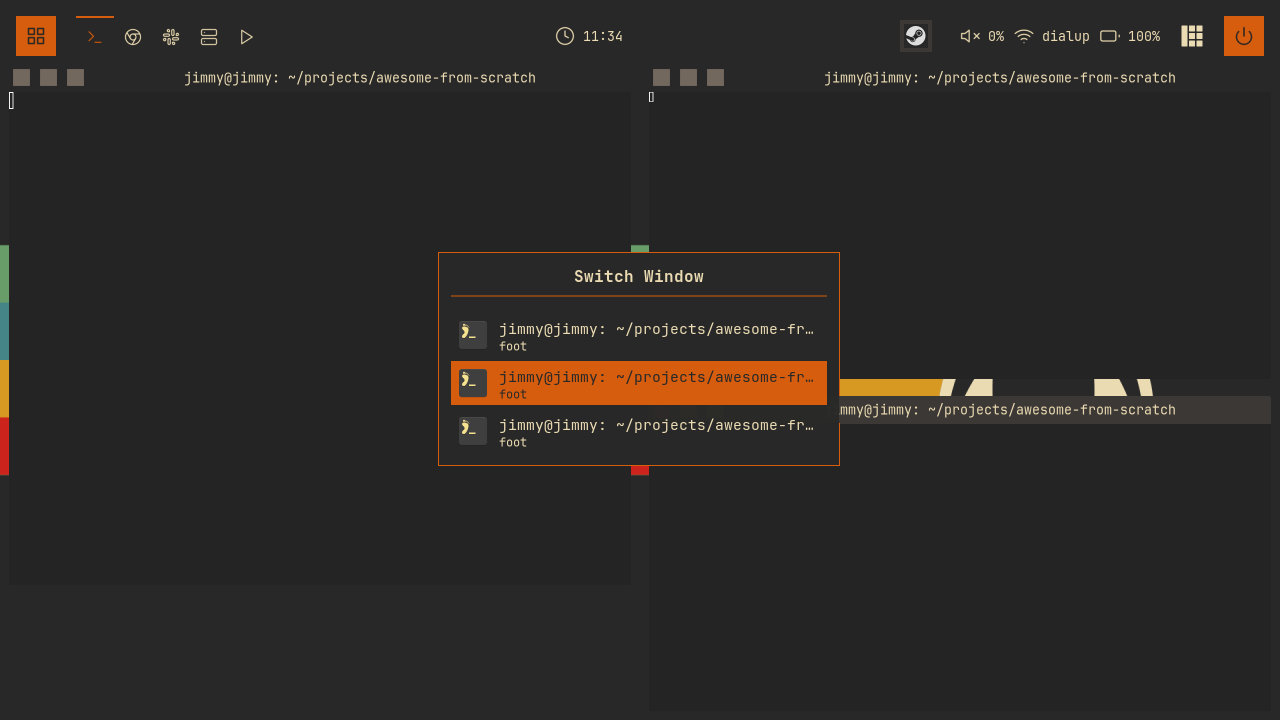
Hold Super and tap Tab to cycle through windows. Release Super to activate the selection. A quick Super+Tab returns to the previous window.
Collecting Windows in MRU Order
Read awful.client.focus.history.list for most-recent-first ordering. Append clients missing from the history:
-- widgets/windowswitcher.lua
-- Collect all clients
local function collect_clients()
  clients = {}
  local seen = {}

  -- awful keeps a most-recent-first stack of focused clients; walking it
  -- first gives real Alt-Tab ordering, with the current window at index 1.
  for _, c in ipairs(awful.client.focus.history.list) do
    if (c:isvisible() or c.minimized) and not seen[c] then
      seen[c] = true
      table.insert(clients, c)
    end
  end

  -- Clients that were never focused (e.g. spawned in the background) go last.
  for _, c in ipairs(client.get()) do
    if (c:isvisible() or c.minimized) and not seen[c] then
      seen[c] = true
      table.insert(clients, c)
    end
  end
end
The filter includes visible and minimised clients. Other hidden clients are excluded.
Why Selection Starts at Index 2
Here is show() picking the initial selection:
-- widgets/windowswitcher.lua
  collect_clients()
  if #clients == 0 then
    return
  end

  -- Start at second item (first is current window)
  selected_index = math.min(2, #clients)
Index 1 is the current window, so start at index 2 to select the previous one. math.min handles the one-window case.
Drawing the List
Centre an awful.popup and highlight the selection with beautiful.primary_color. config.max_items limits it to ten rows; create_client_list scrolls the list to keep the selection visible. Rebuild the widget on selection changes:
-- widgets/windowswitcher.lua
-- Refresh the popup display
local function refresh()
  if popup then
    popup.widget = create_popup_widget()
  end
end
Each row shows the client’s icon (c.icon), title (c.name), and application class (c.class). Use an initial when the icon is missing:
-- widgets/windowswitcher.lua
  else
    -- Fallback: colored initial
    local initial = (c.class or c.name or "?"):sub(1, 1):upper()
Draw the initial in a beautiful.primary_color square. Truncate titles longer than 40 characters with ....
Handling key releases
The switcher handles modifier-key releases. modal.lua only handles key presses, so create a separate keygrabber.
Start it at the end of show():
-- widgets/windowswitcher.lua
  -- Start keygrabber with modifier key events enabled
  keygrabber = awful.keygrabber({
    autostart = true,
    stop_key = nil,
    mask_modkeys = false, -- Receive modifier key events
    keypressed_callback = function(_, mod, key, _)
      if key == "Tab" then
stop_key = nil disables automatic stopping. mask_modkeys = false enables modifier-key events, including the Super release that activates the selection.
Inside keypressed_callback, Tab cycles forward and Shift+Tab cycles backward, wrapping at both ends:
-- widgets/windowswitcher.lua
        if shift_held then
          selected_index = selected_index - 1
          if selected_index < 1 then
            selected_index = #clients
          end
        else
          selected_index = selected_index + 1
          if selected_index > #clients then
            selected_index = 1
          end
        end
        refresh()
Read shift_held from the event’s mod table. Handle Return to activate immediately and Escape to cancel without switching.
Then the release-to-commit itself:
-- widgets/windowswitcher.lua
    keyreleased_callback = function(_, _, key, _)
      -- Activate when Super key is released
      if key == "Super_L" or key == "Super_R" then
        windowswitcher.activate()
      end
    end,
Hide the popup if the grabber stops externally:
-- widgets/windowswitcher.lua
    stop_callback = function()
      -- Keygrabber stopped externally
      if visible then
        windowswitcher.hide()
      end
    end,
hide() sets visible = false before stopping the grabber. Because stop() fires stop_callback synchronously, this guard prevents recursion.
Committing the Switch
-- widgets/windowswitcher.lua
function windowswitcher.activate()
  if not visible then
    return
  end

  local c = clients[selected_index]

  windowswitcher.hide()

  if c then
    if c.minimized then
      c.minimized = false
    end
    c:jump_to()
  end
end
c:jump_to() switches to the client’s tag, raises it, and focuses it. Focus history updates so the next Super+Tab returns to the window you just left.
Wiring the Keybinding
One line in the global keys table, using the table-driven format from chapter 02:
-- keybindings.lua
  {{ modkey }, "Tab",                   windowswitcher.show,                                      "window switcher",                       "client"   },
Register the module in widgets/init.lua. While the switcher is open, its keygrabber handles subsequent Tab presses.
Reload with Super+Ctrl+R. Open a few windows, hold Super, and tap Tab. Check that windows appear in the order you last used them, then release Super to activate the selection.
Try It
- Show the tag next to each window. Each client knows its tags via
c:tags(), andc.first_tag.namegives the primary one. Add a small dimmed textbox tocreate_client_itemso entries on other tags say where jumping will take you. - Limit the switcher to the current tag. Add a second filter to
collect_clientsthat keeps only clients on the selected tag (compare againstawful.screen.focused().selected_tag). Bonus: bind it to a different key, and keep the global version on Super+Tab.
Checkpoint
Your code should now match the 09-switcher branch.
git checkout 09-switcher
somewm-client test start --config "$PWD/rc.lua" --name afs
Compare your work: git diff 08-mainmenu 09-switcher