Notifications: Routing, History, Center
Where We Are
Build notifications.lua with routing rules, history, snooze, and a notification center. To catch up: git checkout 05-rules-titlebars.
How Naughty Works
Apps send notifications over D-Bus to org.freedesktop.Notifications. Under AwesomeWM and SomeWM, naughty receives them and creates notification objects with a title, message, app_name, urgency, and optional icon and actions.
Two hooks control what happens next:
ruled.notificationapplies rules to set properties and run callbacks.- Naughty emits
request::display. Your handler callsnaughty.layout.box({ notification = n })to show a popup.
Move the default notification rule and request::display handler from rc.lua into notifications.lua.
Report module errors
Load the module after theme initialisation, using this wrapper to report errors:
-- rc.lua
-- Catch module errors so the rest of the config can load.
-- Report to stderr as well: if notifications failed to load, there may be
-- no request::display handler to show the error.
local function try(name, fn)
  local ok, err = pcall(fn)
  if not ok then
    io.stderr:write(("[rc.lua] %s failed to load: %s\n"):format(name, tostring(err)))
    naughty.notification({
      urgency = "critical",
      title = name .. " failed to load",
      message = tostring(err),
    })
  end
  return ok
end

-- Notification system: after theme init, before anything can fire a notification.
try("notifications", function()
  require("notifications")
end)
Routing Notifications with Rules
Start notifications.lua with a module table, local M = {}. Its M.config defines the default timeout, positions, quiet modes, and sound paths. Register the rules:
-- notifications.lua
ruled.notification.connect_signal("request::rules", function()
  -- Default rule for all notifications
  ruled.notification.append_rule({
    rule = {},
    properties = {
      screen = awful.screen.preferred,
      implicit_timeout = M.config.default_timeout,
      position = M.config.positions.top_right,
    },
  })

  -- Critical notifications
  ruled.notification.append_rule({
    rule = { urgency = "critical" },
    properties = {
      bg = beautiful.bg_urgent,
      fg = beautiful.fg_urgent,
      timeout = 0, -- Never timeout
      border_color = "#ff0000",
      position = M.config.positions.top_middle,
    },
    callback = function(n)
      play_sound("critical")
    end,
  })
The empty rule matches every notification; later rules override its properties. A low urgency rule follows with dimmer colours, a three-second timeout, and slight transparency.
The browser rule checks for VIP contacts:
-- notifications.lua
  -- VIP contacts. A notification whose title or message mentions one of these names
  -- gets the style below, is bumped to critical, and never times out. Matching is
  -- plain text and case-insensitive, so punctuation in a name is safe.
  --
  -- Empty by default. Put the handful of people you must not miss in here.
  vip_contacts = {},
-- notifications.lua
-- Does this notification mention one of the VIP contacts?
--
-- Note the `1, true` on find: that is a plain-text search. Without it, a name
-- containing a `-` or `.` would be read as a Lua pattern and match the wrong things.
local function is_vip(notification)
  local haystack = ((notification.title or "") .. " " .. (notification.message or "")):lower()

  for _, name in ipairs(M.config.vip_contacts) do
    if haystack:find(name:lower(), 1, true) then
      return true
    end
  end
  return false
end
The browser rule uses it in its callback:
-- notifications.lua
  ruled.notification.append_rule({
    rule_any = {
      app_name = { "Firefox", "Chrome", "Chromium", "Brave", "firefox", "chrome", "chromium", "brave" },
    },
    properties = {
      position = M.config.positions.bottom_right,
    },
    callback = function(n)
      if is_vip(n) then
        n.bg = M.config.vip_style.bg
        n.fg = M.config.vip_style.fg
        n.urgency = "critical"
        n.timeout = 0 -- Don't auto-dismiss

        n:append_actions(naughty.action({ name = "Reply" }))
        n:append_actions(naughty.action({ name = "Snooze" }))
      else
        -- Standard browser notification actions
        n:append_actions(naughty.action({ name = "Open" }))
        n:append_actions(naughty.action({ name = "Snooze" }))
      end
    end,
  })
naughty.action({ name = ... }) adds a button. A shared handler defines what clicking it does.
History, Unread Counts, and Quiet Modes
M.history stores up to M.max_history = 50 notifications. M.unread_count tracks unread entries:
-- notifications.lua
local function add_to_history(notification)
  local history_item = {
    title = notification.title,
    message = notification.message,
    app_name = notification.app_name,
    timestamp = os.time(),
    urgency = notification.urgency,
    icon = notification.icon,
    id = notification.id or tostring(os.time() .. math.random()),
    is_read = false,
  }

  table.insert(M.history, 1, history_item)
  M.unread_count = M.unread_count + 1

  -- Store reference to active notification
  if notification.resident then
    M.active_notifications[history_item.id] = notification
  end

  -- Trim history if too long
  while #M.history > M.max_history do
    local removed = table.remove(M.history)
    if not removed.is_read then
      M.unread_count = math.max(0, M.unread_count - 1)
    end
    if M.active_notifications[removed.id] then
      M.active_notifications[removed.id] = nil
    end
  end
end
When the count changes, emit awesome.emit_signal("notification::unread_count", M.unread_count). The clock widget will subscribe to this signal.
Check the quiet modes before displaying a notification:
-- notifications.lua
local function should_display(n)
  if M.config.dnd_mode and n.urgency ~= "critical" then
    return false
  end

  if M.config.focus_mode then
    local c = client.focus
    if c and c.fullscreen and n.urgency ~= "critical" then
      return false
    end
  end

  return true
end
Critical notifications bypass both quiet modes. Export M.toggle_dnd_mode and M.toggle_focus_mode for keybindings. set_dnd_mode emits notifications::dnd_changed so widgets can update.
Drawing the Notification Itself
Connect the display handler:
-- notifications.lua
naughty.connect_signal("request::display", function(n)
  -- Set resident for important notifications
  if n.urgency == "critical" or n.app_name == "System" then
    n.resident = true
  end

  -- Always record, even when DND swallows the popup
  add_to_history(n)
  awesome.emit_signal("notification::unread_count", M.unread_count)

  if not should_display(n) then
    return
  end

  play_sound(n.urgency or "normal")

  n.widget_template = build_widget_template(n)
  naughty.layout.box({ notification = n })
end)
resident = true keeps a notification open after an action is invoked.
build_widget_template(n) arranges the icon, title, message, and action row. It uses the notification’s colours, shape, and border, with theme fallbacks. Naughty fills the naughty.widget.* placeholders with notification content.
The action row comes from a second builder:
-- notifications.lua (inside build_actions_widget)
      notification = n,
      base_layout = wibox.widget({
        spacing = 8,
        layout = wibox.layout.flex.horizontal,
      }),
      widget_template = {
        {
          {
            id = "text_role",
            halign = "center",
            valign = "center",
            widget = wibox.widget.textbox,
          },
          margins = { left = 12, right = 12, top = 6, bottom = 6 },
          widget = wibox.container.margin,
        },
        bg = beautiful.notification_action_bg_normal,
        fg = beautiful.notification_action_fg_normal,
        shape = gears.shape.rectangle,
        shape_border_width = beautiful.notification_action_border_width or 1,
        shape_border_color = beautiful.notification_action_border_color,
        widget = wibox.container.background,
      },
      widget = naughty.list.actions,
naughty.list.actions builds each button from widget_template, inserting its name into text_role. Return nil from build_actions_widget when there are no actions to avoid an empty row.
Actions: One Handler for Every Button
Clicking an action emits invoked with the notification and the action:
-- notifications.lua
naughty.connect_signal("invoked", function(n, a)
  if a.name == "Open" or a.name == "Reply" then
    -- Find notification's app and activate it
    for _, c in ipairs(client.get()) do
      if c.class and n.app_name and c.class:lower():match(n.app_name:lower()) then
        c:activate({ context = "notification_action", raise = true })
        break
      end
    end
  elseif a.name == "Snooze" then
    show_snooze_picker({
      title = n.title,
      message = n.message,
      app_name = n.app_name,
      urgency = n.urgency,
      icon = n.icon,
    })
  elseif a.name == "Dismiss" or a.name == "Mark Read" or a.name == "Read" or a.name == "Archive" then
    -- Every acknowledge-style action does the same local thing: the history
    -- entry is read. What "Archive" means is up to the sending app.
    mark_read_in_history(n)
  elseif a.name == "Open Folder" then
    -- Open the Downloads folder with whatever the system prefers
    awful.spawn("xdg-open " .. os.getenv("HOME") .. "/Downloads")
  end
end)
mark_read_in_history matches by id, falling back to title and message. It marks the entry read, decrements the counter, and emits the unread signal.
Snooze
Define the available snooze durations:
-- notifications.lua
M.snooze_durations = {
  { label = "5 minutes", seconds = 5 * 60 },
  { label = "15 minutes", seconds = 15 * 60 },
  { label = "1 hour", seconds = 60 * 60 },
  { label = "3 hours", seconds = 3 * 60 * 60 },
}
Use a single-shot timer to create the notification again:
-- notifications.lua (inside snooze_notification)
  local timer = gears.timer({
    timeout = duration_seconds,
    single_shot = true,
    callback = function()
      -- Re-create the notification
      naughty.notification({
        title = notif_data.title,
        message = notif_data.message .. "\n\n<i>(Snoozed " .. duration_label .. " ago)</i>",
        app_name = notif_data.app_name,
        urgency = notif_data.urgency or "normal",
        icon = notif_data.icon,
      })

      -- Remove from snoozed list
      M.snoozed_notifications[snooze_id] = nil
    end,
  })
The new notification goes through the rules and display handler again. Store the timer in M.snoozed_notifications to prevent garbage collection before it fires.
awful.popup sizes itself to its widget. build_picker_widget creates duration buttons; show_snooze_picker places the popup near the cursor and clamps it to the screen edges. Add a dismissal handler:
-- notifications.lua (inside show_snooze_picker)
  -- Wait until the opening click finishes before connecting the handler.
  -- Disconnect it after dismissal.
  gears.timer.start_new(0.1, function()
    local close_handler
    close_handler = function()
      M.hide_snooze_picker()
      client.disconnect_signal("button::press", close_handler)
    end
    client.connect_signal("button::press", close_handler)
    return false
  end)
end
The notification center uses a popup_visible flag and two dismissal handlers:
-- notifications.lua
-- Close when a client is clicked
client.connect_signal("button::press", function()
  if popup_visible then
    M.hide_notification_center()
  end
end)

tag.connect_signal("property::selected", function()
  if popup_visible then
    M.hide_notification_center()
  end
end)
The next chapter extracts these handlers into a shared modal controller.
The Notification Center
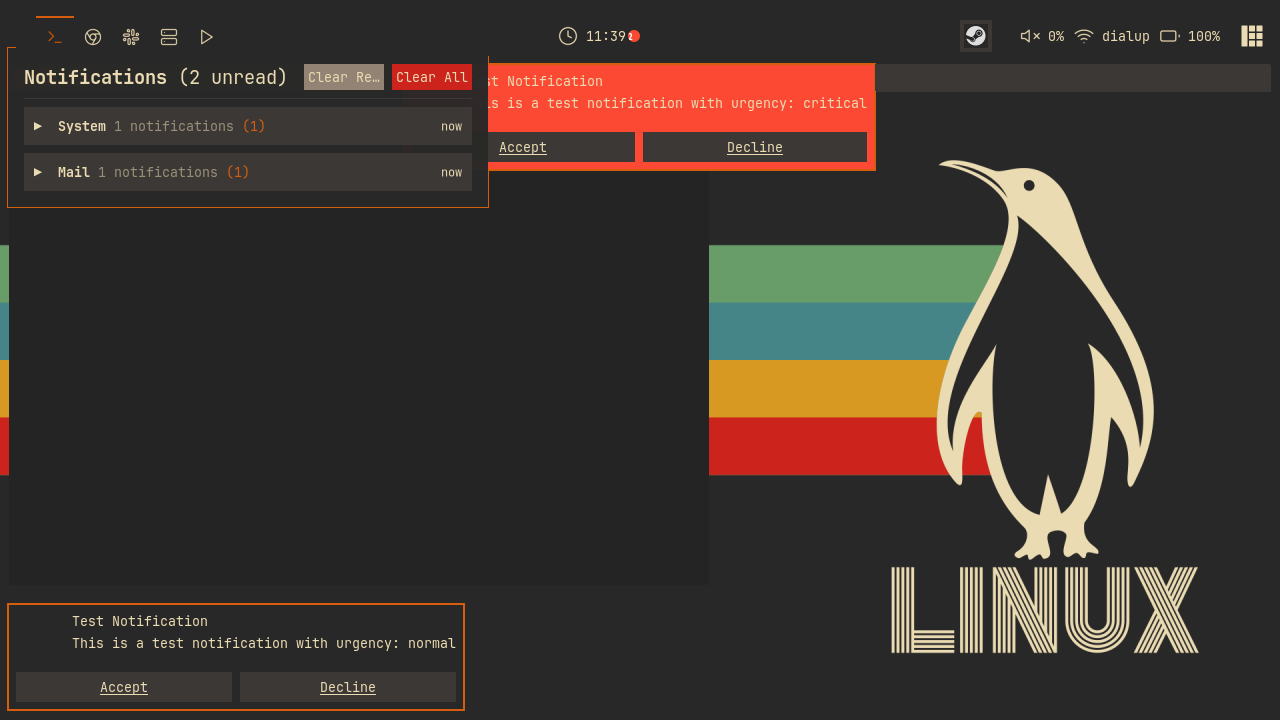
Press Mod+Shift+N or click the clock to open the history, grouped by app:
-- notifications.lua (inside group_notifications_by_app)
  for _, notif in ipairs(M.history) do
    local app = notif.app_name or "Unknown"
    if not groups[app] then
      groups[app] = {
        app_name = app,
        notifications = {},
        unread_count = 0,
        latest_timestamp = notif.timestamp,
      }
      table.insert(group_order, app)
    end
    table.insert(groups[app].notifications, notif)
    if not notif.is_read then
      groups[app].unread_count = groups[app].unread_count + 1
    end
group_order sorts apps by their latest notification. Groups start collapsed; clicking a header toggles its entry in expanded_groups and rebuilds the popup.
Click a notification to mark it read, or its clock button to snooze it. Clear Read removes read entries and their active references; Clear All resets history, the unread count, and active references. max_visible limits the popup to 15 rows.
In widgets/clock.lua, add an unread badge and a click handler:
-- widgets/clock.lua
clock_widget:add_button(awful.button({}, 1, function()
  notifications.toggle_notification_center()
end))
-- widgets/clock.lua
-- Update badge when unread count changes
awesome.connect_signal("notification::unread_count", function(count)
  set_clock()
end)
Inside set_clock, the badge shows math.min(notifications.unread_count, 99) and hides itself when the count is zero. Add a keybinding in keybindings.lua:
-- keybindings.lua
  {{ modkey, "Shift" }, "n",            function() notifications.toggle_notification_center() end, "toggle notifications",                  "awesome"  },
Reload the config, then generate some traffic from the Lua prompt (Mod+x):
require("notifications").generate_sample_notifications()
Check the five samples: the battery warning should stay top middle, Discord appear top right, and Firefox bottom right. The clock should show an unread badge. Press Mod+Shift+N to see the grouped history.
Try It
- Add a "Tomorrow morning" entry to
M.snooze_durationsthat fires at a fixed clock time rather than a fixed number of seconds. You will need to compute the seconds until 9am fromos.time()andos.date("*t")when the button is clicked. - Give your terminal's notifications a home: add a rule matching
app_name = { "ghostty" }that positions them bottom middle with a short timeout, then test it withnotify-send -a ghostty "build done".
Checkpoint
Your code should now match the 06-notifications branch.
git checkout 06-notifications
somewm-client test start --config "$PWD/rc.lua" --name afs
Compare your work: git diff 05-rules-titlebars 06-notifications