Main Menu
Where We Are
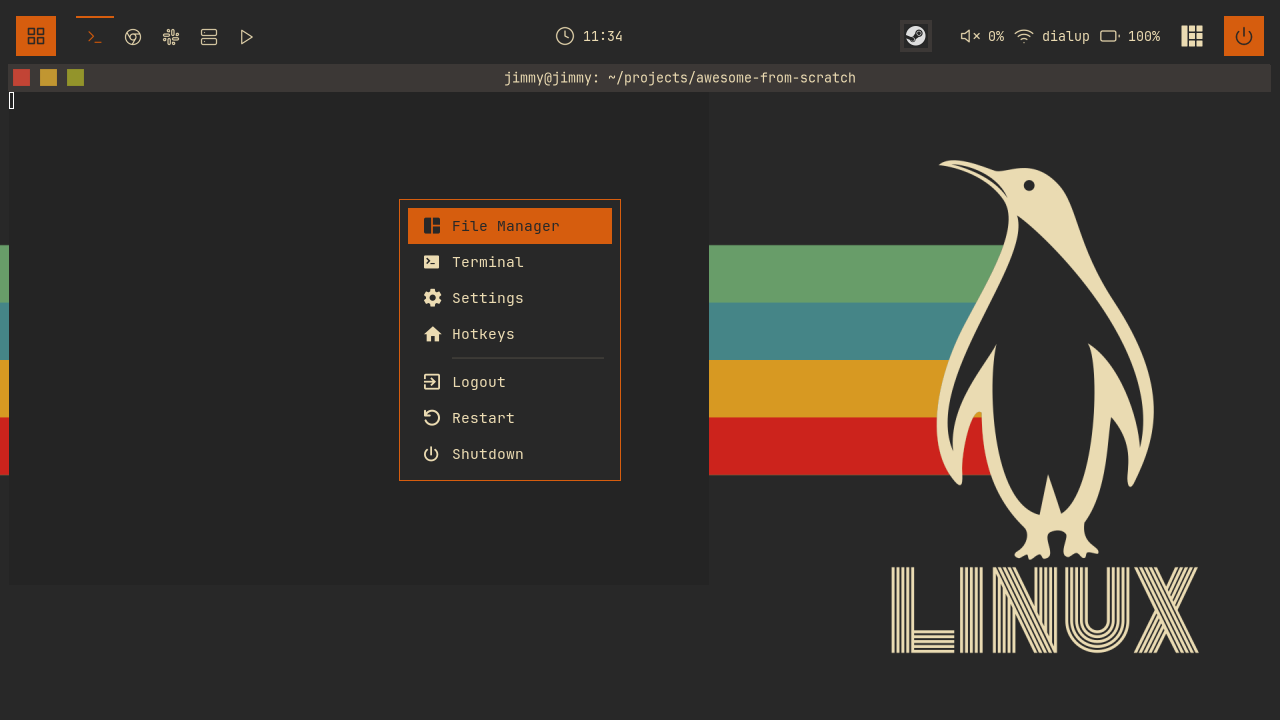
Replace the stock right-click menu with widgets/mainmenu.lua, using the modal controller for visibility and dismissal.
To catch up: git checkout 07-exitscreen
Retiring awful.menu
Delete the myawesomemenu, mymainmenu, and mylauncher definitions from rc.lua. Keep the wibar import and add the new menu module:
-- rc.lua
local wibar = require("wibar")
local mymainmenu = require("widgets.mainmenu")
The Menu as Data
Define the application commands at the top of widgets/mainmenu.lua:
-- widgets/mainmenu.lua
-- Application commands
local apps = {
  file_manager = "thunar",
  terminal = "ghostty",
  settings = "gnome-control-center",
}
Second, the menu itself:
-- widgets/mainmenu.lua
-- Menu items definition
-- type: "item" | "separator"
local menu_items = {
{ type = "item", icon = "", label = "File Manager", command = apps.file_manager },
{ type = "item", icon = "", label = "Terminal", command = apps.terminal },
{ type = "item", icon = "", label = "Settings", command = apps.settings },
{ type = "item", icon = "", label = "Hotkeys", action = "hotkeys" },
{ type = "separator" },
{ type = "item", icon = "", label = "Logout", action = "logout" },
{ type = "item", icon = "", label = "Restart", action = "restart" },
{ type = "item", icon = "", label = "Shutdown", command = "systemctl poweroff" },
}
The icons are Nerd Font glyphs rendered in JetBrainsMono Nerd Font. They use fg for their colour.
command is passed to awful.spawn; action selects an internal operation:
-- widgets/mainmenu.lua
local function execute_item(item)
  mainmenu.hide()

  if item.command then
    awful.spawn(item.command)
  elseif item.action == "hotkeys" then
    hotkeys_popup.show_help(nil, awful.screen.focused())
  elseif item.action == "logout" then
    awesome.quit()
  elseif item.action == "restart" then
    awesome.restart()
  end
end
Hide the menu before running an item so it closes before another popup opens.
Lock and Apps entries are added with the lockscreen and launcher.
Skipping Separators Once
Build a list of selectable items at load time so keyboard navigation skips separators:
-- widgets/mainmenu.lua
-- Store an index on each selectable item for comparison with selected_index.
local selectable_items = {}
for _, item in ipairs(menu_items) do
  if item.type == "item" then
    table.insert(selectable_items, item)
    item.selectable_index = #selectable_items
  end
end
Building the Widgets
create_menu_item builds an icon, label, and background. Select the row by comparing its index:
-- widgets/mainmenu.lua
local function create_menu_item(item)
  local is_selected = item.selectable_index == selected_index
and further down, the container that uses it:
-- widgets/mainmenu.lua
    bg = is_selected and beautiful.primary_color or "transparent",
    fg = is_selected and beautiful.bg_normal or beautiful.fg_normal,
    shape = beautiful.shape_small,
    forced_height = config.item_height,
    widget = wibox.container.background,
Add a left-click handler that calls execute_item, and select the row on hover:
-- widgets/mainmenu.lua
  item_widget:connect_signal("mouse::enter", function()
    if item.selectable_index == selected_index then
      return
    end
    selected_index = item.selectable_index
    mainmenu.refresh()
  end)
create_separator draws a one-pixel line, indented to align with the labels. create_menu_widget builds the rows and separators from menu_items, sums their heights, and adds the rounded background.
Wiring the Modal
Store the mouse position when the menu opens. Use place to position the popup there and keep it inside the workarea:
-- widgets/mainmenu.lua
-- Where the menu opens: the mouse position at show time. One placement
-- function, installed on the popup (so awful.popup re-applies it whenever
-- the popup is resized, covering the not-yet-measured first show) and called
-- from on_show (so a new anchor takes effect even when the size is unchanged).
local anchor = { x = 0, y = 0 }

local function place(d)
  d.x = anchor.x
  d.y = anchor.y
  awful.placement.no_offscreen(d, { honor_workarea = true, margins = 10 })
end
-- widgets/mainmenu.lua
local controller = modal.new({
  name = "mainmenu",
  build_popup = function()
    return awful.popup({
      widget = create_menu_widget(),
      screen = awful.screen.focused(),
      ontop = true,
      visible = false,
      bg = "#00000000",
      shape = beautiful.shape,
      border_width = beautiful.border_width or 1,
      border_color = beautiful.primary_color,
      placement = place,
    })
  end,
  on_show = function(popup)
    selected_index = 1
    anchor = mouse.coords()
    popup.widget = create_menu_widget()
    place(popup)
  end,
keypressed handles navigation with wrap-around, and both arrow keys and vim keys work:
-- widgets/mainmenu.lua
  keypressed = function(_, key)
    if key == "Return" then
      local item = selectable_items[selected_index]
      if item then
        execute_item(item)
      end
    elseif key == "Up" or key == "k" then
      selected_index = selected_index - 1
      if selected_index < 1 then
        selected_index = #selectable_items
      end
      mainmenu.refresh()
    elseif key == "Down" or key == "j" then
      selected_index = selected_index + 1
      if selected_index > #selectable_items then
        selected_index = 1
      end
      mainmenu.refresh()
    end
  end,
})
Export the controller’s show, hide, and toggle functions on mainmenu. Escape is handled by the controller.
The Bar Button
Create widgets/menubutton.lua to open the menu from the wibar:
-- widgets/menubutton.lua
local awful = require("awful")
local beautiful = require("beautiful")
local wrappers = require("widgets.wrappers")
local mainmenu = require("widgets.mainmenu")

local menubutton = wrappers.image_widget("/grid.svg", beautiful.bg_normal)
local menubutton_widget = wrappers.square_icon(menubutton, beautiful.primary_color, beautiful.primary_color_hover)
menubutton_widget:add_button(awful.button({}, 1, function()
  mainmenu.toggle()
end))

return menubutton_widget
Export both new modules from widgets/init.lua. Add the button before the taglist in wibar.lua.
Hooking It Up
Update the desktop right-click handler in rc.lua to call mymainmenu.toggle() with a dot:
-- rc.lua
awful.mouse.append_global_mousebindings({
  awful.button({}, 3, function()
    mymainmenu.toggle()
  end),
This binding applies to the desktop background. Add Super+W in keybindings.lua:
-- keybindings.lua
  {{ modkey }, "w",                     function () mainmenu.toggle() end,                        "show main menu",                        "awesome"  },
Restart with Super+Ctrl+R and try all three. Right-click the desktop near a screen edge to watch the clamping work, then drive the menu entirely with j/k and Return.
Try It
- Add a Screenshot item to
menu_itemsthat runs your screenshot tool (grim,flameshot gui, whatever you use). Decide whether it belongs inappstoo, and where in the list it should sit. - Group the menu with a second separator: put the three application items in one block, Hotkeys in its own block, and the power items in a third. Notice that you touch only
menu_items, and keyboard navigation keeps working without any other change.
Checkpoint
The finished code is on the 08-mainmenu branch:
git checkout 08-mainmenu
somewm-client test start --config "$PWD/rc.lua" --name afs
Compare your work: git diff 07-exitscreen 08-mainmenu