Anatomy of rc.lua
The default rc.lua (called kilnrc.lua in the source tree) is a complete
desktop in about 1300 lines of Lua, written against the public API only: one
require, no compositor internals. Its own header states the contract:
-- kilnrc.lua - the default desktop: a complete session against kiln's public
-- API only. One require, zero compositor primitives; a behavior in here that
-- needs anything else is a defect in the API, not in this file.
This page walks the file top to bottom, in its own order, section by section.
Open your copy alongside (see First Launch
for where it lives). Every screenshot on this page is a real headless kiln
running this exact config, rendered by npm run generate:figures in the docs
repo.
The require line and the globals
local kiln = require("kiln")
local ui, key, rule, button = kiln.ui, kiln.key, kiln.rule, kiln.button
local widgets = kiln.widgets
local th = kiln.theme

-- The modkey is the config's to set, read live at each key/button bind.
kiln.modkey = "super"
require("kiln") is the whole import. It returns the kiln module: functions
(kiln.spawn, kiln.quit, kiln.dirty), submodules (kiln.ui,
kiln.layout, kiln.placement, kiln.widgets), the theme table, and the
binding constructors key, button, rule. The locals are just shorthand.
kiln.modkey is what the string "mod" resolves to in every key and button
spec below. The stdlib default is alt; the shipped config picks super.
Beyond the module, a config sees seven globals: client, screen, tag,
layer, drag, notification (the object classes and buses), and core
(the raw C boundary, which a normal config never needs). See
The object model.
Errors first
The very first wiring is the error bus, so everything after it fails loudly:
kiln.on("error", function(_, err)
  kiln.notify {
    urgency = "critical",
    title = "Oops, an error happened!",
    message = tostring(err),
  }
end)
Every config callback runs pcall-isolated; when one throws, the error surfaces
on kiln.on("error") instead of vanishing into the log. With this handler it
becomes a critical notification, which is sticky by default:

Theme and its persistence
The theme section defines three inline palettes, each mapping the same nine keys:
local palettes = {
  gruvbox = {
    bg = "#282828", bg2 = "#1d2021", fg = "#ebdbb2", accent = "#83a598",
    muted = "#665c54", titlebar = "#3c3836", titlebar_focus = "#504945",
    close = "#cc241d", urgent = "#d79921",
  },
  catppuccin = { ... },
  nord = { ... },
}
The chosen name persists in one file, read back at the top of every run:
local theme_name = "catppuccin"
do
  local f = io.open(theme_file, "r")
  if f ~= nil then
    local name = f:read("*l")
    if name ~= nil and name ~= "" and palettes[name] ~= nil then
      theme_name = name
    end
    f:close()
  end
end
for k, v in pairs(palettes[theme_name]) do
  th[k] = v
end
Switching is a write plus a reload. The write is synchronous on purpose: the reload re-runs this whole file, and the re-run has to see the new name.
local function switch_theme(name)
  os.execute("mkdir -p '" .. theme_dir .. "'")
  local f = io.open(theme_file, "w")
  if f ~= nil then
    f:write(name .. "\n")
    f:close()
  end
  kiln.reload()
end
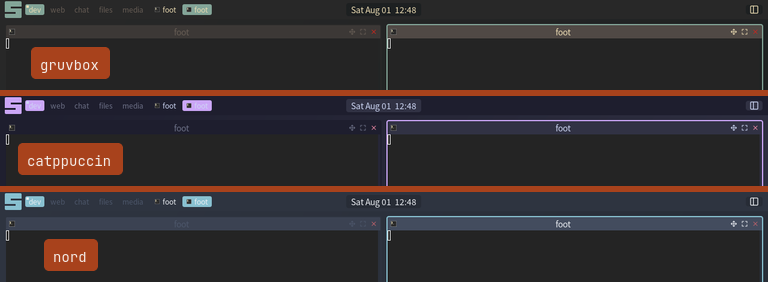
There is no theme framework behind this: th is a plain table the stdlib
reads, and a palette is nine writes into it. See
Theming and the
theme variable reference.
Assets: the config makes its own images
The desktop's look is made of images: line-art glyphs for the layoutbox, the
titlebar buttons, the menu rows and the submenu chevron, plus a gradient
wallpaper with the logo centered on it. kiln has no way to make an image,
only to declare one, so this config makes its own: build an SVG as a string,
render it once with rsvg-convert through kiln.asset, declare the cached
PNG through the image = { path } leaf that already exists.
The glyph set
Every glyph body speaks one line-art language: a 24x24 box, 2px stroke, round caps and joins. A shape added to the table inherits the set's look.
local glyph_body = {
  close = '<path d="M6 6 18 18"/><path d="M18 6 6 18"/>',
  chevron = '<path d="m10 6 6 6-6 6"/>',
  terminal = '<path d="m4 17 6-6-6-6"/><path d="M12 19h8"/>',
  lock = '<rect x="3" y="11" width="18" height="11" rx="2"/>' ..
    '<path d="M7 11V7a5 5 0 0 1 10 0v4"/>',
  -- ...fourteen more shapes: one per layout family, one per menu row,
  -- and the three titlebar buttons.
}

local function glyph_svg(name, color)
  return string.format(
    '<svg xmlns="http://www.w3.org/2000/svg" width="24" height="24" ' ..
    'viewBox="0 0 24 24" fill="none" stroke="%s" stroke-width="2" ' ..
    'stroke-linecap="round" stroke-linejoin="round">%s</svg>',
    color, glyph_body[name])
end
The rendering is batched: the config lists every name-and-color pair it will
need (the color is part of the file, so the titlebar's two ink states are two
entries), requests them all, and flushes once. rsvg-convert runs in one
fork; nothing after this point forks.
local G = {}
for _, u in ipairs(glyph_use) do
  local svg = glyph_svg(u[1], u[2])
  u[3] = asset.request(u[1], GLYPH_PX, GLYPH_PX, svg)
end
asset.flush()
for _, u in ipairs(glyph_use) do
  G[u[1]] = G[u[1]] or {}
  G[u[1]][u[2]] = asset.path(u[3]) or false
end

-- glyph(name, colour) -> a readable PNG path, or nil. nil is not an error: it
-- is the answer every call site is written to take.
local function glyph(name, color)
  local by = G[name]
  return (by ~= nil and by[color]) or nil
end
Every glyph rasterizes at 64px and downscales into its cell, which stays sharp
at 1x and 2x both. And every call site takes nil for an answer: on a system
without rsvg-convert the desktop degrades to text and colored blocks instead
of erroring.
The wallpaper
The wallpaper uses the same trick at screen size: the theme gradient corner to corner, the kiln mark centered on it, generated at the screen's physical pixel count so the ramp is free of banding and the mark stays true under any scale.
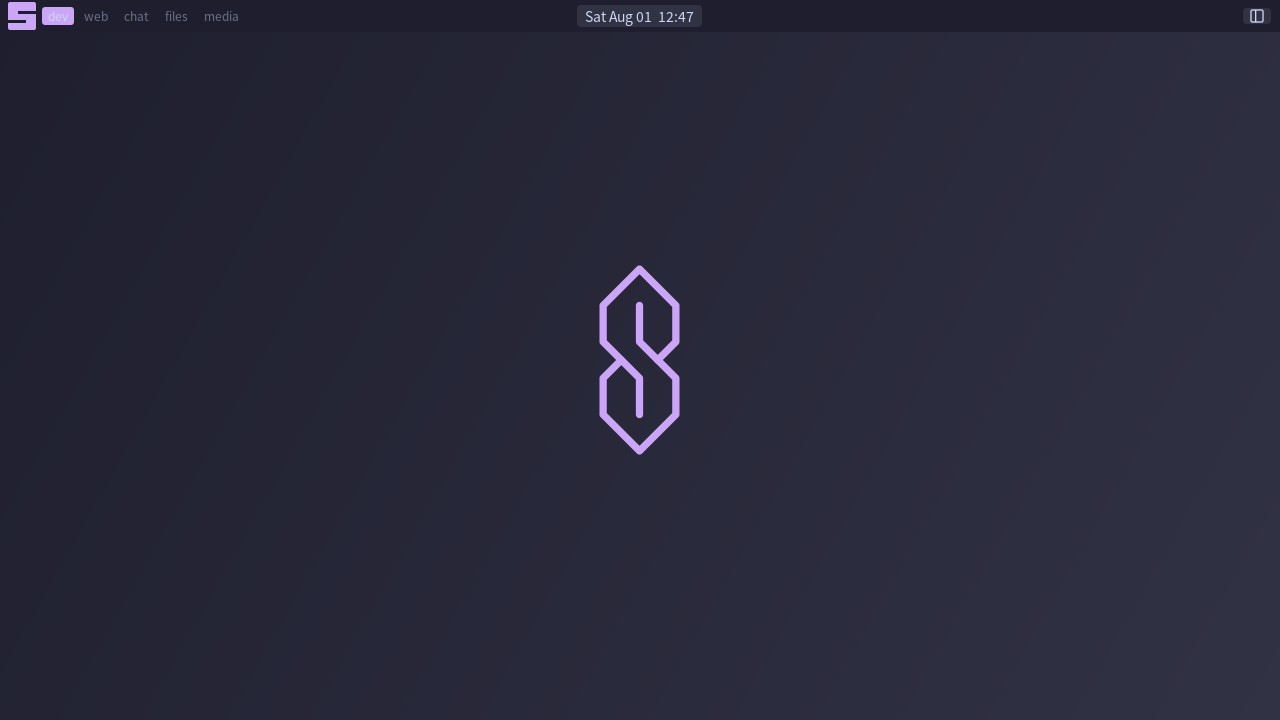
The interesting part of wallpaper(s) is what it keys its cache on:
local dims = w .. "x" .. h
local hit = wallpapers[dims .. "@" .. scale]
if hit ~= nil then
  return hit or nil
end
The scale has to be in the key even though the pixel count already is: a pure
scale change on a fixed mode leaves the physical size alone (logical shrinks
by exactly what the scale grew), so a size-only key would serve the old
picture, whose mark was sized for the old scale. The rest of the function
builds one SVG string (gradient, then a nested <svg> carrying the logo's own
viewBox, so every number written into the document is an integer) and hands it
to asset.svg, memoized per size and scale.
The wallpaper guide rebuilds the pattern in isolation.
Defaults and one history list
local terminal = os.getenv("TERMINAL") or "foot"
local editor = os.getenv("EDITOR") or "nano"
local editor_cmd = terminal .. " -e " .. editor
local conffile = (debug.getinfo(1, "S").source:match("^@(.+)$")) or "kilnrc.lua"

local eval_history = {}
conffile is the config file's own path, read off the running chunk; it feeds
the "edit config" menu item. eval_history keeps the Lua prompt's history out
of the shared run-command history.
Helpers the bindings and widgets share
Nine plain functions, all public-API arithmetic. The two load-bearing ones:
-- View the tag `delta` steps from the current selection, wrapping. Shared by
-- the arrow keys, the taglist scroll, and the backdrop wheel.
local function view_relative(s, delta)
  local sel = s.selected_tag
  if sel == nil or #s.tags == 0 then
    return
  end
  for i, t in ipairs(s.tags) do
    if t == sel then
      s.tags[(i - 1 + delta) % #s.tags + 1]:view()
      return
    end
  end
end

-- The screen's visible client stack, deduped, in declare order (the union a
-- layout draws: selected tags then sticky). The basis for focus and swap by
-- index.
local function visible_union(s)
  local out, seen = {}, {}
  for _, t in ipairs(s.tags) do
    if t.selected then
      for _, c in ipairs(t.clients) do
        if not seen[c] and c.mapped and not c.minimized
            and not c.override_redirect then
          seen[c] = true
          out[#out + 1] = c
        end
      end
    end
  end
  for _, t in ipairs(s.tags) do
    for _, c in ipairs(t.clients) do
      if c.sticky and not seen[c] and c.mapped and not c.minimized then
        seen[c] = true
        out[#out + 1] = c
      end
    end
  end
  return out
end
On top of visible_union sit focus_byidx and swap_byidx (walk the stack
by index, wrapping), and focus_screen_relative (jump to the next monitor's
most recent client). Beside them: layout_prev (because kiln.layout.next
has no prev twin), restore_minimized (unminimize the most recently minimized
client on a selected tag), jump_urgent (view the urgent client's tag and
focus it), and path_bins (the $PATH executable list for the run prompt's
completion, memoized, shelled to ls because Lua has no readdir).
The layout cycle
kiln.layout.list = {
  kiln.layout.tile,
  kiln.layout.tile.left,
  kiln.layout.tile.bottom,
  kiln.layout.tile.top,
  kiln.layout.carousel,
  kiln.layout.fair,
  kiln.layout.fair.horizontal,
  kiln.layout.max,
  kiln.layout.corner.nw,
  kiln.layout.floating,
  kiln.layout.spiral,
  kiln.layout.dwindle,
  kiln.layout.magnifier,
}
This is the cycle mod+space walks. No fullscreen layout is in it by
construction: fullscreen is a client property (c:toggle_fullscreen()), not a
tiling arrangement. See the layout reference.
The menu
Menu items are { label, action } pairs. A table as the second element nests
a submenu, and icon = <path> renders a leading image cell, which is where
the generated glyphs start paying rent:
local function menu_items(s)
  return {
    { "hotkeys", icon = glyph("keys", th.fg), function()
      kiln.hotkeys.show(s)
    end },
    { "terminal", icon = glyph("terminal", th.fg),
      function() kiln.spawn(terminal) end },
    { "theme", icon = glyph("palette", th.fg), {
      { "gruvbox", function() switch_theme("gruvbox") end },
      { "catppuccin", function() switch_theme("catppuccin") end },
      { "nord", function() switch_theme("nord") end },
    } },
    { "edit config", icon = glyph("edit", th.fg), function()
      kiln.spawn(editor_cmd .. " " .. conffile)
    end },
    { "restart", icon = glyph("restart", th.fg), kiln.reload },
    { "lock", icon = glyph("lock", th.fg), kiln.lock },
    { "quit", icon = glyph("power", th.fg), kiln.quit },
  }
end

th.menu_submenu_icon = glyph("chevron", th.muted)

local function main_menu(s)
  return {
    { "kiln", icon = glyph("palette", th.fg), menu_items(s) },
    { "open terminal", icon = glyph("terminal", th.fg),
      function() kiln.spawn(terminal) end },
  }
end
The chevron line is the whole wiring for submenu markers: the stdlib menu
renders th.menu_submenu_icon as an image when it is set and keeps its text
> when it is not. The main menu opens from three places: the launcher glyph
in the bar, mod+w, and a right-click on the desktop.
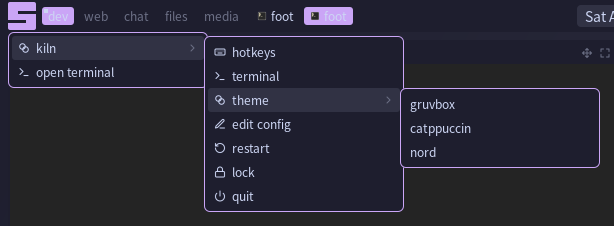
See Menus.
The app launcher: one replaced filter
mod+p opens kiln.launcher: every installed .desktop application behind a
type-to-filter entry. The launcher itself is stdlib; what stays in the config
is the one thing about it that is this desktop's choice rather than the
stdlib's, the ranking:
local default_rank = kiln.launcher.default_filter
kiln.launcher.filter = function(text)
  local out, term = {}, {}
  for _, a in ipairs(default_rank(text)) do
    -- A plain prefix compare, not a pattern: `terminal` comes from $TERMINAL
    -- and a dash in it is a Lua pattern metacharacter.
    if a.exec:sub(1, #terminal) == terminal then
      term[#term + 1] = a
    else
      out[#out + 1] = a
    end
  end
  for _, a in ipairs(term) do
    out[#out + 1] = a
  end
  return out
end
launcher.filter is the whole extension point: this override keeps the
stdlib's ranking and moves terminal apps to the end of it, because a launcher
opened by keyboard is usually not reaching for one. The
app launcher guide builds the idea up from parts.
The bar widgets
The bar's widgets are hand-rolled wrappers over
kiln.widgets. The stock
widgets.taglist/widgets.tasklist/widgets.layoutbox wire only the one
gesture they can name; these wrappers pass an
on = { press = ..., scroll = ... } table that forks on the press button and
modifiers. A handler that returns a truthy value preempts the stock behavior;
falling off the end declines to it.
The launcher glyph
The blocky "s" in the bar's corner is not an image. It is a Clay-composed square in the accent color with two thin cuts floated over it in the bar color, at one third and two thirds of its height:
local function launcher_glyph(s)
  local size = th.bar_height - 4
  local cut = math.max(1, math.floor(size / 9))
  ui.box({
    id = "launcher",
    w = size, h = size, color = th.accent, radius = 2, align = "center",
    on_press = function()
      if kiln.menu.open ~= nil then
        kiln.menu.close()
      else
        kiln.menu.show { under = "launcher", screen = s,
          items = main_menu(s) }
      end
    end,
  }, function()
    ui.box({
      float = { to = "parent",
        anchor = { parent = "right_top", element = "right_top" },
        offset = { x = 0, y = math.floor(size / 3) } },
      w = math.floor(size * 2 / 3), h = cut, color = th.bg,
    })
    ui.box({
      float = { to = "parent",
        anchor = { parent = "left_top", element = "left_top" },
        offset = { x = 0, y = math.floor(size * 2 / 3) } },
      w = math.floor(size * 2 / 3), h = cut, color = th.bg,
    })
  end)
end

Pressing it toggles the main menu, anchored under the element by id:
kiln.menu.show { under = "launcher", ... }.
The taglist
The widget declares the cells, the squares and the plain-click default. Only the added gestures live here:
local function taglist(s)
  widgets.taglist(s, { on = {
    press = function(t, ev)
      local mod = ev ~= nil and ev.mods ~= nil and ev.mods[kiln.modkey]
      local btn = (ev ~= nil and ev.button) or 1
      local c = client.focus
      if btn == 1 and mod then
        if c ~= nil then
          c.tags = { t }
        end
        return true
      elseif btn == 3 and mod then
        if c ~= nil then
          local nt, has = {}, false
          for _, tt in ipairs(c.tags) do
            if tt == t then
              has = true
            else
              nt[#nt + 1] = tt
            end
          end
          if not has then
            nt[#nt + 1] = t
          end
          if #nt > 0 then
            c.tags = nt
          end
        end
        return true
      elseif btn == 3 then
        t:toggle()
        return true
      end
      -- Declined: the stdlib default views the tag.
    end,
    scroll = function(ev)
      view_relative(s, (ev.dy or 0) > 0 and 1 or -1)
    end,
  } })
end
Reading the dispatch off the event: mod+left moves the focused client to the tag, mod+right toggles the client onto it, plain right toggles the tag into the selection, the wheel walks tags, and plain left falls through to the default view.
The tasklist
local function tasklist(s)
  widgets.tasklist(s, {
    filter = function(c, sc)
      if c.sticky then
        return true
      end
      return widgets.filter.currenttags(c, sc)
    end,
    on = {
      press = function(c, ev)
        local btn = (ev ~= nil and ev.button) or 1
        if btn == 3 then
          kiln.menu.client_list { screen = s }
          return true
        elseif c == client.focus then
          c.minimized = true
          return true
        end
        -- Declined: the stdlib default unminimizes and focuses.
      end,
      scroll = function(ev)
        focus_byidx((ev.dy or 0) > 0 and 1 or -1)
      end,
    },
  })
end
Left on the focused row minimizes it; left on any other row declines to the default, which unminimizes and focuses. Right opens the client-list menu, the wheel walks focus by index, and the filter adds sticky clients to the default predicate.
The layoutbox
The cell draws a glyph rather than the layout's name. The glyphs reach the
widget the way the menu chevron does, as a theme key, keyed by layout
family, so every variant of tile shares the tile glyph:
th.layout_icons = {}
for family, name in pairs(layout_glyph) do
  th.layout_icons[family] = glyph(name, th.fg)
end

local function layoutbox(s)
  widgets.layoutbox(s, { on = {
    press = function(t, ev)
      if ev ~= nil and ev.button == 3 then
        t.layout = layout_prev(t.layout)
        return true
      end
      -- Declined: the stdlib default steps forward.
    end,
    scroll = function(ev)
      local sel = s.selected_tag
      if sel == nil then
        return
      end
      if (ev.dy or 0) > 0 then
        sel.layout = kiln.layout.next(sel.layout)
      else
        sel.layout = layout_prev(sel.layout)
      end
    end,
  } })
end
The widget falls back to its text label for any family the table does not name.
The backdrop
The wallpaper enters the tree here: one image leaf floated to root in the background band. It also carries the root wheel binding, so a scroll over empty desktop walks the tags.
local function backdrop(s)
  local wp = os.getenv("KILN_WALLPAPER")
  if wp == nil or wp == "" then
    wp = wallpaper(s)
  end
  ui.box({
    id = "backdrop",
    float = { to = "root", band = "background", passthrough = true },
    w = "grow", h = "grow",
    color = (wp == nil or wp == "") and th.bg or nil,
    image = (wp ~= nil and wp ~= "") and { path = wp } or nil,
    on_scroll = function(ev)
      view_relative(s, (ev.dy or 0) > 0 and 1 or -1)
    end,
  })
end
Two details carry the section. passthrough = true is not decoration: a
background float defaults to capture, and a captured full-screen root float
would sit over the bar's in-flow widgets in Clay's pointer test, taking clicks
meant for the bar. Passthrough keeps the bar hittable while the backdrop still
catches the wheel over empty desktop. And the theme color is written only when
no wallpaper resolved: a fill and an image on one box are one channel, not
two, so given both, the fill becomes the ink the image is drawn in.
KILN_WALLPAPER wins when set; the theme fill is the answer when nothing
resolves.
Titlebars
The stock widgets.titlebar draws icon, title, maximize and close. This
config overrides it with a version that adds the floating toggle, keeping the
stock id scheme so existing probes still find every button.
widgets.client calls widgets.titlebar through the module table, so the
override is a public-symbol swap, zero stdlib edits.
local function titlebar_button(id, name, color, press)
  ui.box({
    id = id, w = 14, h = 14, radius = 2, align = "center",
    on_press = press,
  }, function()
    local g = glyph(name, color)
    if g ~= nil then
      ui.image(g, { w = 12, h = 12 })
    else
      -- No glyph rendered: fall back to a plain coloured block, because
      -- a pressable button has to be visible.
      ui.box({ w = 12, h = 12, color = color, radius = 2 })
    end
  end)
end

kiln.widgets.titlebar = function(c, focused)
  ui.row({
    id = { "titlebar", c.handle },
    w = "grow", h = th.titlebar_height,
    color = focused and th.titlebar_focus or th.titlebar,
    pad = { x = 4 }, gap = 4, align = { y = "center" },
    on_press = function(ev)
      if ev ~= nil and ev.button == 3 then
        c:grab_resize_nearest()
      else
        c:grab_move()
      end
    end,
  }, function()
    local ic = kiln.icon.client(c)
    if ic ~= nil then
      ui.image(ic, { w = 12, h = 12 })
    else
      ui.box({ w = 12, h = 12, color = th.accent, radius = 2 })
    end
    ui.box({ w = "grow", align = "center" }, function()
      ui.text(c.title or c.app_id or "",
        { color = focused and th.fg or th.muted })
    end)
    local ink = focused and th.fg or th.muted
    titlebar_button({ "float", c.handle }, "move", ink, function()
      c.floating = not c.floating
    end)
    titlebar_button({ "maximize", c.handle }, "maximize", ink,
      function() c:toggle_maximized() end)
    titlebar_button({ "close", c.handle }, "close", th.close,
      function() c:close() end)
  end)
end
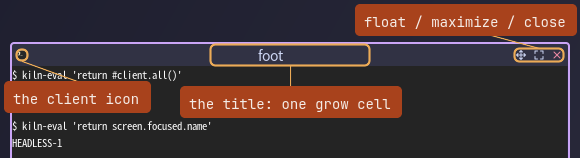
The title rides a single growing cell that centers its text. It has to be one grow cell rather than a spacer on each side: two spacers plus a long title would overflow a narrow floating client and shove the buttons off the row. Press anywhere on the bar drags; right-press resizes from the nearest corner. The line-art ink follows focus, and the two colors are two glyph cache entries, because the color is part of the file.
The screen: tags and the bar
Everything per-screen happens in one handler:
screen.on("added", function(s)
  tag.new { name = "dev", screen = s, layout = kiln.layout.tile }
  tag.new { name = "web", screen = s, layout = kiln.layout.tile }
  tag.new { name = "chat", screen = s, layout = kiln.layout.tile }
  tag.new { name = "files", screen = s, layout = kiln.layout.tile }
  tag.new { name = "media", screen = s, layout = kiln.layout.tile }
  s.tags[1]:view()

  wallpaper(s)

  ui.bar(s, { edge = "top", dir = "row", h = th.bar_height,
    color = th.bg, pad = { x = 8 } }, function()
    backdrop(s)
    ui.row({ w = "33.33%", h = "grow", gap = 6,
        clip = { horizontal = true },
        align = { y = "center" } }, function()
      launcher_glyph(s)
      taglist(s)
      tasklist(s)
    end)
    ui.row({ w = "33.33%", h = "grow", align = "center" }, function()
      ui.box({ id = "clock", color = th.bg2, radius = 4,
        pad = { x = 8 },
        on_hover = ui.tooltip(function()
          return os.date("%A %d %B %Y")
        end),
      }, widgets.clock)
    end)
    ui.row({ w = "33.33%", h = "grow", gap = 6,
        clip = { horizontal = true },
        align = { x = "right", y = "center" } }, function()
      widgets.systray()
      layoutbox(s)
    end)
  end)
end)
screen.on("added") fires once per output, at boot and whenever a monitor is
plugged in, so tags and bars exist on every screen without special-casing
multi-monitor. tag.new creates a tag with a layout; t:view() selects it.
The wallpaper(s) call warms the render outside the frame path; backdrop()
would ask again and memoize either way.
ui.bar(s, cfg, fn) registers a bar whose fn is a declare function: it runs
again on every dirty frame and states what the bar contains right now. The
body is three percent-third regions in a row. The thirds are the centering
mechanism: Clay sizes a percent child unconditionally, so the middle region's
center is the bar's center however wide the tasklist gets, and the side
regions clip so an overfull tasklist truncates at its third instead of pushing
into the middle. Nothing floats and nothing computes a position.

The clock is a plain box in the middle region; its date tooltip is nothing
but the on_hover handler ui.tooltip makes:

The full build-up of a bar like this one is A bar from scratch.
Key bindings
Every binding is one key{} call: mods, key, a press handler, plus desc and
group. The sheet on mod+s is stdlib (kiln.hotkeys.toggle); it reads the
same registry these calls fill, so the desc and group on every binding below
are the whole of what the config contributes to it:
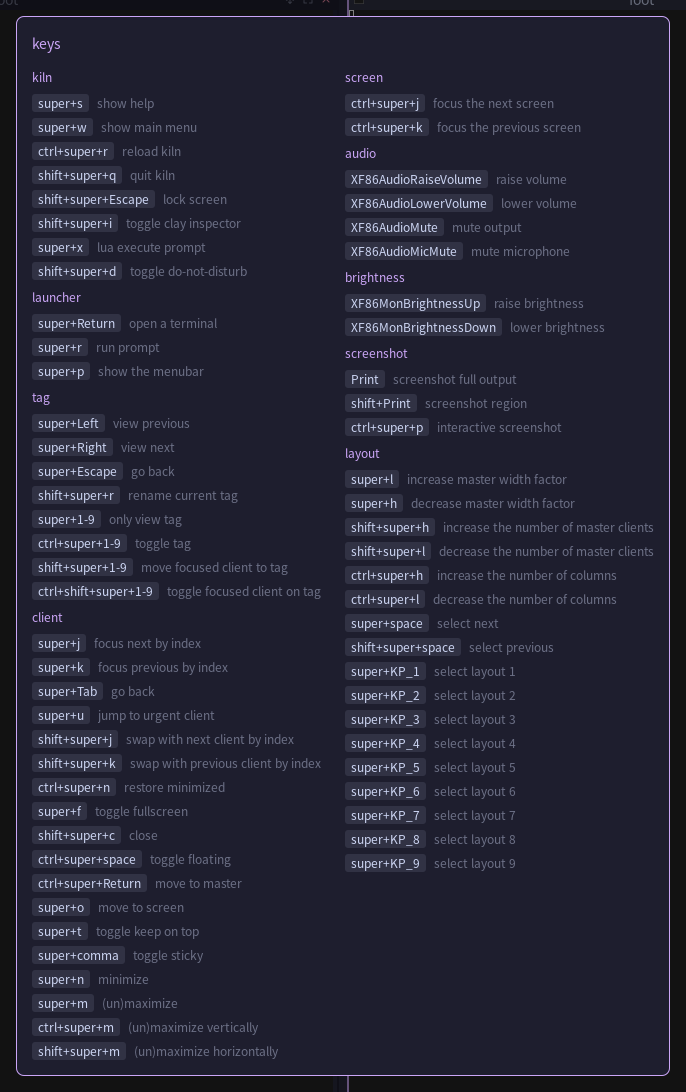
The groups, in file order.
kiln
Session verbs, most of them one liner bindings to stdlib functions:
key { mods = { "mod" }, key = "s", desc = "show help", group = "kiln",
  press = kiln.hotkeys.toggle }
key { mods = { "mod", "ctrl" }, key = "r", desc = "reload kiln", group = "kiln",
  press = kiln.reload }
key { mods = { "mod", "shift" }, key = "q", desc = "quit kiln", group = "kiln",
  press = kiln.quit }
key { mods = { "mod", "shift" }, key = "Escape", desc = "lock screen", group = "kiln",
  press = kiln.lock }
key { mods = { "mod", "shift" }, key = "i", desc = "toggle clay inspector",
  group = "kiln", press = function() kiln.inspector() end }
mod+w opens the main menu anchored under the launcher glyph. The inspector
is Clay's own debug panel over the live desktop; it takes 400px off the right
of the screen while it is up, so the desktop reflows into what is left rather
than being covered (see
Inspect the Live Element Tree).
mod+x is a Lua prompt against the running compositor. Try an expression
first, fall back to a statement, notify the result either way:
key { mods = { "mod" }, key = "x", desc = "lua execute prompt", group = "kiln",
  press = function()
    kiln.prompt.run {
      label = "Run Lua code: ",
      history = eval_history,
      done = function(str)
        if str == "" then
          return
        end
        local chunk, cerr = loadstring("return " .. str)
        if chunk == nil then
          chunk = loadstring(str)
        end
        if chunk == nil then
          kiln.notify { title = "Lua error", message = tostring(cerr) }
          return
        end
        local ok, res = pcall(chunk)
        kiln.notify { title = ok and "=" or "Lua error",
          message = tostring(res) }
      end,
    }
  end }
The do-not-disturb toggle is an ordering trick. There is no way to exempt one notification from suspension, so the order is the mechanism: enabling notifies then suspends, so the confirmation shows; disabling unsuspends then notifies, so the queue flushes and then confirms:
key { mods = { "mod", "shift" }, key = "d", desc = "toggle do-not-disturb",
  group = "kiln",
  press = function()
    if notification.suspended then
      notification.suspended = false
      kiln.notify { title = "Notifications", message = "Resumed",
        timeout = 2 }
    else
      kiln.notify { title = "Notifications", message = "Do Not Disturb",
        timeout = 2 }
      notification.suspended = true
    end
  end }
launcher
key { mods = { "mod" }, key = "Return", desc = "open a terminal", group = "launcher",
  press = function() kiln.spawn(terminal) end }
key { mods = { "mod" }, key = "r", desc = "run prompt", group = "launcher",
  press = function()
    kiln.prompt.run {
      label = "Run: ",
      completion = kiln.prompt.completion(function() return path_bins() end),
      done = function(cmd)
        if cmd ~= "" then
          kiln.spawn(cmd)
        end
      end,
    }
  end }
key { mods = { "mod" }, key = "p", desc = "show the menubar", group = "launcher",
  press = function() kiln.launcher.open() end }
tag
The arrows walk tags through view_relative; mod+Escape restores the
previous selection through tag.history; mod+shift+r renames the current
tag through a prompt pre-filled with its name:
key { mods = { "mod" }, key = "Left", desc = "view previous", group = "tag",
  press = function() view_relative(screen.focused, -1) end }
key { mods = { "mod" }, key = "Right", desc = "view next", group = "tag",
  press = function() view_relative(screen.focused, 1) end }
key { mods = { "mod" }, key = "Escape", desc = "go back", group = "tag",
  press = function() tag.history.restore(screen.focused) end }
Then the numrow. "1-9" is a range: one key{} call expands to nine chords,
and the handler receives the index. Four Mod variants cover the whole
tag-number vocabulary:
key { mods = { "mod" }, key = "1-9", desc = "only view tag", group = "tag",
  press = function(i)
    local t = screen.focused.tags[i]
    if t ~= nil then
      t:view()
    end
  end }
mod+ctrl+1-9 toggles the tag into the selection, mod+shift+1-9 moves the
focused client to it, and mod+ctrl+shift+1-9 toggles the focused client onto
it with the same add-or-remove loop the taglist's mod+right-click uses.
client and screen
Focus and swap walk visible_union by index; mod+Tab jumps through the
focus history:
key { mods = { "mod" }, key = "j", desc = "focus next by index", group = "client",
  press = function() focus_byidx(1) end }
key { mods = { "mod" }, key = "Tab", desc = "go back", group = "client",
  press = function()
    local c = client.history.previous()
    if c ~= nil then
      c:focus()
      c:raise()
    end
  end }
key { mods = { "mod" }, key = "u", desc = "jump to urgent client", group = "client",
  press = jump_urgent }
mod+k, mod+shift+j and mod+shift+k are the previous/swap twins, and
mod+ctrl+n restores the most recently minimized client. The screen group is
two bindings over focus_screen_relative.
audio, brightness, screenshot
The media keys shell out; every kiln.spawn string runs via /bin/sh -c:
key { mods = {}, key = "XF86AudioRaiseVolume", desc = "raise volume", group = "audio",
  press = function() kiln.spawn("wpctl set-volume @DEFAULT_AUDIO_SINK@ 5%+") end }
Volume and mute ride wpctl, brightness rides brightnessctl, and
screenshots ride grim:
key { mods = {}, key = "Print", desc = "screenshot full output", group = "screenshot",
  press = function()
    kiln.spawn(
      "mkdir -p ~/Pictures && grim ~/Pictures/screenshot-$(date +%Y%m%d-%H%M%S).png")
  end }
the "interactive screenshot" chord
(mod+ctrl+p) is the same slurp | grim -g - region pipeline the Shift+Print
binding uses. slurp draws the selection and grim captures it; there is no
compositor overlay.
layout
The tiling knobs are tag properties, so every handler is a property write on
screen.focused.selected_tag:
key { mods = { "mod" }, key = "l", desc = "increase master width factor",
  group = "layout",
  press = function()
    local t = screen.focused.selected_tag
    if t ~= nil then
      t.master_width_factor = math.min(0.95,
        (t.master_width_factor or 0.5) + 0.05)
    end
  end }
mod+h decreases it; mod+shift+h/l walk master_count, mod+ctrl+h/l walk
column_count, and mod+space / mod+shift+space walk the layout cycle
declared above. Layout-by-number is nine explicit numpad bindings, generated
in a loop because there is no keygroup mechanism for KP_ names:
for i = 1, 9 do
  key { mods = { "mod" }, key = "KP_" .. i, desc = "select layout " .. i,
    group = "layout",
    press = function()
      local t = screen.focused.selected_tag
      if t ~= nil then
        t.layout = kiln.layout.list[i] or t.layout
      end
    end }
end
per-client verbs
All wrapped in kiln.focused, which runs the verb on the focused client or
no-ops:
key { mods = { "mod" }, key = "f", desc = "toggle fullscreen", group = "client",
  press = kiln.focused(function(c)
    c:toggle_fullscreen()
    c:raise()
  end) }
-- The polite close. c:kill() is SIGKILL, which is no chord's job.
key { mods = { "mod", "shift" }, key = "c", desc = "close", group = "client",
  press = kiln.focused(function(c) c:close() end) }
key { mods = { "mod", "ctrl" }, key = "Return", desc = "move to master",
  group = "client",
  press = kiln.focused(function(c)
    local s = (c.tag ~= nil and c.tag.screen) or screen.focused
    if s == nil then
      return
    end
    for _, o in ipairs(visible_union(s)) do
      if o ~= c and not o.floating then
        c:swap(o)
        return
      end
    end
  end) }
Note the close comment: c:close() asks politely, c:kill() is SIGKILL, and
only the polite one is bound. The rest of the group is one-line property
toggles: floating (mod+ctrl+space), move to screen (mod+o), keep on top
(mod+t), sticky (mod+comma), minimize (mod+n), maximize (mod+m).
maximized is one boolean, so the per-axis chords both toggle the same state:
key { mods = { "mod", "ctrl" }, key = "m", desc = "(un)maximize vertically",
  group = "client",
  press = kiln.focused(function(c)
    c:toggle_maximized()
    c:raise()
  end) }
mod+shift+m ("horizontally") is the same handler. The
keybindings tutorial covers the key{}
mechanism from scratch.
Mouse bindings
button { mods = {}, button = 3, on = "root", press = function()
  local s = screen.focused
  if kiln.menu.open ~= nil then
    kiln.menu.close()
  else
    kiln.menu.show { under = "launcher", screen = s, items = main_menu(s) }
  end
end }
button { mods = { "mod" }, button = 1, press = function(c) c:grab_move() end }
button { mods = { "mod" }, button = 3,
  press = function(c) c:grab_resize_nearest() end }
Root right-click toggles the main menu, opened at the launcher anchor rather
than the pointer, because a root button handler gets the client, not the press
point. The root wheel is not here: it rides the backdrop's on_scroll,
declared with the wallpaper. Plain left-click on a client focuses (the
built-in default); mod+left drags; mod+right resizes from the nearest corner.
Rules
Three rule{} calls: global placement, floating apps, and routing for nested
compositors.
rule { match = { fn = function() return true end },
  on = function(c)
    kiln.placement.no_overlap(c)
    kiln.placement.no_offscreen(c)
  end }

rule { match_any = {
    app = { "pinentry", "Blueman%-manager", "Gpick" },
    instance = { "pinentry" },
    class = { "Blueman%-manager", "Gpick" },
    role = { "pop%-up" },
  },
  props = { floating = true } }

rule { match_any = { app = { "wlroots" }, class = { "wlroots" } },
  props = { tag = "media", focus = false } }
Rules run when a client maps: selectors (match, match_any, except)
against app, class, instance, title, role, dialog, or an arbitrary
predicate; props are property writes; on is a callback. The idioms worth
reading twice:
- An empty match clause matches nothing, because a fire-on-everything rule
is a mistake worth catching. "All clients" is therefore spelled
match = { fn = function() return true end }. - Apps are named in both their Wayland (
app) and X11 (class/instance) forms, so the rule fires whichever way the client arrives. The dash inpop-upis escaped because a rule string is a Lua pattern. - A tag assignment never auto-switches the view, so
focus = falseis the whole of "do not steal my screen".
Titlebars need no rule: they are on by default and opted out per client with
titlebar = false. See Client rules.
What is deliberately not here
Two sections at the bottom of the file are nearly empty, and the file says
why. Notifications need no wiring: the per-urgency timeouts and the display
function (kiln.defaults.notify_display) are already the stdlib defaults.
And the ten replaceable kiln.defaults.* policy functions are all left stock.
The one policy the config does add is a single line:
-- Sloppy focus: focus follows the mouse, and focus does not raise.
client.on("mouse::enter", function(c) c:focus() end)
That line is focus-follows-mouse. Swapping a default wholesale is the same
shape in reverse: client.off("request::activate", kiln.defaults.activate),
then client.on with your own. See
Replace default policies and the
defaults reference.
Where to go next
Work through the tutorials in order:
- Basics: drive the stock desktop, then reload a change
- Keybindings
- A bar from scratch
- Widgets
- Theming