Layout with Clay
Everything kiln puts on screen is a box with a sizing rule, nested inside other boxes. Clay is the layout engine that turns that tree of boxes into pixel rectangles: you declare the tree, Clay computes a rectangle for every element, and kiln draws them. Clay allocates nothing per frame, draws nothing itself, and knows nothing about windows.
Four sizing rules
Each axis of an element has one rule:
| Rule | Means | In kiln |
|---|---|---|
| fixed | exactly this many pixels | w = 180 |
| grow | share whatever is left over | w = "grow" |
| percent | a fraction of the parent | w = "25%" |
| fit | just big enough for the children | w = "fit" |
A container lays its children out in one of two directions: ui.row left to
right, ui.column top to bottom.
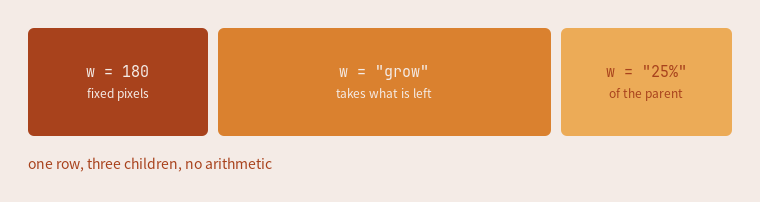
Figures captured from an earlier build; the layout is unchanged.
ui.row({ w = "grow", h = 108, gap = 10 }, function()
  ui.box({ w = 180,    h = "grow" })
  ui.box({ w = "grow", h = "grow" })
  ui.box({ w = "25%",  h = "grow" })
end)
Nesting
A container holding a fixed square and a growing column is already a usable row:
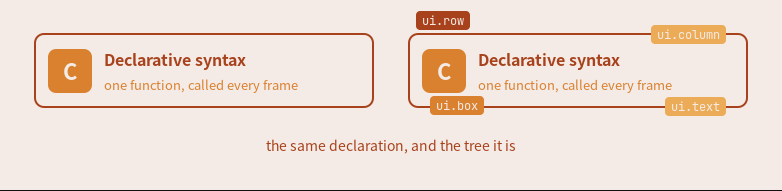
ui.row({ pad = 14, gap = 12 }, function()
  ui.box({ w = 44, h = 44 })
  ui.column({ w = "grow", gap = 3 }, function()
    ui.text("Declarative syntax")
    ui.text("one function, called every frame")
  end)
end)
The labels in the second card are floats, so they take no space; the two cards are solved identically. Floats, stacking and clipping are in Nodes, Floats, and Bands.
The bar, as Clay sees it
This is the bar from the landing page, reduced to the constructors each cell uses: three percent-third regions in a row, each region a container, the clock an ordinary in-flow box in the middle one.

ui.bar(s, { edge = "top" }, function()
  ui.row({ w = "33.33%", h = "grow", gap = 6,
      clip = { horizontal = true }, align = { y = "center" } }, function()
    ui.box({ id = "launcher", w = 28, h = 28 }, launcher_glyph)
    kiln.widgets.taglist(s)
    kiln.widgets.tasklist(s)
  end)
  ui.row({ w = "33.33%", h = "grow", align = "center" }, function()
    ui.box({ id = "clock", pad = { x = 8 } }, kiln.widgets.clock)
  end)
  ui.row({ w = "33.33%", h = "grow", gap = 6,
      clip = { horizontal = true }, align = { x = "right", y = "center" } }, function()
    kiln.widgets.systray()
    kiln.widgets.layoutbox(s)
  end)
end)
The percent thirds are the centering mechanism: Clay sizes a percent child unconditionally, so the middle third's center is the bar's center at any tasklist width, and the side regions clip so an overfull tasklist truncates at its third instead of pushing the clock aside.
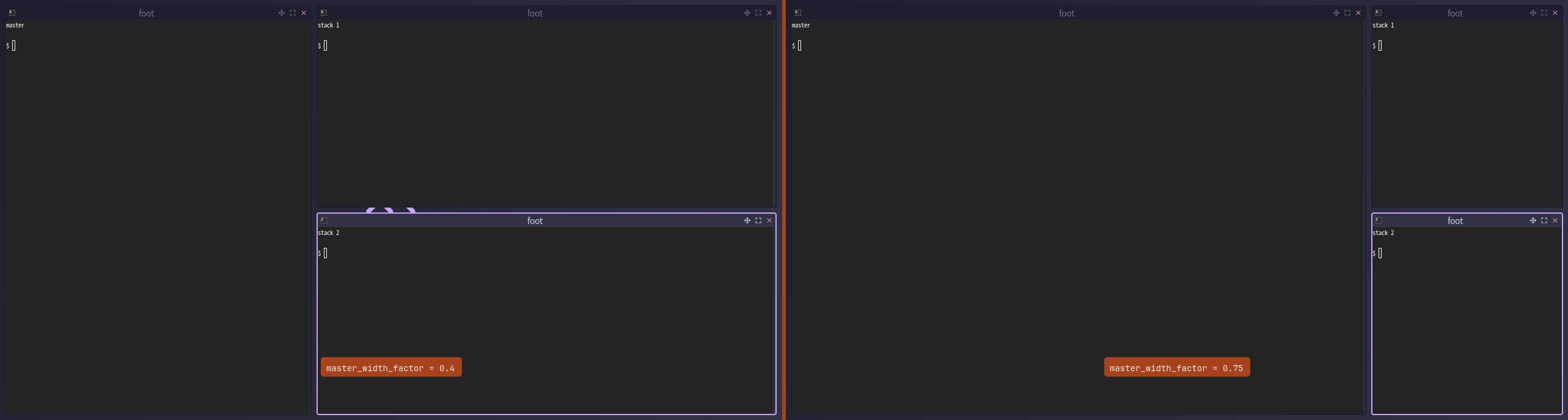
A window is placed with the same rules. The tile layout declares a master
container sized as a percentage beside a stack of grow cells, and
master_width_factor is that percentage:
Going further into Clay
- How Clay's UI Layout Algorithm Works. Nic Barker, Clay's author, walking through the solver itself. Start here if you want the algorithm rather than the API.
- The Clay README is the documentation: the concepts, the full API, and every element macro.
- nicbarker.com/clay is Clay laying out its own website, compiled to WebAssembly. The debug panel there is Clay's built-in inspector, the same one kiln embeds (see Inspect the Live Element Tree).
kiln vendors unmodified upstream Clay (revision e6cc369, v0.14) and its
official Odin binding in clay/. Cite clay/clay.h for exact behaviour.
See also
- One tree per screen: why the whole screen is one tree
- ui reference
- A bar from scratch
- Custom layouts