wibox.widget.calendar
Shows a month or a year as a grid of day cells, with the weekday names, the month name and today in bold. For a colored today cell, wrap the "focus" cell in a background container through fn_embed. Every cell is a textbox you can restyle through fn_embed. Give it forced_width and forced_height, or put it in a box with a size: in a content-sized box, such as a popup sized to its content, the cells take their own sizes and the columns do not line up.
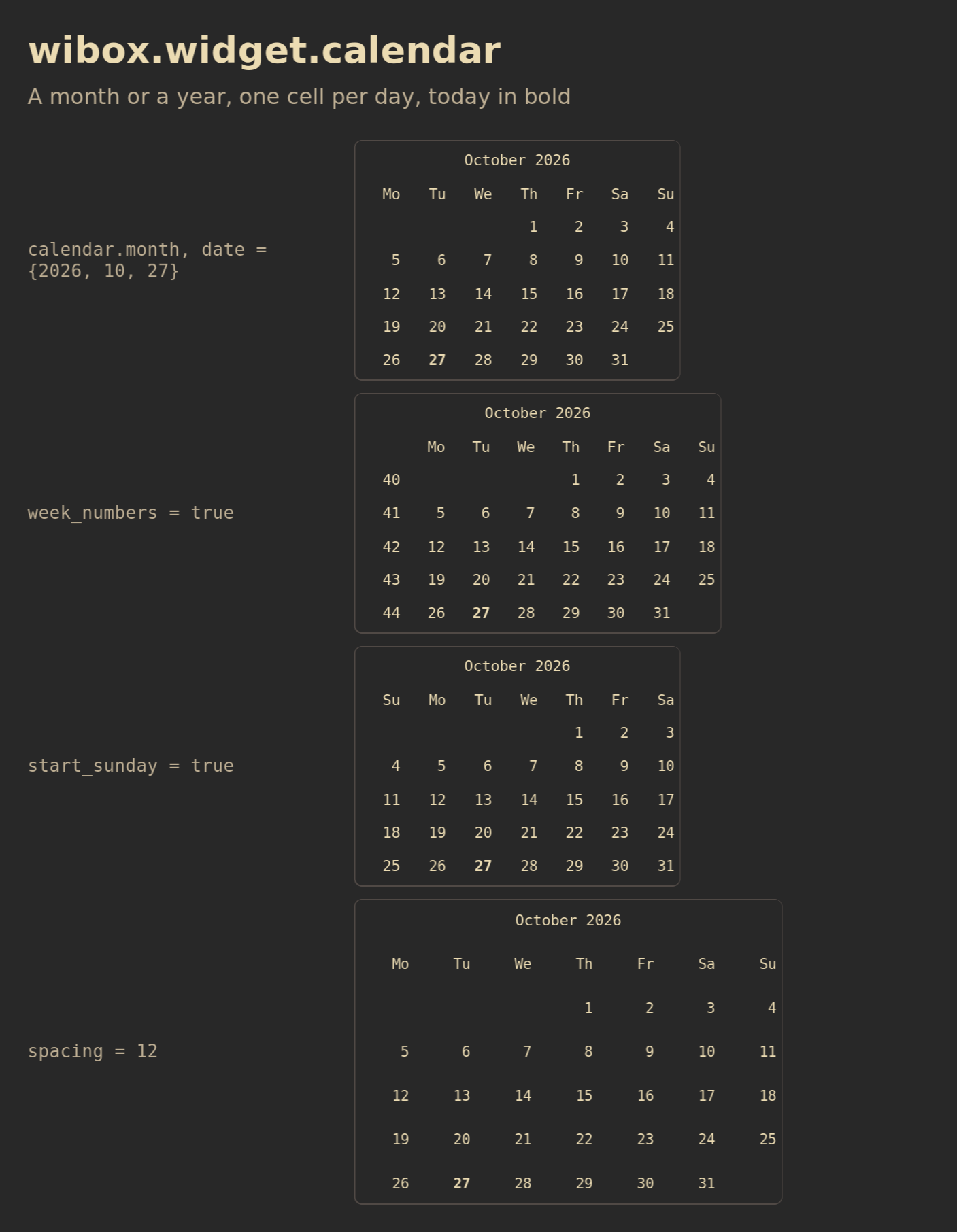
Each row sets one property. The outline is the box the widget was given.
Show Lua
Save this as /tmp/widget-calendar.lua, then run:
somewm-client eval 'dofile("/tmp/widget-calendar.lua")'
It opens the figure on your focused screen and closes after two minutes. Every row is a month calendar at a fixed date in a sized box, with one property set.
-- Shared canvas for the SomeWM widget reference figures, in the style of the
-- 2.1.0 announcement diagrams: the session's theme colors and font family
-- with gruvbox fallbacks, a bold title and a muted subtitle, rounded cards
-- with one-pixel borders, 28 px margins, an ontop popup that closes itself.
--
-- generate.sh concatenates this file ahead of each scene and publishes the
-- result next to the PNG, so a reader can run the same file:
--   somewm-client eval 'dofile("/tmp/figure.lua")'
-- The scene calls F.scene(title, subtitle, rows). This file defines the
-- global F instead of returning a module because the concatenation is one
-- chunk with no package path.

local awful = require("awful")
local beautiful = require("beautiful")
local gears = require("gears")
local wibox = require("wibox")

if _G.somewm_reference_figure then _G.somewm_reference_figure.stop() end

F = {}

F.bg     = beautiful.bg_normal or "#282828"
F.fg     = beautiful.fg_normal or "#ebdbb2"
F.panel  = "#32302f"
F.slot   = "#504945"
F.muted  = "#bdae93"
F.amber  = "#d79921"
F.blue   = "#83a598"
F.green  = "#b8bb26"
F.family = (beautiful.font or "sans 10"):gsub("%s+%d+%.?%d*$", "")
F.font   = F.family .. " 14"
F.font_bold = F.family .. " Bold 14"
F.mono   = "monospace 13"

F.width       = 940
F.label_width = 300
F.slot_height = 44

function F.rounded(cr, w, h)
    gears.shape.rounded_rect(cr, w, h, 8)
end

-- A line of text in the figure's own font. size is in points.
function F.text(text, size, color, bold)
    return wibox.widget {
        markup = '<span foreground="' .. (color or F.fg) .. '">'
            .. gears.string.xml_escape(text) .. '</span>',
        font = F.family .. (bold and " Bold " or " ") .. size,
        widget = wibox.widget.textbox,
    }
end

-- A textbox in the figure font, for rows that show text. extra overrides
-- properties, which is how a row demonstrates one of them.
function F.label(text, extra)
    local t = { text = text, font = F.font, widget = wibox.widget.textbox }
    for k, v in pairs(extra or {}) do t[k] = v end
    return t
end

-- A solid block of a given size and color, for layout figures.
function F.block(w, h, color, text)
    return {
        text and {
            text = text, font = F.mono, halign = "center", valign = "center",
            widget = wibox.widget.textbox,
        } or nil,
        forced_width = w,
        forced_height = h,
        bg = color,
        fg = F.bg,
        shape = F.rounded,
        widget = wibox.container.background,
    }
end

-- One row: the property value in monospace, then the widget in a rounded
-- slot outlined in F.slot. The outline is the box the widget is given plus
-- opts.pad on each side (6 unless the scene needs the edge). opts.w and
-- opts.h size the slot; opts.fit lets it take the widget's own size.
function F.row(label, widget, opts)
    opts = opts or {}
    local slot = {
        { widget, margins = opts.pad or 6, widget = wibox.container.margin },
        border_width = 1,
        border_color = F.slot,
        shape = F.rounded,
        widget = wibox.container.background,
    }
    if not opts.fit then
        slot.forced_width = opts.w or (F.width - 56 - F.label_width - 20)
        slot.forced_height = opts.h or F.slot_height
    elseif opts.h then
        slot.forced_height = opts.h
    end
    return {
        {
            markup = '<span foreground="' .. F.muted .. '">' .. gears.string.xml_escape(label) .. '</span>',
            font = F.mono,
            ellipsize = "none",
            forced_width = F.label_width,
            widget = wibox.widget.textbox,
        },
        {
            slot,
            halign = "left",
            valign = "center",
            widget = wibox.container.place,
        },
        spacing = 20,
        layout = wibox.layout.fixed.horizontal,
    }
end

-- Build the figure as a centered popup on the primary screen, so every
-- capture comes from the same output and scale. It stays until
-- stop() runs or two minutes pass. Returns a message; generate.sh reads the
-- geometry from _G.somewm_reference_figure.popup once it has a size.
function F.scene(title, subtitle, rows)
    local target = screen.primary
    local contents = wibox.layout.fixed.vertical()
    contents.spacing = 12
    contents:add(F.text(title, 27, F.fg, true))
    contents:add(F.text(subtitle, 16, F.muted))
    contents:add(wibox.widget { forced_height = 6, widget = wibox.container.background })
    for _, r in ipairs(rows) do contents:add(wibox.widget(r)) end

    local popup = awful.popup {
        screen = target,
        visible = true,
        ontop = true,
        input_passthrough = true,
        bg = F.bg,
        fg = F.fg,
        minimum_width = F.width,
        maximum_width = F.width,
        placement = awful.placement.centered,
        widget = { contents, margins = 28, widget = wibox.container.margin },
    }
    local state = { popup = popup, screen = target }
    _G.somewm_reference_figure = state
    function state.stop()
        popup.visible = false
        if state.timer then state.timer:stop() end
        if _G.somewm_reference_figure == state then _G.somewm_reference_figure = nil end
    end
    state.timer = gears.timer.start_new(120, function() state.stop(); return false end)
    return title .. " figure opened on screen " .. target.index
end
-- wibox.widget.calendar: a month at a fixed date, with the display options.
local date = { year = 2026, month = 10, day = 27 }
local function month(extra)
    local t = { date = date, font = "monospace 11", widget = wibox.widget.calendar.month }
    for k, v in pairs(extra or {}) do t[k] = v end
    return t
end
return F.scene("wibox.widget.calendar", "A month or a year, one cell per day, today in bold", {
    F.row('calendar.month, date = {2026, 10, 27}', month(), { w = 320, h = 236 }),
    F.row('week_numbers = true', month { week_numbers = true }, { w = 360, h = 236 }),
    F.row('start_sunday = true', month { start_sunday = true }, { w = 320, h = 236 }),
    F.row('spacing = 12', month { spacing = 12 }, { w = 420, h = 300 }),
})
Download the Lua file. To close it early:
somewm-client eval 'if somewm_reference_figure then somewm_reference_figure.stop() end'
Constructors: wibox.widget.calendar.month(date, font, spacing) and wibox.widget.calendar.year(date, font, spacing). Upstream page.
local cal = wibox.widget {
    date         = os.date("*t"),
    week_numbers = true,
    widget       = wibox.widget.calendar.month,
}
Properties
| Property | Type | Default | What it does | In SomeWM |
|---|---|---|---|---|
date | table or nil | nil | { year = , month = , day = }. day picks the highlighted cell; for a year calendar only year matters. nil shows nothing. | |
font | string | beautiful.calendar_font, else "Monospace 10" | Font of every cell. | |
spacing | number | beautiful.calendar_spacing, else 5 | Gap between cells in pixels. | A negative value warns once and is 0. |
week_numbers | boolean | beautiful.calendar_week_numbers, else false | Adds a column with the ISO week number. | |
start_sunday | boolean | beautiful.calendar_start_sunday, else false | Starts each week on Sunday instead of Monday. | |
long_weekdays | boolean | beautiful.calendar_long_weekdays, else false | Three-letter weekday names instead of two. | On a scaled output some three-letter headers collapse to an ellipsis. |
flex_height | boolean | false | Lets rows grow to fill extra height. | |
fn_embed | function or nil | nil | function(widget, flag, date) called for every cell and header; returns the widget to show. flag is "header", "weekday", "weeknumber", "normal", "focus", "month" or "monthheader". | |
border_width | number or table | 0 | Grid lines between cells, in pixels. | A dashed border draws solid; a border color that is not solid warns once and is transparent. |
border_color | color or table | beautiful.fg_normal | Color of the grid lines. |
Setting a property emits property::<name>.
Gone in SomeWM 2.1: empty_cell_mode, empty_color and empty_widget, with the theme variable calendar_empty_color. Cells outside the month are empty.
The common properties, methods and signals apply.