The Clay Bet
kiln is built on one idea: the entire visible surface of each screen is a single Clay layout tree. Windows, bars, widgets, the contents of your tags, menus, notifications, the wallpaper: every one of them is a node in that tree. There is no window layer and a separate widget layer, no widget pass and a separate window pass. One tree, solved as a whole, every frame that needs drawing.
What Clay does
Clay is a layout solver in a single C header. You declare a tree of nested elements, each with sizing rules; Clay computes a rectangle for every one and hands back a flat array of drawing commands. It allocates nothing per frame, draws nothing itself, and knows nothing about windows.
The whole sizing vocabulary is four rules, set per axis:
| Rule | Means | In kiln |
|---|---|---|
| fixed | exactly this many pixels | w = 180 |
| grow | share whatever is left over | w = "grow" |
| percent | a fraction of the parent | w = "25%" |
| fit | just big enough for the children | w = "fit" |
A container lays its children out in one of two directions, left to right or top to bottom. That is the entire model. If you know flexbox, you already know Clay.
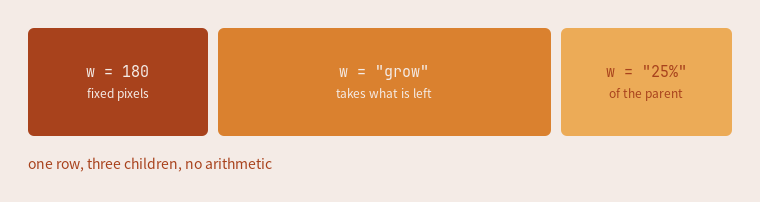
ui.row({ w = "grow", h = 108, gap = 10 }, function()
  ui.box({ w = 180,    h = "grow" })
  ui.box({ w = "grow", h = "grow" })
  ui.box({ w = "25%",  h = "grow" })
end)
Nesting is how everything else gets built. A container holding a fixed square and a growing column is already a usable row:
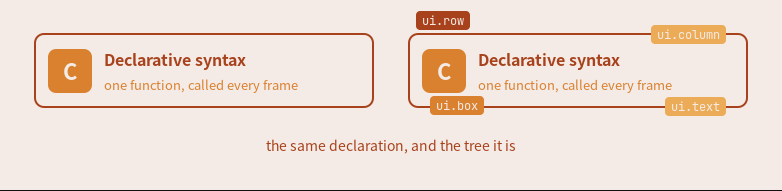
ui.row({ pad = 14, gap = 12 }, function()
  ui.box({ w = 44, h = 44 })
  ui.column({ w = "grow", gap = 3 }, function()
    ui.text("Declarative syntax")
    ui.text("one function, called every frame")
  end)
end)
Those badges are themselves Clay elements, floated out of flow, which is why naming a container does not change how it was solved: both cards above are identical.
Going further into Clay
- How Clay's UI Layout Algorithm Works. Nic Barker, Clay's author, walking through the solver itself. Start here if you want the algorithm rather than the API.
- The Clay README is the documentation: the concepts, the full API, and every element macro.
- nicbarker.com/clay is Clay laying out its own website, compiled to WebAssembly. The debug panel there is Clay's built-in inspector, the same one kiln embeds (see Inspect the Live Element Tree).
kiln vendors Clay at third_party/clay.h, currently v0.14. Upstream has moved on, so read the above for the model and this site for what kiln actually exposes.
One tree, the whole screen
Every screen runs the same cycle:
- Something marks the screen dirty (a client mapped, a tag switched, a property changed).
- Lua declares a fresh node tree for that screen: your bars, the selected tag's layout with its clients, any floats, menus, and notifications.
- Clay solves the tree: every node gets a box.
- A thin retained renderer in C reconciles the solved boxes into
wlr_scene, the scene graph wlroots actually presents.
The declaration is cheap and rebuilt from scratch; the reconcile is incremental. Nothing happens between dirty frames. See Frames and Dirty State for when a frame is produced.
The bar is the easiest place to see it. This is the bar from the landing page, reduced to the constructors each cell reaches for: three percent-third regions in a row, each region a container, the clock an ordinary in-flow box in the middle one.

ui.bar(s, { edge = "top" }, function()
  ui.row({ w = "33.33%", h = "grow", gap = 6,
      clip = { horizontal = true }, align = { y = "center" } }, function()
    ui.box({ id = "launcher", w = 28, h = 28 }, launcher_glyph)
    kiln.widgets.taglist(s)
    kiln.widgets.tasklist(s)
  end)
  ui.row({ w = "33.33%", h = "grow", align = "center" }, function()
    ui.box({ id = "clock", pad = { x = 8 } }, kiln.widgets.clock)
  end)
  ui.row({ w = "33.33%", h = "grow", gap = 6,
      clip = { horizontal = true }, align = { x = "right", y = "center" } }, function()
    kiln.widgets.systray()
    kiln.widgets.layoutbox(s)
  end)
end)
The percent thirds are the centering mechanism: Clay sizes a percent child unconditionally, so the middle third's center is the bar's center at any tasklist width, and the side regions clip so an overfull tasklist truncates at its third instead of pushing the clock aside. No float, no spacer arithmetic, no arithmetic at all.
One fork, at the leaf
Every node in the tree is one of two things:
- Clay owns the content. A rectangle, a border, text, or an image, arriving as
RECTANGLE,BORDER,TEXT, orIMAGE. This is everything kiln draws itself: bars, titlebars, taglists, menus, notifications, tooltips. - The node is someone else's Wayland surface. A client's buffer tree, placed at the box Clay solved. It arrives as
CUSTOM, which the renderer reads as "put this client's buffers here". kiln never draws into a client.
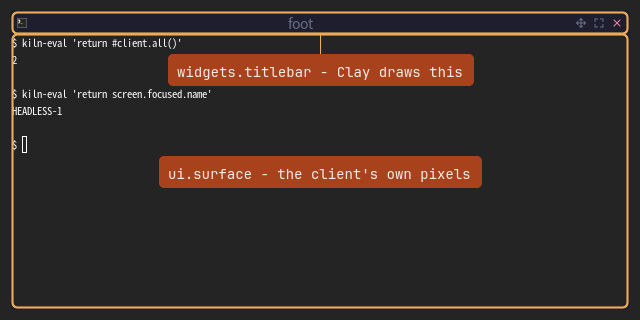
A titlebar and the window under it are siblings, differing only in who supplies the pixels. Because the fork sits at the leaf and nowhere else, everything above it (containers, sizing, alignment, floats, stacking) is uniform.
The two tiers
The API splits along one line, and the bar above shows both sides of it. ui.* is the primitives: each constructor maps a cfg table onto one Clay concept and adds no policy. kiln.widgets.* is the stock widgets: compositions of those primitives that read compositor state (screens, tags, clients, the theme) and encode an opinion about what a taglist or a titlebar should be.
The distinction is enforced, not aspirational. Every stock widget is written in public API a config can reach with the same spelling, and a standing check in the kiln repo fails any widget that uses a private door. So the stock widgets hold no privileged position: kiln.widgets.taglist is what your config would have written, written once, and replacing it is one assignment, because every caller reaches it through the module table.
What this deletes
Tiling layouts contain no rectangle arithmetic. A traditional tile layout is a page of geometry math: divide the width, subtract the gaps, round, assign. kiln's declares a master container sized as a percentage beside a stack of grow cells. master_width_factor is that percentage:
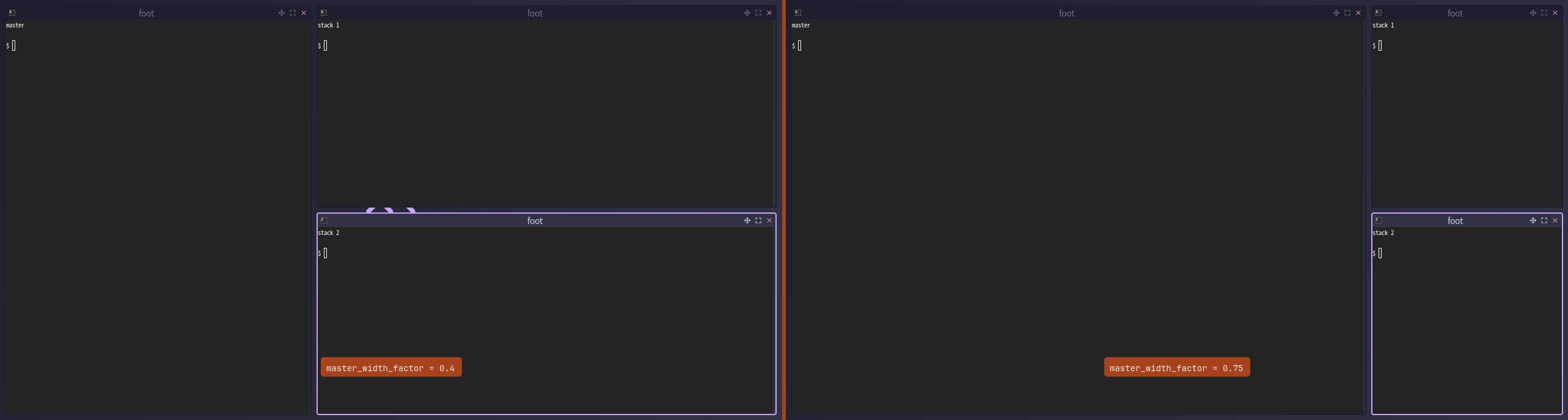
Layouts are ordinary Lua functions that declare nodes, so writing your own is short: see Custom layouts and the layout reference.
Hit testing is Clay's order. A click asks Clay what is under the point, innermost first, in the same tree that was drawn. No second bookkeeping structure can disagree with the screen: if a menu draws over a button, the menu gets the click. See Nodes, Floats, and Bands.
There is no separate widget toolkit. A widget is not an object with a draw method. It is a function that declares nodes, using the constructors the layouts and the titlebar already use. The stock ones live on kiln.widgets; building your own is the widgets tutorial.
Two retained trees
wlroots already ships a retained scene graph, so kiln keeps two: Clay's tree and the scene's. That redundancy is the price, and the bet is that Clay pays it by owning layout and hit testing so nothing else has to. What the model deliberately excludes is documented in Limitations, and how the work splits between C and Lua is in The C/Lua Boundary.
Every figure on this page is a screenshot of a real headless kiln, rendered by npm run generate:figures.