wibox.container.scroll
Shows a child that does not fit, moving it through the box over time. The usual use is a long song title or window title in a bar. The scrolling runs on a timer at fps frames per second while the widget is visible.
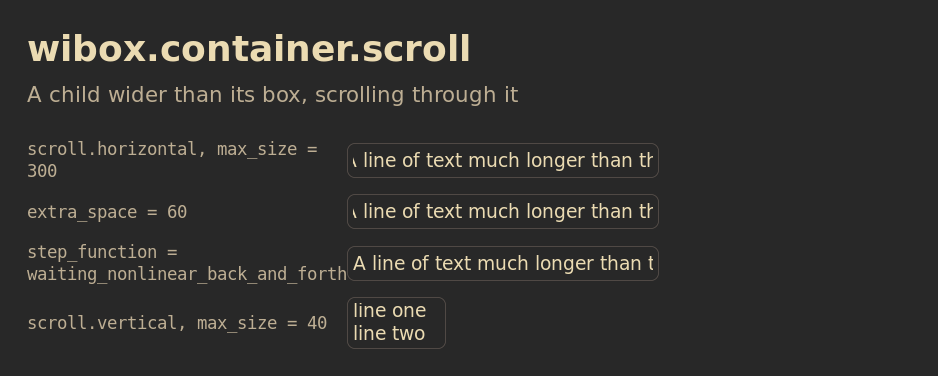
Each row sets one property. The outline is the box the container was given.
Show Lua
Save this as /tmp/container-scroll.lua, then run:
somewm-client eval 'dofile("/tmp/container-scroll.lua")'
It opens the figure on your focused screen and closes after two minutes. Every row is a textbox in a scroll container with one setting.
-- Shared canvas for the SomeWM widget reference figures, in the style of the
-- 2.1.0 announcement diagrams: the session's theme colors and font family
-- with gruvbox fallbacks, a bold title and a muted subtitle, rounded cards
-- with one-pixel borders, 28 px margins, an ontop popup that closes itself.
--
-- generate.sh concatenates this file ahead of each scene and publishes the
-- result next to the PNG, so a reader can run the same file:
--   somewm-client eval 'dofile("/tmp/figure.lua")'
-- The scene calls F.scene(title, subtitle, rows). This file defines the
-- global F instead of returning a module because the concatenation is one
-- chunk with no package path.

local awful = require("awful")
local beautiful = require("beautiful")
local gears = require("gears")
local wibox = require("wibox")

if _G.somewm_reference_figure then _G.somewm_reference_figure.stop() end

F = {}

F.bg     = beautiful.bg_normal or "#282828"
F.fg     = beautiful.fg_normal or "#ebdbb2"
F.panel  = "#32302f"
F.slot   = "#504945"
F.muted  = "#bdae93"
F.amber  = "#d79921"
F.blue   = "#83a598"
F.green  = "#b8bb26"
F.family = (beautiful.font or "sans 10"):gsub("%s+%d+%.?%d*$", "")
F.font   = F.family .. " 14"
F.font_bold = F.family .. " Bold 14"
F.mono   = "monospace 13"

F.width       = 940
F.label_width = 300
F.slot_height = 44

function F.rounded(cr, w, h)
    gears.shape.rounded_rect(cr, w, h, 8)
end

-- A line of text in the figure's own font. size is in points.
function F.text(text, size, color, bold)
    return wibox.widget {
        markup = '<span foreground="' .. (color or F.fg) .. '">'
            .. gears.string.xml_escape(text) .. '</span>',
        font = F.family .. (bold and " Bold " or " ") .. size,
        widget = wibox.widget.textbox,
    }
end

-- A textbox in the figure font, for rows that show text. extra overrides
-- properties, which is how a row demonstrates one of them.
function F.label(text, extra)
    local t = { text = text, font = F.font, widget = wibox.widget.textbox }
    for k, v in pairs(extra or {}) do t[k] = v end
    return t
end

-- A solid block of a given size and color, for layout figures.
function F.block(w, h, color, text)
    return {
        text and {
            text = text, font = F.mono, halign = "center", valign = "center",
            widget = wibox.widget.textbox,
        } or nil,
        forced_width = w,
        forced_height = h,
        bg = color,
        fg = F.bg,
        shape = F.rounded,
        widget = wibox.container.background,
    }
end

-- One row: the property value in monospace, then the widget in a rounded
-- slot outlined in F.slot. The outline is the box the widget is given plus
-- opts.pad on each side (6 unless the scene needs the edge). opts.w and
-- opts.h size the slot; opts.fit lets it take the widget's own size.
function F.row(label, widget, opts)
    opts = opts or {}
    local slot = {
        { widget, margins = opts.pad or 6, widget = wibox.container.margin },
        border_width = 1,
        border_color = F.slot,
        shape = F.rounded,
        widget = wibox.container.background,
    }
    if not opts.fit then
        slot.forced_width = opts.w or (F.width - 56 - F.label_width - 20)
        slot.forced_height = opts.h or F.slot_height
    elseif opts.h then
        slot.forced_height = opts.h
    end
    return {
        {
            markup = '<span foreground="' .. F.muted .. '">' .. gears.string.xml_escape(label) .. '</span>',
            font = F.mono,
            ellipsize = "none",
            forced_width = F.label_width,
            widget = wibox.widget.textbox,
        },
        {
            slot,
            halign = "left",
            valign = "center",
            widget = wibox.container.place,
        },
        spacing = 20,
        layout = wibox.layout.fixed.horizontal,
    }
end

-- Build the figure as a centered popup on the primary screen, so every
-- capture comes from the same output and scale. It stays until
-- stop() runs or two minutes pass. Returns a message; generate.sh reads the
-- geometry from _G.somewm_reference_figure.popup once it has a size.
function F.scene(title, subtitle, rows)
    local target = screen.primary
    local contents = wibox.layout.fixed.vertical()
    contents.spacing = 12
    contents:add(F.text(title, 27, F.fg, true))
    contents:add(F.text(subtitle, 16, F.muted))
    contents:add(wibox.widget { forced_height = 6, widget = wibox.container.background })
    for _, r in ipairs(rows) do contents:add(wibox.widget(r)) end

    local popup = awful.popup {
        screen = target,
        visible = true,
        ontop = true,
        input_passthrough = true,
        bg = F.bg,
        fg = F.fg,
        minimum_width = F.width,
        maximum_width = F.width,
        placement = awful.placement.centered,
        widget = { contents, margins = 28, widget = wibox.container.margin },
    }
    local state = { popup = popup, screen = target }
    _G.somewm_reference_figure = state
    function state.stop()
        popup.visible = false
        if state.timer then state.timer:stop() end
        if _G.somewm_reference_figure == state then _G.somewm_reference_figure = nil end
    end
    state.timer = gears.timer.start_new(120, function() state.stop(); return false end)
    return title .. " figure opened on screen " .. target.index
end
-- wibox.container.scroll: a long textbox scrolling inside a short box.
local long = "A line of text much longer than the space it scrolls through, repeated as it goes"
local function sc(extra)
    local t = { F.label(long), max_size = 300, speed = 40, layout = wibox.container.scroll.horizontal }
    for k, v in pairs(extra or {}) do t[k] = v end
    return t
end
return F.scene("wibox.container.scroll", "A child wider than its box, scrolling through it", {
    F.row('scroll.horizontal, max_size = 300', sc(), { fit = true }),
    F.row('extra_space = 60', sc { extra_space = 60 }, { fit = true }),
    F.row('step_function = waiting_nonlinear_back_and_forth', sc { step_function = wibox.container.scroll.step_functions.waiting_nonlinear_back_and_forth }, { fit = true }),
    F.row('scroll.vertical, max_size = 40', { F.label("line one\nline two\nline three\nline four", { ellipsize = "none" }), max_size = 40, speed = 20, layout = wibox.container.scroll.vertical }, { fit = true }),
})
Download the Lua file. To close it early:
somewm-client eval 'if somewm_reference_figure then somewm_reference_figure.stop() end'
Constructors: wibox.container.scroll.horizontal(widget, fps, speed, extra_space, expand, max_size, step_function, space_for_scrolling) and wibox.container.scroll.vertical(...). In a declarative table use layout = wibox.container.scroll.horizontal and the setting names below as fields. Upstream page.
local title = wibox.widget {
    {
        text   = "A long window title that does not fit the bar",
        widget = wibox.widget.textbox,
    },
    max_size      = 200,
    speed         = 40,
    step_function = wibox.container.scroll.step_functions.waiting_nonlinear_back_and_forth,
    layout        = wibox.container.scroll.horizontal,
}
Properties
| Property | Type | Default | What it does | In SomeWM |
|---|---|---|---|---|
widget | widget or nil | nil | The child. | A scroll container inside a rotate or mirror is left out with a warning. |
The settings below are set through methods, or as fields of the declarative table.
Methods
| Method | Default | What it does |
|---|---|---|
:set_max_size(pixels) | none | The box size in the scroll direction. Without it the box is as large as the child and nothing scrolls. |
:set_speed(pixels_per_second) | 10 | How fast the child moves. The step function decides what the number means. |
:set_fps(frames) | 20 | How often the position updates. |
:set_extra_space(pixels) | 0 | Empty space between the end of the child and its next repetition. |
:set_space_for_scrolling(pixels) | no limit | A cap on the child's size in the scroll direction. |
:set_step_function(fn) | linear_increase | fn(elapsed, size, visible_size, speed, extra_space) returns the offset. The ready-made ones are in wibox.container.scroll.step_functions: linear_increase, linear_decrease, linear_back_and_forth, nonlinear_back_and_forth, waiting_nonlinear_back_and_forth. |
:set_direction("h" or "v") | from the constructor | Scroll direction. |
:set_expand(boolean) | false | Kept for compatibility. The extra space stays empty either way. |
:pause(), :continue() | Stop and resume the timer. | |
:reset_scrolling() | Put the child back at the start. |
Gone in SomeWM 2.1: context, first_x, first_y, fit_width, fit_height, hierarchy, surface_width and surface_height. The container is a scroll element of the tree.
The common properties, methods and signals apply.