SomeWM 2.1.0
TL;DR
SomeWM 2.1 changes how the compositor builds a frame. Clients and widgets now go through one layout engine in C, followed by one renderer that applies the result to the scene. Rounded corners, new animation library, and a desktop inspector get rolled in with those changes.
I never wrote a release announcement for 2.0, so here's a tiny summary. That release rebuilt the C-to-Lua event boundary; 2.1 rebuilds the layout and rendering path. Together, they give state changes, layout and drawing an explicit order in the main loop.
I'm trying something just to be a bit extra. All the widget diagrams and animation demos in this post are captured from live SomeWM 2.1 widgets. Open “Show Lua” beneath a capture for the complete code to try it yourself.
New in 2.1
- A single layout and rendering pipeline. Dirty outputs are declared as Clay trees, solved in C, then handed to the renderer as commands. Bars, widgets and client frames follow the same path.
- Rounded client corners and frames that fit. Set
c.shape = 12for a 12-pixel radius. Titlebars share the corners, and decorations follow the size the application actually draws. - Patched wlroots. I added the rounded clipping that wlroots 0.20.2 lacked, including pointer hit-testing that respects the cut corners. SomeWM builds the patched version automatically, with rendering support in GLES2 and pixman.
- Composable animations. Clients, wiboxes, popups and widgets have animation policies. Eleven entrance effects include five new scale effects; combine a scale, a slide and a fade.
- A desktop inspector. Set
screen.primary.inspector = trueto browse the element tree and inspect solved boxes. Style it throughbeautiful.inspector_*. - Lock screen wallpaper. Set
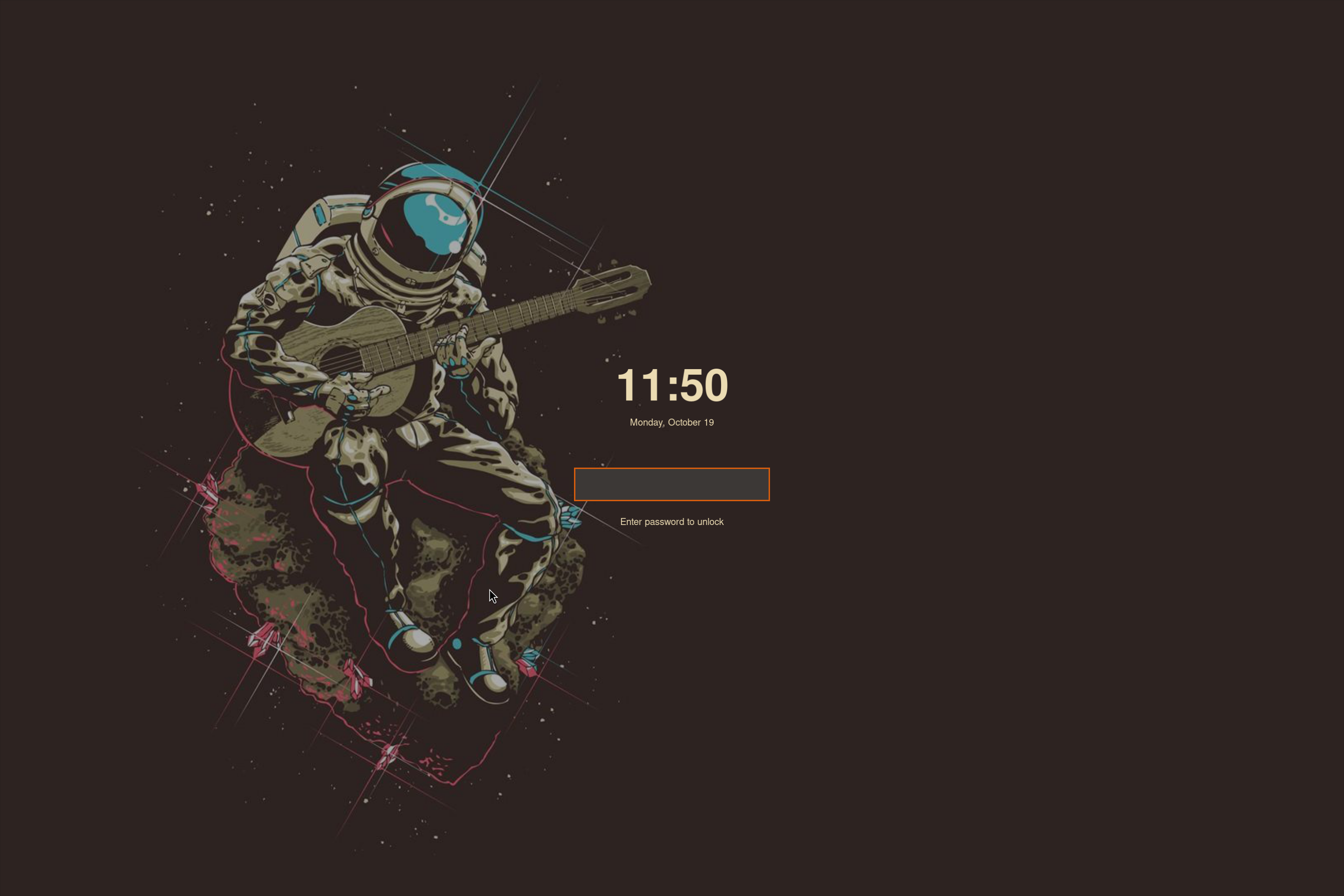
theme.lockscreen_wallpaperandtheme.lockscreen_wallpaper_overlayfor a letterboxed image with an overlay. - Scrollable hotkeys help and menubar. Long lists scroll instead of paging.
Existing configurations need a migration check. SomeWM still loads your rc.lua and supports composition from stock wibox widgets. Custom widgets that implement their own draw, fit or layout methods are omitted, along with their children. Third-party widgets using those methods need updates. Read the upgrade guide before switching.
2.0 rebuilt the C and Lua boundary
The 2.0 work reached across the compositor's C-to-Lua boundary: event delivery, object bindings and the lifecycle of the Lua state during reloads. I also split the C core into focused modules. The aim was to give state changes and configuration code a predictable order of execution.
A C event handler could previously emit a notification and immediately enter Lua. A Lua handler could change another property and call back into C before the original operation had finished. Geometry, focus and input handling all had to account for that back-and-forth.
The queue moves those notifications to a deliberate hand-off point. C records them, then some_refresh() delivers a batch to Lua before running refresh work. Repeated pointer moves can be combined, and newly queued notifications wait for the next drain. Requests whose answers C needs immediately remain synchronous, as do Lua-emitted signals.
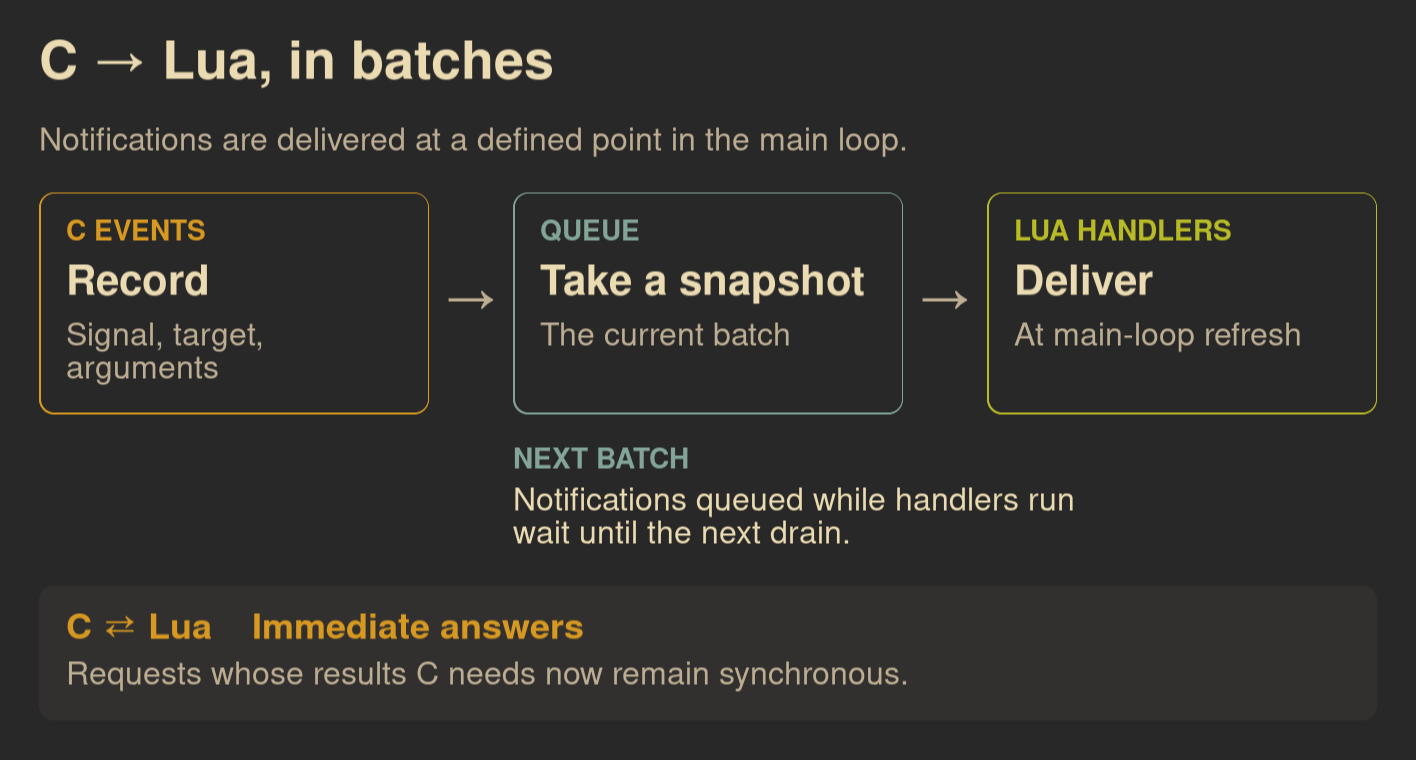
Show Lua
Save this as /tmp/signal-queue.lua, then run:
somewm-client eval 'dofile("/tmp/signal-queue.lua")'
It opens the diagram on your focused screen and closes after two minutes. Every box, label and arrow is a stock widget.
local options = ... or {}
local awful = require("awful")
local beautiful = require("beautiful")
local gears = require("gears")
local wibox = require("wibox")

local target = awful.screen.focused()
if options.output then
    target = assert(output.get_by_name(options.output), "Output not found").screen
end
if _G.somewm_signal_figure then _G.somewm_signal_figure.stop() end

local bg = beautiful.bg_normal or "#282828"
local fg = beautiful.fg_normal or "#ebdbb2"
local muted = "#bdae93"
local amber, blue, green = "#d79921", "#83a598", "#b8bb26"
local family = (beautiful.font or "sans 10"):gsub("%s+%d+%.?%d*$", "")
local function label(text, size, color, bold)
    return wibox.widget {
        markup = '<span foreground="' .. (color or fg) .. '">'
            .. gears.string.xml_escape(text) .. '</span>',
        font = family .. (bold and " Bold " or " ") .. size,
        wrap = "word_char",
        widget = wibox.widget.textbox,
    }
end
local function card(heading, action, detail, color)
    return wibox.widget {
        {
            {
                label(heading, 14, color, true),
                label(action, 21, fg, true),
                label(detail, 16, muted),
                spacing = 10,
                layout = wibox.layout.fixed.vertical,
            },
            margins = 18,
            widget = wibox.container.margin,
        },
        forced_width = 260,
        bg = bg,
        shape = gears.shape.rounded_rect,
        border_width = 1,
        border_color = color,
        widget = wibox.container.background,
    }
end
local function arrow()
    return wibox.widget {
        label("→", 27, muted),
        halign = "center",
        valign = "center",
        forced_width = 56,
        widget = wibox.container.place,
    }
end

local contents = wibox.layout.fixed.vertical()
contents.spacing = 22
contents:add(label("C → Lua, in batches", 27, fg, true))
contents:add(label("Notifications are delivered at a defined point in the main loop.", 16, muted))
contents:add(wibox.widget {
    card("C EVENTS", "Record", "Signal, target, arguments", amber),
    arrow(),
    card("QUEUE", "Take a snapshot", "The current batch", blue),
    arrow(),
    card("LUA HANDLERS", "Deliver", "At main-loop refresh", green),
    layout = wibox.layout.fixed.horizontal,
})
contents:add(wibox.widget {
    { forced_width = 316, widget = wibox.container.background },
    {
        label("NEXT BATCH", 14, blue, true),
        label("Notifications queued while handlers run\nwait until the next drain.", 16),
        spacing = 6,
        layout = wibox.layout.fixed.vertical,
    },
    layout = wibox.layout.fixed.horizontal,
})
contents:add(wibox.widget {
    {
        {
            label("C ⇄ Lua    Immediate answers", 18, amber, true),
            label("Requests whose results C needs now remain synchronous.", 16, muted),
            spacing = 8,
            layout = wibox.layout.fixed.vertical,
        },
        margins = 18,
        widget = wibox.container.margin,
    },
    bg = "#32302f",
    shape = gears.shape.rounded_rect,
    widget = wibox.container.background,
})

local popup = awful.popup {
    screen = target,
    visible = true,
    ontop = true,
    input_passthrough = true,
    bg = bg,
    fg = fg,
    minimum_width = 948,
    maximum_width = 948,
    placement = awful.placement.centered,
    widget = { contents, margins = 28, widget = wibox.container.margin },
}
local state = { popup = popup, screen = target }
_G.somewm_signal_figure = state
function state.stop()
    popup.visible = false
    if state.timer then state.timer:stop() end
    if _G.somewm_signal_figure == state then _G.somewm_signal_figure = nil end
end
state.timer = gears.timer.start_new(120, function() state.stop(); return false end)
return "Signal figure opened on screen " .. target.index
Download the Lua file. To close the diagram early:
somewm-client eval 'if somewm_signal_figure then somewm_signal_figure.stop() end'
The signal documentation explains the ordering and its consequences.
2.1 rebuilds the path from state to pixels
Layout used to be spread across several mechanisms. Client layouts calculated rectangles in Lua. Widgets answered fit and layout calls and painted into Cairo surfaces. C then had to position those surfaces and the clients in the scene. Each mechanism was responsible for a different part of the desktop's geometry.
In 2.1, those native layout paths describe relationships: a bar has a height, the workarea takes the space below it, and a master client takes a share of that workarea. Widgets describe their content, padding, gaps and sizing rules. Clay computes the resulting sizes and positions together in C.
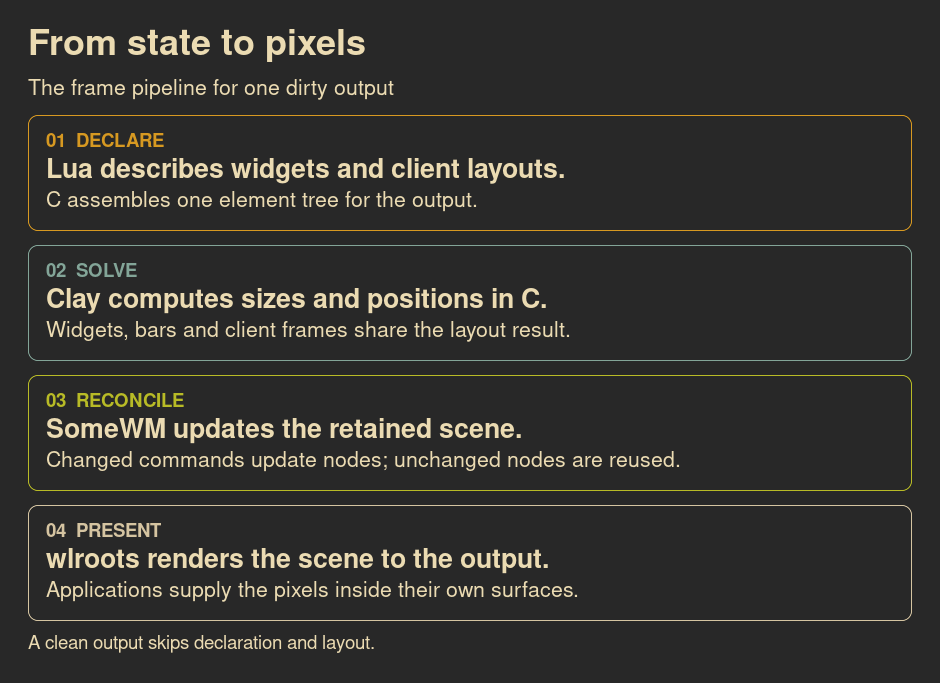
Show Lua
Save this as /tmp/frame-pipeline.lua, then run:
somewm-client eval 'dofile("/tmp/frame-pipeline.lua")'
It opens on your focused screen and closes after two minutes. Run it again to replace the preview. Colors and fonts follow your theme.
local options = ... or {}
local awful = require("awful")
local beautiful = require("beautiful")
local gears = require("gears")
local wibox = require("wibox")

local target = awful.screen.focused()
if options.output then
    target = nil
    for s in screen do
        for _, output in pairs(s.outputs) do
            if output.name == options.output then target = s end
        end
    end
    assert(target, "Output not found: " .. tostring(options.output))
end
if _G.somewm_frame_figure then _G.somewm_frame_figure.stop() end

local bg = beautiful.bg_normal or "#282828"
local fg = beautiful.fg_normal or "#ebdbb2"
local family = (beautiful.font or "sans 10"):gsub("%s+%d+%.?%d*$", "")
local function label(text, size, color, bold)
    return wibox.widget {
        markup = '<span foreground="' .. (color or fg) .. '">'
            .. gears.string.xml_escape(text) .. '</span>',
        font = family .. (bold and " Bold " or " ") .. size,
        wrap = "word_char",
        widget = wibox.widget.textbox,
    }
end

local stages = {
    { "01  DECLARE", "Lua describes widgets and client layouts.",
      "C assembles one element tree for the output.", "#d79921" },
    { "02  SOLVE", "Clay computes sizes and positions in C.",
      "Widgets, bars and client frames share the layout result.", "#83a598" },
    { "03  RECONCILE", "SomeWM updates the retained scene.",
      "Changed commands update nodes; unchanged nodes are reused.", "#b8bb26" },
    { "04  PRESENT", "wlroots renders the scene to the output.",
      "Applications supply the pixels inside their own surfaces.", "#d5c4a1" },
}

local contents = wibox.layout.fixed.vertical()
contents.spacing = 14
contents:add(label("From state to pixels", 27, fg, true))
contents:add(label("The frame pipeline for one dirty output", 16))

for _, stage in ipairs(stages) do
    local lines = wibox.layout.fixed.vertical()
    lines.spacing = 5
    lines:add(label(stage[1], 14, stage[4], true))
    lines:add(label(stage[2], 20, fg, true))
    lines:add(label(stage[3], 16))
    contents:add(wibox.widget {
        {
            lines,
            margins = 18,
            widget = wibox.container.margin,
        },
        bg = bg,
        fg = fg,
        shape = gears.shape.rounded_rect,
        border_width = 1,
        border_color = stage[4],
        widget = wibox.container.background,
    })
end
contents:add(label("A clean output skips declaration and layout.", 14))

local popup = awful.popup {
    screen = target,
    visible = true,
    ontop = true,
    input_passthrough = true,
    bg = bg,
    fg = fg,
    minimum_width = 940,
    maximum_width = 940,
    placement = awful.placement.centered,
    widget = {
        contents,
        margins = 28,
        widget = wibox.container.margin,
    },
}

local state = { popup = popup, screen = target }
_G.somewm_frame_figure = state
function state.stop()
    popup.visible = false
    if state.timer then state.timer:stop() end
    if _G.somewm_frame_figure == state then _G.somewm_frame_figure = nil end
end
state.timer = gears.timer.start_new(120, function()
    state.stop()
    return false
end)
return "Frame figure opened on screen " .. target.index
Download the Lua file. To close it early:
somewm-client eval 'if somewm_frame_figure then somewm_frame_figure.stop() end'
Changing a widget property marks work for that stage. A widget no longer paints its own surface as part of handling the change. Cairo is still used for raster content such as text and paths, under the renderer's control. Applications still supply their own surface pixels.
Outputs with no pending changes skip layout work, and unchanged elements reuse their existing scene nodes.
How SomeWM draws follows the complete path, including dirty tracking, solved geometry and the renderer boundary.
See what the desktop is doing
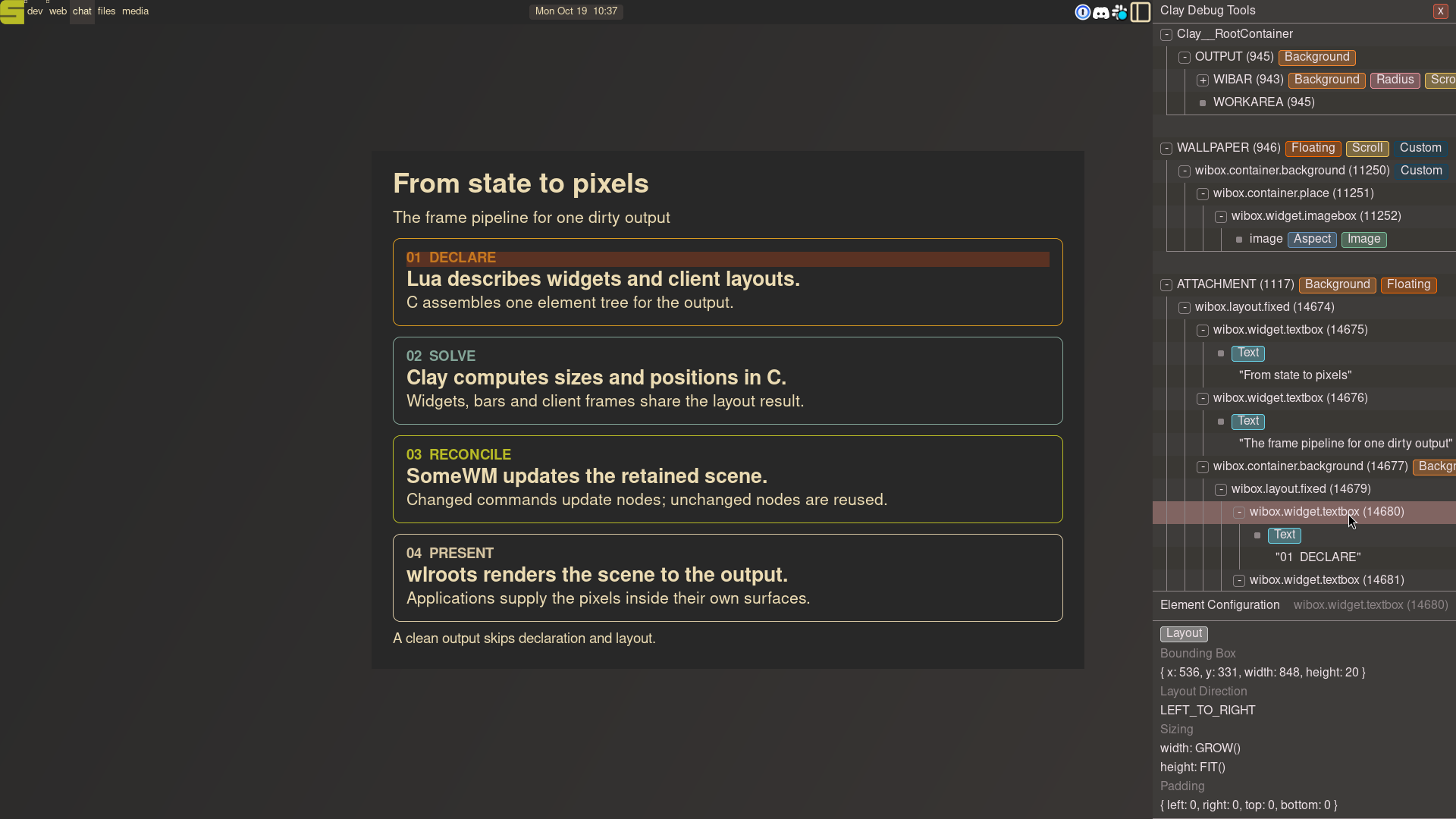
The inspector makes the layout visible while you configure it. Set screen.primary.inspector = true, select a widget in the element tree and inspect its solved position and size.
Show Lua
Save this as /tmp/clay-inspector.lua, then run:
somewm-client eval 'dofile("/tmp/clay-inspector.lua")'
This opens the same popup and the inspector on your focused screen. Collapse the WIBAR branch, find the popup's 01 DECLARE textbox, and click its row. Hovering the row highlights its box on the desktop. After two minutes, the popup closes and restores the previous inspector setting.
local options = ... or {}
local awful = require("awful")
local beautiful = require("beautiful")
local gears = require("gears")
local wibox = require("wibox")

local target = awful.screen.focused()
if options.output then
    target = nil
    for s in screen do
        for _, output in pairs(s.outputs) do
            if output.name == options.output then target = s end
        end
    end
    assert(target, "Output not found: " .. tostring(options.output))
end
if _G.somewm_frame_figure then _G.somewm_frame_figure.stop() end

local bg = beautiful.bg_normal or "#282828"
local fg = beautiful.fg_normal or "#ebdbb2"
local family = (beautiful.font or "sans 10"):gsub("%s+%d+%.?%d*$", "")
local function label(text, size, color, bold)
    return wibox.widget {
        markup = '<span foreground="' .. (color or fg) .. '">'
            .. gears.string.xml_escape(text) .. '</span>',
        font = family .. (bold and " Bold " or " ") .. size,
        wrap = "word_char",
        widget = wibox.widget.textbox,
    }
end

local stages = {
    { "01  DECLARE", "Lua describes widgets and client layouts.",
      "C assembles one element tree for the output.", "#d79921" },
    { "02  SOLVE", "Clay computes sizes and positions in C.",
      "Widgets, bars and client frames share the layout result.", "#83a598" },
    { "03  RECONCILE", "SomeWM updates the retained scene.",
      "Changed commands update nodes; unchanged nodes are reused.", "#b8bb26" },
    { "04  PRESENT", "wlroots renders the scene to the output.",
      "Applications supply the pixels inside their own surfaces.", "#d5c4a1" },
}

local contents = wibox.layout.fixed.vertical()
contents.spacing = 14
contents:add(label("From state to pixels", 27, fg, true))
contents:add(label("The frame pipeline for one dirty output", 16))

for _, stage in ipairs(stages) do
    local lines = wibox.layout.fixed.vertical()
    lines.spacing = 5
    lines:add(label(stage[1], 14, stage[4], true))
    lines:add(label(stage[2], 20, fg, true))
    lines:add(label(stage[3], 16))
    contents:add(wibox.widget {
        {
            lines,
            margins = 18,
            widget = wibox.container.margin,
        },
        bg = bg,
        fg = fg,
        shape = gears.shape.rounded_rect,
        border_width = 1,
        border_color = stage[4],
        widget = wibox.container.background,
    })
end
contents:add(label("A clean output skips declaration and layout.", 14))

local previous_inspector = target.inspector
target.inspector = true

local popup = awful.popup {
    screen = target,
    visible = true,
    ontop = true,
    input_passthrough = true,
    bg = bg,
    fg = fg,
    minimum_width = 940,
    maximum_width = 940,
    placement = awful.placement.centered,
    widget = {
        contents,
        margins = 28,
        widget = wibox.container.margin,
    },
}

local state = { popup = popup, screen = target }
_G.somewm_frame_figure = state
function state.stop()
    popup.visible = false
    if target.valid then target.inspector = previous_inspector end
    if state.timer then state.timer:stop() end
    if _G.somewm_frame_figure == state then _G.somewm_frame_figure = nil end
end
state.timer = gears.timer.start_new(120, function()
    state.stop()
    return false
end)
return "Frame figure opened on screen " .. target.index
Download the Lua file. To close it early:
somewm-client eval 'if somewm_frame_figure then somewm_frame_figure.stop() end'
The highlight covers the textbox's allocated width, including the space after “01 DECLARE”. Its solved box appears below the tree. Click the image to view it at full size.
For a text view, run somewm-client clay tree. It includes the bar and client frames as well as their children. Reading the tree explains the sizes, ids and frame counters.
Corners and client sizes
With c.shape = 16, a left titlebar takes the left corners and the application surface takes the right ones. Clicks in the cut corners reach what is below.
The frame also follows the client's committed size. A terminal that keeps whole character cells gets a titlebar, border and shadow around those cells. Its frame no longer overhangs the content to fill the last few pixels of its tiled slot.
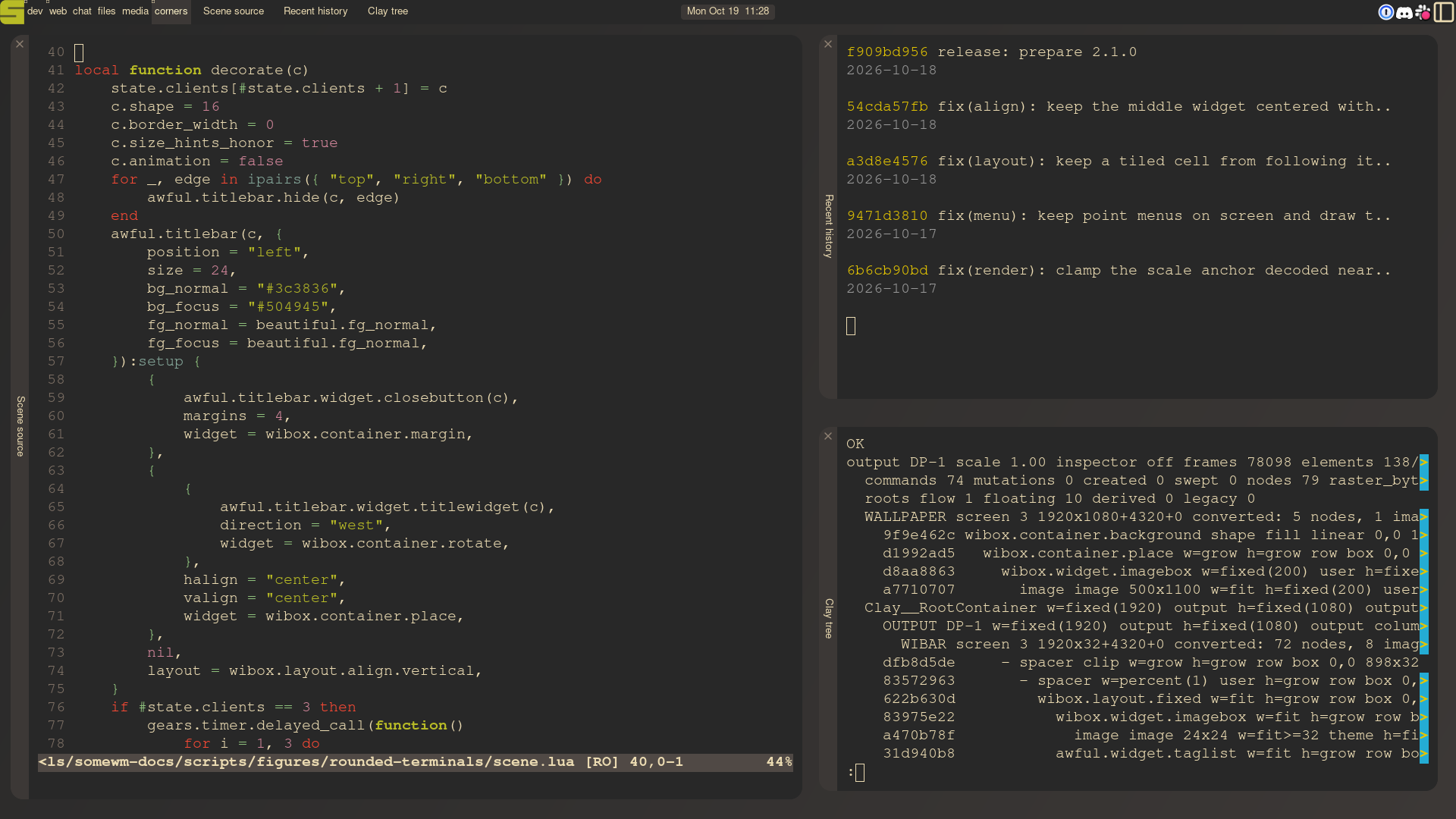
Three terminals, 14-pixel gaps, 16-pixel corners and 24-pixel left titlebars. Click the image to view it at full size.
Show Lua
Save this as /tmp/rounded-terminals.lua, then run:
somewm-client eval 'dofile("/tmp/rounded-terminals.lua")'
This opens three foot terminals on a temporary corners tag on your focused screen. It requires foot 1.28 or newer. The screenshot opens the scene's source, Git history and a Clay tree dump; this example opens ordinary shells with the same layout and framing. After ten minutes, it closes those terminals and removes the temporary tag.
local options = ... or {}
local awful = require("awful")
local beautiful = require("beautiful")
local gears = require("gears")
local ruled = require("ruled")
local wibox = require("wibox")

assert(not _G.somewm_rounded_terminals or not _G.somewm_rounded_terminals.running,
    "Close the existing terminal demo first")
local target = awful.screen.focused()
if options.output then target = assert(output.get_by_name(options.output), "Output not found").screen end
local token = "somewm-rounded-" .. tostring({}):match("0x(%x+)")
local state = { running = true, ready = false, clients = {}, previous_tags = target.selected_tags }
_G.somewm_rounded_terminals = state
state.tag = awful.tag.add("corners", {
    screen = target,
    layout = awful.layout.suit.tile,
    master_width_factor = 0.56,
    master_count = 1,
    column_count = 1,
    gap = 14,
})

function state.stop()
    if not state.running then return end
    state.running = false
    if state.timer then state.timer:stop() end
    ruled.client.remove_rule(token)
    for _, c in ipairs(state.clients) do if c.valid then c:kill() end end
    if #target.selected_tags == 1 and state.tag.selected then
        awful.tag.viewmore(state.previous_tags, target)
    end
    local attempts = 0
    gears.timer.start_new(0.1, function()
        attempts = attempts + 1
        if #state.tag:clients() == 0 then state.tag:delete(); return false end
        return attempts < 30
    end)
end

local function decorate(c)
    state.clients[#state.clients + 1] = c
    c.shape = 16
    c.border_width = 0
    c.size_hints_honor = true
    c.animation = false
    for _, edge in ipairs({ "top", "right", "bottom" }) do
        awful.titlebar.hide(c, edge)
    end
    awful.titlebar(c, {
        position = "left",
        size = 24,
        bg_normal = "#3c3836",
        bg_focus = "#504945",
        fg_normal = beautiful.fg_normal,
        fg_focus = beautiful.fg_normal,
    }):setup {
        {
            awful.titlebar.widget.closebutton(c),
            margins = 4,
            widget = wibox.container.margin,
        },
        {
            {
                awful.titlebar.widget.titlewidget(c),
                direction = "west",
                widget = wibox.container.rotate,
            },
            halign = "center",
            valign = "center",
            widget = wibox.container.place,
        },
        nil,
        layout = wibox.layout.align.vertical,
    }
    if #state.clients == 3 then
        gears.timer.delayed_call(function()
            for i = 1, 3 do
                local ordered = {}
                for _, candidate in ipairs(client.get(target)) do
                    if candidate.class and candidate.class:sub(1, #token) == token then
                        ordered[#ordered + 1] = candidate
                    end
                end
                for _, owned in ipairs(state.clients) do
                    if owned.class == token .. "-" .. i and owned ~= ordered[i] then
                        owned:swap(ordered[i])
                    end
                end
            end
            state.ready = true
        end)
    end
end

local classes = { token .. "-1", token .. "-2", token .. "-3" }
ruled.client.append_rule {
    id = token,
    rule_any = { class = classes },
    properties = {
        screen = target, tag = state.tag, focus = false, switchtotag = false,
        floating = false, border_width = 0, shape = 16, size_hints_honor = true,
    },
    callback = decorate,
}
if options.select ~= false then state.tag:view_only() end
local bg = (beautiful.bg_normal or "#282828"):gsub("#", "")
local fg = (beautiful.fg_normal or "#ebdbb2"):gsub("#", "")
for i = 1, 3 do
    local argv = {
        "foot", "--app-id=" .. classes[i],
        "--title=" .. (options.titles and options.titles[i] or "Terminal " .. i),
        "--font=monospace:size=15",
        "--override=colors-dark.background=" .. bg,
        "--override=colors-dark.foreground=" .. fg,
        "--override=pad=12x12",
    }
    if options.commands and options.commands[i] then
        argv[#argv + 1] = "--hold"
        for _, arg in ipairs(options.commands[i]) do argv[#argv + 1] = arg end
    end
    local pid = awful.spawn(argv, false)
    if type(pid) ~= "number" then state.stop(); error(tostring(pid)) end
end
state.timer = gears.timer.start_new(600, function() state.stop(); return false end)
return "Three terminals opening on screen " .. target.index
Download the Lua file. To close the demo early:
somewm-client eval 'if somewm_rounded_terminals then somewm_rounded_terminals.stop() end'
The rounded corners guide shows how to apply the setting through a client rule.
Animations
Client animations respond to events such as appearing, changing tags or gaining focus. Wiboxes and popups animate visibility, and widgets have their own animation API. Effects compose, so a popup can scale and fade in together.
Three popups enter and leave together, with 0.8 seconds for each transition. The labels stay fixed so you can compare the effects.
Show Lua
Save this as /tmp/animation-comparison.lua, then run it in SomeWM 2.1:
somewm-client eval 'dofile("/tmp/animation-comparison.lua")'
The demo opens on your focused screen, runs twice, and closes itself. It uses your theme's background, foreground and font family. Animations must be enabled.
local options = ... or {}
local awful = require("awful")
local beautiful = require("beautiful")
local gears = require("gears")
local wibox = require("wibox")

assert(require("somewm.animation").enabled, "Enable SomeWM animations first")
if _G.somewm_animation_comparison then _G.somewm_animation_comparison.stop() end
local target = awful.screen.focused()
if options.output then
    target = assert(output.get_by_name(options.output), "Output not found").screen
end
local bg, fg = beautiful.bg_normal or "#282828", beautiful.fg_normal or "#ebdbb2"
local family = (beautiful.font or "sans 10"):gsub("%s+%d+%.?%d*$", "")
local function text(value, size, color, bold)
    return wibox.widget {
        markup = '<span foreground="' .. (color or fg) .. '">'
            .. gears.string.xml_escape(value) .. '</span>',
        font = family .. (bold and " Bold " or " ") .. size,
        align = "center",
        valign = "center",
        widget = wibox.widget.textbox,
    }
end
local effects = {
    { name = "Fade", enter = "fade", color = "#d79921" },
    { name = "Scale", enter = "scale", color = "#83a598" },
    { name = "Scale + fade", enter = { "scale", "fade" }, color = "#b8bb26" },
}
local state = { running = true, completed = false, timers = {}, cards = {}, screen = target }
_G.somewm_animation_comparison = state
function state.stop()
    for _, timer in ipairs(state.timers) do timer:stop() end
    for _, card in ipairs(state.cards) do card.animation = false; card.visible = false end
    if state.board then state.board.visible = false end
    state.running = false
end
local function later(seconds, callback)
    local timer = gears.timer.start_new(seconds, function()
        if not state.running then return false end
        local ok, err = pcall(callback)
        if not ok then state.error = tostring(err); state.stop() end
        return false
    end)
    state.timers[#state.timers + 1] = timer
end

local columns = wibox.layout.flex.horizontal()
columns.spacing = 24
local slots = {}
for i, effect in ipairs(effects) do
    slots[i] = wibox.widget { forced_height = 200, widget = wibox.widget.textbox }
    columns:add(wibox.widget {
        text(effect.name, 20, effect.color, true),
        slots[i],
        spacing = 12,
        layout = wibox.layout.fixed.vertical,
    })
end
local phase = text("Same duration. Same popup.", 16)
state.board = awful.popup {
    screen = target, visible = true, ontop = true, input_passthrough = true,
    bg = bg, fg = fg, minimum_width = 1004, maximum_width = 1004,
    placement = awful.placement.centered,
    widget = {
        {
            text("Three ways to appear", 27, fg, true),
            text("Fade, scale, and both together · 0.8 seconds", 16),
            columns,
            phase,
            spacing = 20,
            layout = wibox.layout.fixed.vertical,
        },
        margins = 28,
        widget = wibox.container.margin,
    },
}

local function build_cards()
    local board = state.board
    if board.width ~= 1004 or board.height < 300 then return false end
    local boxes = {}
    for i, slot in ipairs(slots) do
        local x = 28 + (i - 1) * 324 + 150
        for y = 0, board.height - 1, 8 do
            for _, hit in ipairs(board:find_widgets(x, y)) do
                if hit.widget == slot then boxes[i] = hit; break end
            end
            if boxes[i] then break end
        end
        if not boxes[i] or boxes[i].height < 200 then return false end
    end
    state.geometry = board:geometry()
    for i, effect in ipairs(effects) do
        local box = boxes[i]
        state.cards[i] = awful.popup {
            screen = target, visible = false, ontop = true, input_passthrough = true,
            placement = awful.placement.top_left,
            offset = {
                x = board.x - target.geometry.x + box.x + (box.width - 270) / 2,
                y = board.y - target.geometry.y + box.y + (box.height - 170) / 2,
            },
            minimum_width = 270, maximum_width = 270,
            minimum_height = 170, maximum_height = 170,
            bg = bg, fg = fg, shape = gears.shape.rounded_rect,
            border_width = 2, border_color = effect.color,
            widget = {
                {
                    text("Hello, SomeWM", 21, fg, true),
                    text("A real popup", 16),
                    spacing = 8,
                    layout = wibox.layout.fixed.vertical,
                },
                valign = "center", halign = "center",
                widget = wibox.container.place,
            },
            animation = {
                visible = { duration = 0.8, enter = effect.enter, exit = effect.enter },
            },
        }
    end
    return true
end

local function show(visible, label)
    phase.text = label
    for _, card in ipairs(state.cards) do card.visible = visible end
end
local function cycle(number)
    state.phase = "enter"
    show(true, "Entering together")
    later(2.2, function()
        state.phase = "exit"
        show(false, "Leaving together")
    end)
    later(4, function()
        if number < 2 then
            cycle(number + 1)
        else
            state.phase = "final"
            show(true, "Same duration. Same popup.")
            later(2.2, function() state.completed = true; state.stop() end)
        end
    end)
end

local attempts = 0
local ready = gears.timer.start_new(0.05, function()
    attempts = attempts + 1
    local ok, built = pcall(build_cards)
    if not ok or attempts > 100 then
        state.error = ok and "Popup layout did not settle" or tostring(built)
        state.stop()
        return false
    end
    if not built then return true end
    state.ready = true
    state.phase = "ready"
    later(1.2, function() cycle(1) end)
    return false
end)
state.timers[#state.timers + 1] = ready
return "Animation comparison opened on screen " .. target.index
Download the Lua file. To stop early:
somewm-client eval 'if somewm_animation_comparison then somewm_animation_comparison.stop() end'
The animation guide covers triggers, effects, timing and theme settings.
Lock screen wallpaper
The lock screen can use an image behind its clock and password panel, with a configurable dimming overlay.
Show Lua
In rc.lua, set these values after beautiful.init(...) and before the existing lockscreen.init() call. Change the image path to a wallpaper on your machine.
local beautiful = require("beautiful")
local gears = require("gears")
local g = screen.primary.geometry
beautiful.lockscreen_wallpaper = gears.surface.crop_surface {
    surface = gears.surface.load_uncached(
        os.getenv("HOME") .. "/wallpapers/gruvbox/spaceman.jpg"
    ),
    ratio = g.width / g.height,
}
beautiful.lockscreen_wallpaper_overlay = "#00000055"
require("lockscreen").init()
The final two hex digits control the overlay's opacity; 55 is about one-third opacity. The lock screen guide covers the other settings.
Why Clay
I wanted one sensible layout engine, running in C. Clients and widgets had separate ways of working out sizes and positions. Clay was a chance to simplify how the whole desktop is laid out.
For a closer look at Clay itself, Nic Barker's video How Clay's UI Layout Algorithm Works explains how it sizes and places elements.
Installing and upgrading
Follow the installation guide, or try SomeWM in a window.
Coming from 1.4, start with the 1.4 to 2.0 upgrade guide, then follow the 2.0 to 2.1 upgrade guide.
Existing custom client layouts with an arrange function still work through the compatibility path. Custom widget draw, fit and layout methods need migration; see the widget migration example.
The changelog has the full list of changes.
Where we go next
Next I want to bring in Elv13's tree work from awesome-1. The intended split is an awful tree for compositor state, with Clay responsible for layout computation.
I also want the debug inspector to be fully live and editable, like a browser's developer tools. You should be able to change Clay properties directly in the inspector and immediately see the changes on your desktop.
For a future major release, probably 3.0, I want to overhaul widget and client creation around a single native Clay syntax. I explored that approach in Kiln; for SomeWM, I want to take it further in performance and usability. 2.1 unifies layout computation. That release would unify how you describe the desktop.
Try it with your own configuration and report any issues on GitHub.